Example 413: 3D Surface RealTime Larger Data ComputeShader CircularBuffer
Pe3do3D Scientific Objectadvanced
RealTime Larger Data ComputeShader CircularBuffer
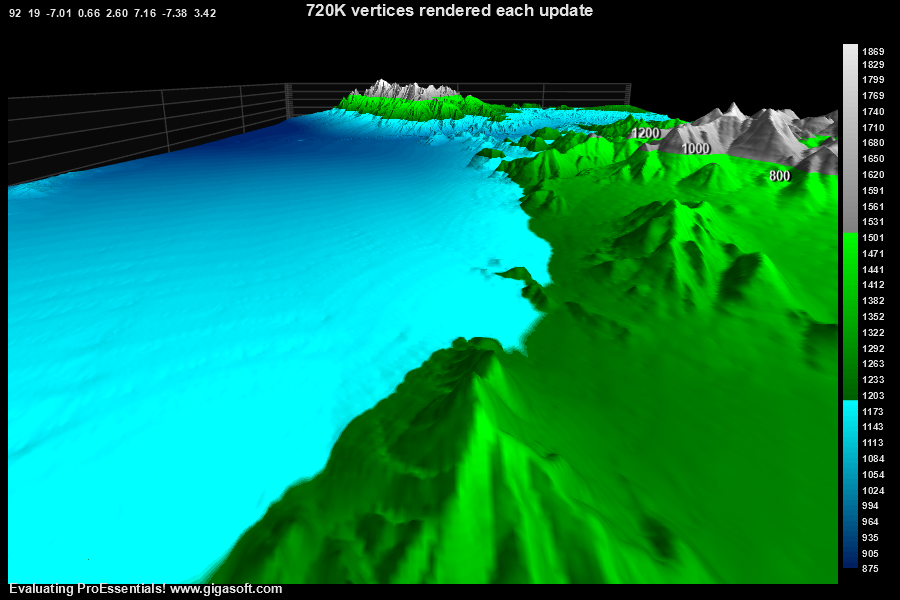
Form6.cs
1//! Right click to show popup menu. //2//! Larger amount of data than example 410 showing strength of ComputeShader3 4String filepath;5filepath = System.AppDomain.CurrentDomain.BaseDirectory + "\\terrain2.bin";6System.IO.FileStream fs = new System.IO.FileStream(filepath, System.IO.FileMode.Open);7System.IO.BinaryReader r = new System.IO.BinaryReader(fs);8int o;9for (o = 0; o < 2250000; o++)10 MainWindow.pGlobalElevData[o] = r.ReadInt32();11fs.Close();12 13Pe3do1.PeData.Subsets = 800;14Pe3do1.PeData.Points = 900;15 16Pe3do1.PeData.DuplicateDataX = DuplicateData.PointIncrement;17Pe3do1.PeData.DuplicateDataZ = DuplicateData.SubsetIncrement;18 19Pe3do1.PeData.Y[799, 899] = 0; // set last point first, pre allocates memory, simply spoon feeding below20int l, s, p;21for (s = 0; s < 800; s++)22{23 for (p = 0; p < 900; p++)24 {25 l = (s * 1500) + p;26 Pe3do1.PeData.Y[s, p] = MainWindow.pGlobalElevData[l] * 0.1F;27 }28}29 30for (p = 0; p < 900; p++)31{32 Pe3do1.PeData.X[0, p] = (float)p + 1; // XData is Duplicated for all points33}34 35for (s = 0; s < 800; s++)36{37 Pe3do1.PeData.Z[0, s] = (float)s + 1; // ZData is Duplicated for all subsets38}39 40MainWindow.m_nRealTimeCounter = 900; // Keeps track of current row in terrain data41MainWindow.m_nOverallCounter = 900;42 43Pe3do1.PeColor.SubsetColors[(int)SurfaceColors.WireFrame] = Color.FromArgb(255, 215, 215, 255);44Pe3do1.PeColor.SubsetColors[(int)SurfaceColors.SolidSurface] = Color.FromArgb(255, 215, 215, 255);45 46// There are different plotting method values for each case of PolyMode //47Pe3do1.PePlot.Method = Gigasoft.ProEssentials.Enums.ThreeDGraphPlottingMethod.Four; // Surface With Contour48Pe3do1.PePlot.Allow.SurfaceContour = true;49Pe3do1.PePlot.Option.ShowWireFrame = false;50 51// Set various other properties //52 53Pe3do1.PeConfigure.RenderEngine = RenderEngine.Direct3D;54 55// setting up view parameters //56Pe3do1.PeUserInterface.Scrollbar.ViewingHeight = 19;57Pe3do1.PeUserInterface.Scrollbar.DegreeOfRotation = 92;58 59Pe3do1.PeFunction.SetLight(0, 7.36F, -7.59F, 3.52F);60 61Pe3do1.PePlot.Option.DxZoom = -7.01F;62Pe3do1.PePlot.Option.DxViewportX = .66F;63Pe3do1.PePlot.Option.DxViewportY = 2.6F;64 65Pe3do1.PePlot.Option.DxZoomMax = -3F; // v10 New properties to control max and min mousewheel zoom66Pe3do1.PePlot.Option.DxZoomMin = -12F;67 68Pe3do1.PePlot.Option.DxViewportPanFactor = 2.0F; // v10 New properties to control shift/drag and mousewheel sensitivity69Pe3do1.PeUserInterface.Scrollbar.MouseWheelZoomFactor = 3.75F;70 71// Manually scaling allows us to avoid range checking the data //72 73Pe3do1.PeGrid.Configure.ManualScaleControlY = ManualScaleControl.MinMax;74Pe3do1.PeGrid.Configure.ManualMinY = 600;75Pe3do1.PeGrid.Configure.ManualMaxY = 1800;76 77Pe3do1.PeGrid.Configure.ManualScaleControlX = ManualScaleControl.MinMax;78Pe3do1.PeGrid.Configure.ManualMinX = 1;79Pe3do1.PeGrid.Configure.ManualMaxX = 900;80 81Pe3do1.PeGrid.Configure.ManualScaleControlZ = ManualScaleControl.MinMax;82Pe3do1.PeGrid.Configure.ManualMinZ = 1;83Pe3do1.PeGrid.Configure.ManualMaxZ = 800;84 85// Set contour and contour legend parameters //86Pe3do1.PeLegend.ContourLegendPrecision = ContourLegendPrecision.ZeroDecimals;87Pe3do1.PeLegend.Location = LegendLocation.Right;88Pe3do1.PeLegend.ContourStyle = true;89 90// Set Contour Color regions //91Pe3do1.PeColor.SubsetColors.Clear();92for (s = 0; s <= 31; s++)93 Pe3do1.PeColor.SubsetColors[s] = Color.FromArgb(255, 0, (byte)(31 + (s * 7)), (byte)(95 + (s * 5)));94for (s = 0; s <= 31; s++)95 Pe3do1.PeColor.SubsetColors[32 + s] = Color.FromArgb(255, 0, (byte)(95 + (s * 5)), 0);96for (s = 0; s <= 35; s++)97 Pe3do1.PeColor.SubsetColors[64 + s] = Color.FromArgb(255, (byte)(128 + (s * 3)), (byte)(128 + (s * 3)), (byte)(128 + (s * 3)));98 99// For when ViewingStyle is monochrome //100for (s = 0; s <= 99; s++)101 Pe3do1.PeColor.SubsetShades[s] = Color.FromArgb(255, (byte)(50 + (s * 2)), (byte)(50 + (s * 2)), (byte)(50 + (s * 2)));102 103Pe3do1.PeLegend.ContourStyle = true;104Pe3do1.PeLegend.Show = true;105Pe3do1.PeLegend.Location = LegendLocation.Right;106Pe3do1.PeUserInterface.Menu.LegendLocation = MenuControl.Show;107 108// Dark background //109Pe3do1.PeColor.BitmapGradientMode = false;110Pe3do1.PeColor.QuickStyle = QuickStyle.DarkNoBorder;111 112Pe3do1.PeString.MainTitle = "720K vertices rendered each update";113Pe3do1.PeString.SubTitle = "";114 115Pe3do1.PePlot.Option.DegreePrompting = true; // shows view parameters top left116 117// expand the x and z axes for a panoramic view of data //118Pe3do1.PeGrid.Option.GridAspectX = 10.0F;119Pe3do1.PeGrid.Option.GridAspectZ = 5.0F;120 121Pe3do1.PeFont.Fixed = true;123 124Pe3do1.PeConfigure.PrepareImages = true;125Pe3do1.PeConfigure.CacheBmp = true;126Pe3do1.PeUserInterface.Allow.FocalRect = false;127 128Pe3do1.PeUserInterface.Menu.Contour = MenuControl.Hide;129Pe3do1.PeUserInterface.Menu.Rotation = MenuControl.Hide;130Pe3do1.PeUserInterface.Menu.BorderType = MenuControl.Hide;131 132Pe3do1.PeConfigure.TextShadows = TextShadows.BoldText;133Pe3do1.PeFont.Label.Bold = true;134Pe3do1.PeConfigure.ImageAdjustRight = 50;135Pe3do1.PeConfigure.ImageAdjustLeft = 50;136 137// Set various export defaults //138Pe3do1.PeSpecial.DpiX = 600;139Pe3do1.PeSpecial.DpiY = 600;140Pe3do1.PeUserInterface.Dialog.ExportSizeDef = ExportSizeDef.NoSizeOrPixel;141Pe3do1.PeUserInterface.Dialog.ExportTypeDef = ExportTypeDef.Png;142Pe3do1.PeUserInterface.Dialog.ExportDestDef = ExportDestDef.Clipboard;143Pe3do1.PeUserInterface.Dialog.ExportUnitXDef = "1280";144Pe3do1.PeUserInterface.Dialog.ExportUnitYDef = "768";145Pe3do1.PeUserInterface.Dialog.ExportImageDpi = 300;146Pe3do1.PeUserInterface.Dialog.AllowEmfExport = false;147Pe3do1.PeUserInterface.Dialog.AllowWmfExport = false;148 149// Enable button dragging //150Pe3do1.PeUserInterface.Scrollbar.MouseDraggingX = true;151Pe3do1.PeUserInterface.Scrollbar.MouseDraggingY = true;152 153// v10 Enable ComputeShader and CircularBuffer for fastest possible rendering.154Pe3do1.PeData.ComputeShader = true;155Pe3do1.PeData.StagingBufferX = true;156Pe3do1.PeData.StagingBufferY = true;157Pe3do1.PeData.StagingBufferZ = true;158Pe3do1.PeData.CircularBuffers = true;159// Comment the above v10 lines to experience the difference between cpu construction and ComputeShader construction.160// The performance is amazingly different demonstrating the power of potentially 2000+ cores versus a single cpu161 162Pe3do1.PeFunction.Force3dxVerticeRebuild = true; // signifies chart to rebuild low level vertex content163 164Pe3do1.PeFunction.ReinitializeResetImage(); // needed to update axis scales165Pe3do1.Invalidate();166Pe3do1.Refresh();167 168MainWindow.Timer1.Interval = 15;169MainWindow.Timer1.Start();170 171/*172/////////////////////////173// Example Timer Event //174/////////////////////////175private void Timer1_Tick(object sender, System.EventArgs e)176{177 float[] pNewXData = new float[800];178 float[] pNewYData = new float[800];179 180 int l, s;181 for (s = 0; s < 800; s++)182 {183 pNewXData[s] = m_nOverallCounter;184 l = (s * 1500) + m_nRealTimeCounter + 0;185 pNewYData[s] = pGlobalElevData[l] * 0.1F;186 }187 188 m_nRealTimeCounter = m_nRealTimeCounter + 1;189 if (m_nRealTimeCounter > 1499) { m_nRealTimeCounter = 0; } // end of terrain file190 m_nOverallCounter = m_nOverallCounter + 1;191 192 Pe3do1.PeGrid.Configure.ManualMinX = m_nOverallCounter - 900;193 Pe3do1.PeGrid.Configure.ManualMaxX = m_nOverallCounter;194 Pe3do1.PeData.SkipRanging = true; // Manually scaling everything, we can skip range testing, which can get cpu intensive for larger data sets195 196 // transfer new Data //197 Pe3do1.PeData.Y.AppendData(pNewYData, 1);198 Pe3do1.PeData.X.AppendData(pNewXData, 1);199 Pe3do1.PeData.ReuseDataZ = true;200 201 // causes 3D object to reconstruct polygon data //202 Pe3do1.PeFunction.PEreconstruct3dpolygons();203 Pe3do1.Invalidate();204}205*/Tip: Uses property syntax like
Pego1.PeData.Y[s, p]Click underlined properties to view documentation