Example 412: 3D Bar RealTime
Pe3do3D Scientific Objectadvanced
3D Bar RealTime
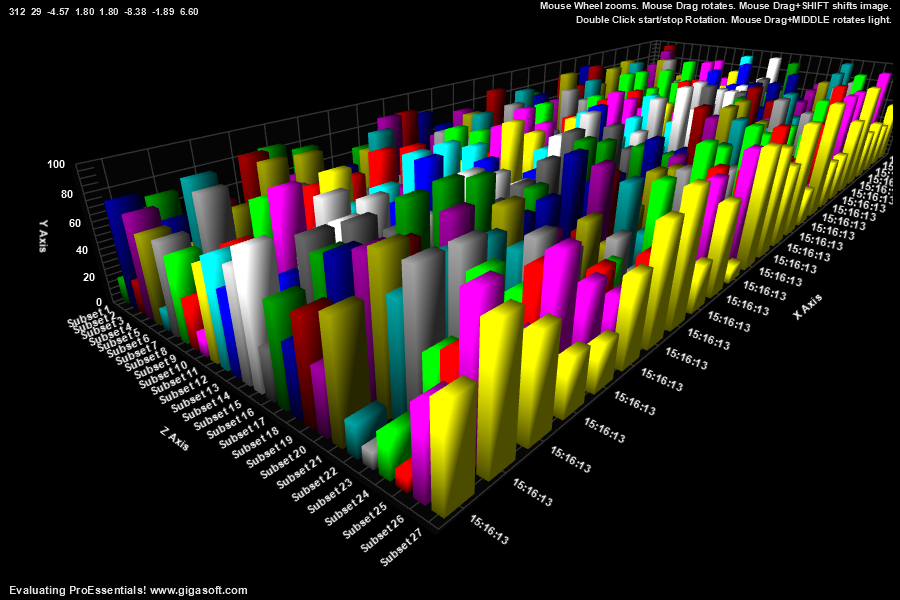
Form6.cs
1//! Left click and drag to rotate. Also Hold shift to translate. //2//! Mouse Wheel zooms in/out.3//! Middle Button hold down while drag rotates light. //4//! Right click to show popup menu. //5 6// Non-Surface chart, set PolyMode //7Pe3do1.PePlot.PolyMode = PolyMode.ThreeDBar;8 9// change light location better suited for 3d bar10Pe3do1.PeFunction.SetLight(0, -8.0F, -1.8F, 6.3F); // v9.511 12// Define quantity of data //13Pe3do1.PeData.Subsets = 27;14Pe3do1.PeData.Points = 25;15 16// Set all data to start with zero //17for (int s = 0; s < 27; s++)18{19 for (int p = 0; p < 25; p++)20 {21 Pe3do1.PeData.Y[s, p] = 0.0F;22 }23}24 25// Set initial point labels for x axis //26for (int p = 0; p < 25; p++)27 Pe3do1.PeString.PointLabels[p] = " ";28 29// Manually scale y axis //30Pe3do1.PeGrid.Configure.ManualScaleControlY = ManualScaleControl.MinMax;31Pe3do1.PeGrid.Configure.ManualMinY = 0;32Pe3do1.PeGrid.Configure.ManualMaxY = 100;33 34// Set Titles //35Pe3do1.PeString.MainTitle = "";36Pe3do1.PeString.SubTitle = "||Mouse Wheel zooms. Mouse Drag rotates. Mouse Drag+SHIFT shifts image. ";37Pe3do1.PeString.MultiSubTitles[0] = "||Double Click start/stop Rotation. Mouse Drag+MIDDLE rotates light. ";38 39Pe3do1.PeConfigure.RenderEngine = RenderEngine.Direct3D;40 41Pe3do1.PeGrid.Option.GridAspectZ = 2.0F;42Pe3do1.PeGrid.Option.GridAspectX = 5.0F;43 44Pe3do1.PePlot.Option.DxZoomMax = -1F; // v10 New properties to control max and min mousewheel zoom45Pe3do1.PePlot.Option.DxZoomMin = -5F;46 47Pe3do1.PePlot.Option.DxViewportPanFactor = 2.0F; // v10 New properties to control shift/drag and mousewheel sensitivity48Pe3do1.PeUserInterface.Scrollbar.MouseWheelZoomFactor = 3.75F;49 50Pe3do1.PeUserInterface.Scrollbar.ViewingHeight = 29;51Pe3do1.PeUserInterface.Scrollbar.DegreeOfRotation = 312;52Pe3do1.PePlot.Option.DxZoom = -4.57F;53Pe3do1.PePlot.Option.DxViewportX = 1.8F;54Pe3do1.PePlot.Option.DxViewportY = 1.8F;55Pe3do1.PePlot.Option.DegreePrompting = true;56 57// Set Plotting methods //58Pe3do1.PePlot.Method = Gigasoft.ProEssentials.Enums.ThreeDGraphPlottingMethod.Two;59Pe3do1.PePlot.Allow.WireFrame = false;60Pe3do1.PeUserInterface.Dialog.PlotCustomization = false;61Pe3do1.PeUserInterface.Dialog.Style = false;62 63// Add padding around chart //64Pe3do1.PeConfigure.ImageAdjustLeft = 50;65Pe3do1.PeConfigure.ImageAdjustRight = 50;66Pe3do1.PeConfigure.ImageAdjustBottom = 50;67 68// Set Various Other Properties //70Pe3do1.PeFont.Fixed = true;71 72// Note RenderEngine 3DX requires setting renderengine before QuickStyle73Pe3do1.PeColor.BitmapGradientMode = false;74Pe3do1.PeColor.QuickStyle = QuickStyle.DarkNoBorder;75Pe3do1.PeConfigure.PrepareImages = true;76Pe3do1.PeConfigure.CacheBmp = true;77Pe3do1.PeFont.Label.Bold = true;78Pe3do1.PeUserInterface.Allow.FocalRect = false;79Pe3do1.PeUserInterface.Dialog.Style = false;80 81// Set various export defaults //82Pe3do1.PeSpecial.DpiX = 600;83Pe3do1.PeSpecial.DpiY = 600;84 85// default export setting //86Pe3do1.PeUserInterface.Dialog.ExportSizeDef = ExportSizeDef.NoSizeOrPixel;87Pe3do1.PeUserInterface.Dialog.ExportTypeDef = ExportTypeDef.Png;88Pe3do1.PeUserInterface.Dialog.ExportDestDef = ExportDestDef.Clipboard;89Pe3do1.PeUserInterface.Dialog.ExportUnitXDef = "1280";90Pe3do1.PeUserInterface.Dialog.ExportUnitYDef = "768";91Pe3do1.PeUserInterface.Dialog.ExportImageDpi = 300;92Pe3do1.PeUserInterface.Dialog.AllowEmfExport = false;93Pe3do1.PeUserInterface.Dialog.AllowWmfExport = false;94 95// Enable button dragging //96Pe3do1.PeUserInterface.Scrollbar.MouseDraggingX = true;97Pe3do1.PeUserInterface.Scrollbar.MouseDraggingY = true;98 99Pe3do1.PeUserInterface.Menu.ShowLegend = MenuControl.Hide;100Pe3do1.PeUserInterface.Menu.ShowWireFrame = MenuControl.Hide;101 102Pe3do1.PeFunction.Force3dxVerticeRebuild = true;103 104Pe3do1.PeFunction.ReinitializeResetImage();105Pe3do1.Invalidate();106Pe3do1.Refresh();107 108MainWindow.Timer1.Interval = 15;109MainWindow.Timer1.Start();110 111/*112/////////////////////////113// Example Timer Event //114/////////////////////////115private void Timer1_Tick(object sender, System.EventArgs e)116{117 String CurrentTime;118 int i;119 120 // new point label //121 CurrentTime = DateTime.Now.Hour.ToString() + ":" + DateTime.Now.Minute.ToString() + ":" + DateTime.Now.Second.ToString();122 123 // new YData //124 float[] NewData = new float[27];125 for (i = 0; i < 27; i++)126 NewData[i] = 10.0F + ((float)(Rand_Num.NextDouble()) * 90.0F);127 128 // transfer new point label //129 Pe3do1.PeString.PointLabels.AppendData(CurrentTime);130 131 // transfer new YData //132 Pe3do1.PeData.Y.AppendData(NewData, 1);133 134 // causes 3D object to reconstruct polygon data //135 Pe3do1.PeFunction.PEreconstruct3dpolygons();136 Pe3do1.Refresh();137}138*/Tip: Uses property syntax like
Pego1.PeData.Y[s, p]Click underlined properties to view documentation