Example 414: 3D Delaunay Heightmap from Point Cloud
Pe3do3D Scientific Objectintermediate
3D Delaunay Heightmap from Point Cloud
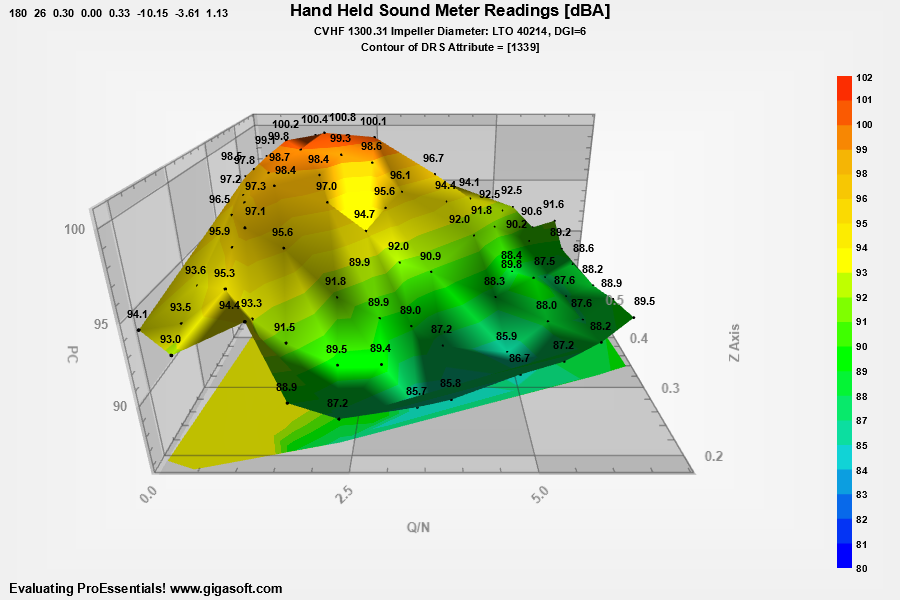
Form6.cs
1// Set PlottingMethod //2Pe3do1.PePlot.Option.Delaunay3D = true;3Pe3do1.PePlot.Method = ThreeDGraphPlottingMethod.Four; // Surface With Contour4 5// Pass Data //6Pe3do1.PeData.Subsets = 1;7Pe3do1.PeData.Points = 70; // Delaunay Triangulation works with a single array of points8 9int nPointCount = 0;10 11string[] fileArray = { "", "" };12try13{14 fileArray = File.ReadAllLines("DelaunaySample.txt");15}16catch17{18 System.Windows.Forms.MessageBox.Show("Demo File Not Found?", "Error", System.Windows.Forms.MessageBoxButtons.OK);19 System.Windows.Forms.Application.Exit();20}21 22for (int i = 0; i < fileArray.Length; i++)23{24 String line = fileArray[i];25 if (line.Length < 3) { continue; }26 var columns = line.Split(' ');27 String valueX = columns[0];28 String valueZ = columns[1];29 String valueY = columns[2];30 31 float fX = float.Parse(valueX, CultureInfo.InvariantCulture.NumberFormat);32 float fY = float.Parse(valueY, CultureInfo.InvariantCulture.NumberFormat); // note we swap y and z compared to example 14733 float fZ = float.Parse(valueZ, CultureInfo.InvariantCulture.NumberFormat);34 35 Pe3do1.PeData.X[0, nPointCount] = fX;36 Pe3do1.PeData.Y[0, nPointCount] = fY;37 Pe3do1.PeData.Z[0, nPointCount] = fZ;38 39 Pe3do1.PeAnnotation.Graph.X[nPointCount] = fX;40 Pe3do1.PeAnnotation.Graph.Y[nPointCount] = fY;41 Pe3do1.PeAnnotation.Graph.Z[nPointCount] = fZ;42 Pe3do1.PeAnnotation.Graph.Type[nPointCount] = (int)GraphAnnotationType.SmallDotSolid;43 Pe3do1.PeAnnotation.Graph.Color[nPointCount] = Color.FromArgb(255, 0, 0, 0);44 Pe3do1.PeAnnotation.Graph.Text[nPointCount] = String.Format("{0:##0.0}", fY);45 46 nPointCount++;47}48 49Pe3do1.PeData.NullDataValueX = -9999;50Pe3do1.PeData.NullDataValue = -9999;51Pe3do1.PeData.NullDataValueZ = -9999;52 53Pe3do1.PeGrid.Configure.AutoPadBeyondZeroX = true;54Pe3do1.PeConfigure.ImageAdjustLeft = 100;55 56Pe3do1.PeString.MainTitle = "Hand Held Sound Meter Readings [dBA]";57Pe3do1.PeString.SubTitle = "CVHF 1300.31 Impeller Diameter: LTO 40214, DGI=6";58Pe3do1.PeString.MultiSubTitles[0] = "|Contour of DRS Attribute = [1339]|";61Pe3do1.PeString.YAxisLabel = "PC";62Pe3do1.PeString.XAxisLabel = "Q/N";63 64// to match target image you want to replicate //65Pe3do1.PePlot.Option.ManualContourScaleControl = ManualScaleControl.MinMax;66Pe3do1.PePlot.Option.ManualContourMin = 80.0F;67Pe3do1.PePlot.Option.ManualContourMax = 102.0F;68 69Pe3do1.PeColor.ContourColors.Clear(6);70Pe3do1.PeColor.ContourColors[0] = Color.FromArgb(255, 0, 0, 255);71Pe3do1.PeColor.ContourColors[1] = Color.FromArgb(255, 17, 211, 214);72Pe3do1.PeColor.ContourColors[2] = Color.FromArgb(255, 0, 255, 0);73Pe3do1.PeColor.ContourColors[3] = Color.FromArgb(255, 255, 255, 0);74Pe3do1.PeColor.ContourColors[4] = Color.FromArgb(255, 245, 181, 5);75Pe3do1.PeColor.ContourColors[5] = Color.FromArgb(255, 255, 0, 0);76 77Pe3do1.PeColor.ContourColorBlends = 4;78Pe3do1.PeColor.ContourColorAlpha = 225;79Pe3do1.PeColor.ContourColorSet = ContourColorSet.ContourColors;80 81Pe3do1.PeGrid.Configure.AutoMinMaxPadding = 1;82 83Pe3do1.PeLegend.Location = LegendLocation.Right;84Pe3do1.PeLegend.Show = true;85Pe3do1.PeUserInterface.Menu.LegendLocation = MenuControl.Show;86 87// Show a 2D bottom contour88Pe3do1.PePlot.Option.ShowContour = ShowContour.BottomColors;89 90Pe3do1.PeLegend.ContourStyle = true;91 92// Set various other properties //93Pe3do1.PeFont.Fixed = true;94 95Pe3do1.PeConfigure.RenderEngine = RenderEngine.Direct3D;96Pe3do1.PeColor.BitmapGradientMode = true;97Pe3do1.PeColor.QuickStyle = QuickStyle.LightNoBorder;98 100Pe3do1.PeFont.SizeGlobalCntl = 1.1F;101Pe3do1.PeLegend.ContourLegendPrecision = ContourLegendPrecision.ZeroDecimals;102 103Pe3do1.PeConfigure.PrepareImages = true;104Pe3do1.PeConfigure.CacheBmp = true;105Pe3do1.PeUserInterface.Allow.FocalRect = false;106 107Pe3do1.PeColor.SubsetColors[(int)(SurfaceColors.WireFrame)] = Color.FromArgb(255, 198, 0, 0);108Pe3do1.PeColor.SubsetColors[(int)(SurfaceColors.SolidSurface)] = Color.FromArgb(255, 0, 148, 90);109 110// Add Some Padding around image //111Pe3do1.PeConfigure.ImageAdjustLeft = 100;112Pe3do1.PeConfigure.ImageAdjustRight = 100;113Pe3do1.PeConfigure.ImageAdjustBottom = 100;114 115Pe3do1.PeConfigure.TextShadows = TextShadows.BoldText;116Pe3do1.PeFont.Label.Bold = true;117 118// Do not auto fit to shape of window //119Pe3do1.PePlot.Option.DxFitControlShape = false;120Pe3do1.PeGrid.Option.GridAspectY = .5F;121 122// Set eye/camera distance, or Zoom amount //123Pe3do1.PePlot.Option.DxZoom = .3F;124// Set camera position //125Pe3do1.PeUserInterface.Scrollbar.ViewingHeight = 26;126Pe3do1.PeUserInterface.Scrollbar.DegreeOfRotation = 180;127 128Pe3do1.PePlot.Option.DxZoomMax = 3F; // v10 New properties to control max and min mousewheel zoom129Pe3do1.PePlot.Option.DxZoomMin = -.20F;130 131Pe3do1.PePlot.Option.DxViewportPanFactor = 2.0F; // v10 New properties to control shift/drag and mousewheel sensitivity132Pe3do1.PeUserInterface.Scrollbar.MouseWheelZoomFactor = 3.75F;133 134// Set a light location //135Pe3do1.PeFunction.SetLight(0, -9.0F, -3.2F, 1.0F);136Pe3do1.PePlot.Option.LightStrength = .35F;137 138// Enable DegreePrompting, to view rotation, zoom, light location to aid139// in determining different default values for such properties //140Pe3do1.PePlot.Option.DegreePrompting = true;141 142Pe3do1.PeData.Precision = DataPrecision.TwoDecimals;143 144// Enable CursorPromptTracking HighlighColor, etc only applicable to Direct3D RenderEngine145Pe3do1.PeUserInterface.Cursor.PromptTracking = true;146Pe3do1.PeUserInterface.Cursor.PromptStyle = CursorPromptStyle.YValue; // only y and xyz are options.147Pe3do1.PeUserInterface.Cursor.TrackingTooltipTitle = "dBA";148Pe3do1.PeUserInterface.Cursor.PromptLocation = CursorPromptLocation.ToolTip;149Pe3do1.PeUserInterface.Cursor.HighlightColor = Color.FromArgb(255, 255, 0, 0);150Pe3do1.PeUserInterface.HotSpot.Data = true; // true provides hotspot data151 152Pe3do1.PeUserInterface.Menu.DataShadow = MenuControl.Show;153Pe3do1.PeUserInterface.Menu.ShowWireFrame = MenuControl.Hide;154 155Pe3do1.PeUserInterface.Menu.AnnotationControl = true; // v9.5156Pe3do1.PeUserInterface.Menu.ShowAnnotationText = MenuControl.Show;157Pe3do1.PeUserInterface.Menu.AnnotationTextFixedSize = MenuControl.Show;158 159// Enable smooth rotating and zooming //160Pe3do1.PeUserInterface.Scrollbar.ScrollSmoothness = 2;161Pe3do1.PeUserInterface.Scrollbar.MouseWheelZoomSmoothness = 2;162Pe3do1.PeUserInterface.Scrollbar.PinchZoomSmoothness = 2;163 164// Enable button dragging //165Pe3do1.PeUserInterface.Scrollbar.MouseDraggingX = true;166Pe3do1.PeUserInterface.Scrollbar.MouseDraggingY = true;167 168Pe3do1.PeConfigure.TextShadows = TextShadows.BoldText;169 170Pe3do1.PeAnnotation.Graph.LeftJustificationOutside = true; // set a default smart orientation for labels171Pe3do1.PeAnnotation.Graph.SymbolObstacles = true;172Pe3do1.PeFont.GraphAnnotationTextSize = 90;173Pe3do1.PeUserInterface.HotSpot.GraphAnnotation = true;174Pe3do1.PePlot.Option.DxSphereComplexity = 12;175Pe3do1.PeAnnotation.Graph.SizeCntl = 1.2f;176Pe3do1.PeAnnotation.Show = true;177Pe3do1.PeAnnotation.Graph.Show = true;178Pe3do1.PeAnnotation.Graph.AnnotationTextFixedSize = true; // text in background can be smaller, menu controllable179 180// Set a default ViewingAt location.181float x, y, z;182x = (float)Pe3do1.PeAnnotation.Graph.X[0];183y = (float)Pe3do1.PeAnnotation.Graph.Y[0];184z = (float)Pe3do1.PeAnnotation.Graph.Z[0];185Pe3do1.PeFunction.SetViewingAt(x, y, z);186 187Pe3do1.PeConfigure.RenderEngine = RenderEngine.Direct3D;188 189Pe3do1.PeFunction.Force3dxVerticeRebuild = true;190Pe3do1.PeFunction.Force3dxAnnotVerticeRebuild = true;191 192Pe3do1.PeFunction.ReinitializeResetImage();193Pe3do1.Invalidate();194Pe3do1.Refresh();Tip: Uses property syntax like
Pego1.PeData.Y[s, p]Click underlined properties to view documentation