Example 115: Scientific Graph showing real-time 1
PesgoScientific Graph Objectintermediate
Real-time 1
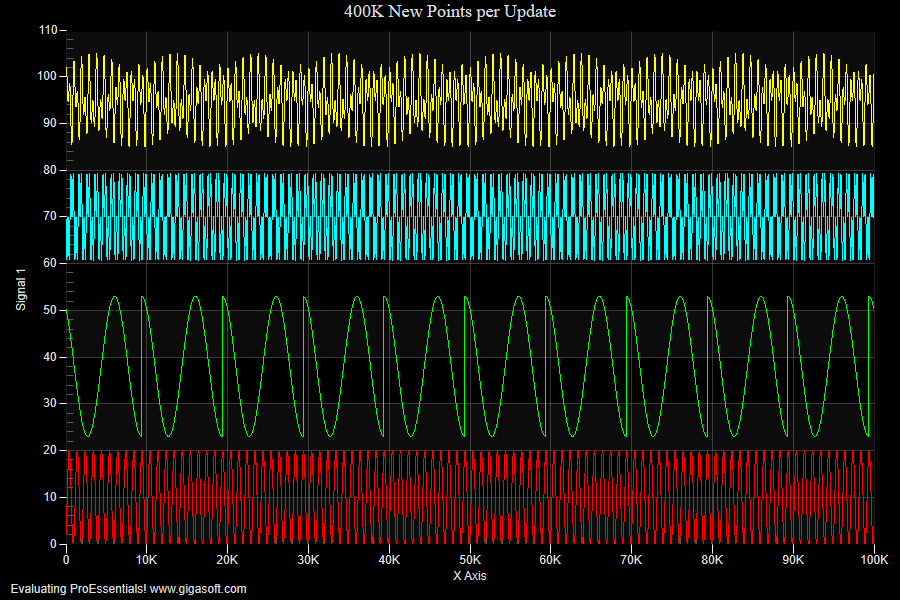
Form3.cs
1//! Chart changes all data each update2 3Pesgo1.PeData.Subsets = 4;4Pesgo1.PeData.Points = 100000;5 6// Manually configure x and y axes //7Pesgo1.PeGrid.Configure.ManualScaleControlX = ManualScaleControl.MinMax;8Pesgo1.PeGrid.Configure.ManualMinX = 0;9Pesgo1.PeGrid.Configure.ManualMaxX = 100000;10 11Pesgo1.PeGrid.WorkingAxis = 0;12Pesgo1.PeGrid.Configure.ManualScaleControlY = ManualScaleControl.MinMax;13Pesgo1.PeGrid.Configure.ManualMinY = 0;14Pesgo1.PeGrid.Configure.ManualMaxY = 110;15 16Pesgo1.PeString.YAxisLabel = "Signal 1";17Pesgo1.PePlot.Method = SGraphPlottingMethod.Line;18 19// Set X data and clear out default Y data //20Pesgo1.PeData.DuplicateDataX = DuplicateData.PointIncrement;21Pesgo1.PeData.X.FastCopyFrom(MainWindow.tmpXData, 100000);24 25//Set various properties //26Pesgo1.PeString.MainTitle = "400K New Points per Update";27Pesgo1.PeString.SubTitle = "";28Pesgo1.PeLegend.Show = false;29 30Pesgo1.PeUserInterface.Scrollbar.MouseWheelFunction = MouseWheelFunction.HorizontalZoom;31Pesgo1.PeUserInterface.Scrollbar.ScrollingHorzZoom = true;32Pesgo1.PePlot.ZoomWindow.Show = true;33 34Pesgo1.PeUserInterface.Dialog.RandomPointsToExport = false;35Pesgo1.PeUserInterface.Allow.FocalRect = false;36 37Pesgo1.PePlot.Allow.Bar = false;38Pesgo1.PeUserInterface.Dialog.PlotCustomization = false;39Pesgo1.PeUserInterface.Dialog.Page2 = false;40Pesgo1.PeUserInterface.Allow.Popup = true;41Pesgo1.PeUserInterface.Dialog.Axis = false;42 43Pesgo1.PeUserInterface.Dialog.Subsets = false;44Pesgo1.PeUserInterface.Allow.TextExport = false;45Pesgo1.PeUserInterface.Dialog.AllowEmfExport = false;46Pesgo1.PeUserInterface.Dialog.AllowWmfExport = false;47 48Pesgo1.PeConfigure.CacheBmp = true;49Pesgo1.PeConfigure.PrepareImages = true;50Pesgo1.PeConfigure.AntiAliasGraphics = true;51 52// Set Various Other Properties //53 54Pesgo1.PeColor.BitmapGradientMode = false;55Pesgo1.PeColor.QuickStyle = QuickStyle.DarkNoBorder;56Pesgo1.PeFont.Fixed = true;57 58Pesgo1.PeColor.SubsetColors[0] = Color.FromArgb(255, 255, 0, 0);59Pesgo1.PeColor.SubsetColors[1] = Color.FromArgb(255, 0, 255, 0);60Pesgo1.PeColor.SubsetColors[2] = Color.FromArgb(255, 0, 255, 255);61Pesgo1.PeColor.SubsetColors[3] = Color.FromArgb(255, 255, 255, 0);62 63Pesgo1.PePlot.DataShadows = DataShadows.None;64Pesgo1.PePlot.SubsetLineTypes[0] = LineType.Dash; // v10.0.0.24 supports dash dot Direct3D with ComputeShader65Pesgo1.PePlot.SubsetLineTypes[1] = LineType.Dot;66Pesgo1.PePlot.SubsetLineTypes[2] = LineType.ThinSolid;67Pesgo1.PePlot.SubsetLineTypes[3] = LineType.ThinSolid;68 69// Set various export defaults //70Pesgo1.PeSpecial.DpiX = 600;71Pesgo1.PeSpecial.DpiY = 600;72 73Pesgo1.PeUserInterface.Cursor.HourGlassThreshold = 10000000;74Pesgo1.PeConfigure.ImageAdjustLeft = 100;75Pesgo1.PeSpecial.AutoImageReset = false; // important for Direct3D rendering76 77Pesgo1.PeConfigure.RenderEngine = RenderEngine.Direct3D;78 79// Composite2D3D // Faster settings are 1-force only one D2D layer in back, 2-force only one D2D layer in front80// Default setting 0 creates 2 D2D layers, one in back ground and one in foreground, allowing normal separation81// of graphics as properties dictate.82Pesgo1.PeConfigure.Composite2D3D = Composite2D3D.Background;83 84Pesgo1.PeData.ComputeShader = true; // v10 Enable ComputeShader for fastest possible rendering.85Pesgo1.PeData.StagingBufferX = true; // 400K points also plots quite fast without enabling compute shader86Pesgo1.PeData.StagingBufferY = true; // rendering but uses more CPU.87 88// Reset image //89Pesgo1.PeFunction.Force3dxNewColors = true;90Pesgo1.PeFunction.Force3dxVerticeRebuild = true;91Pesgo1.PeFunction.ReinitializeResetImage();92 93// Start Timer //94MainWindow.Timer1.Interval = 20;95MainWindow.Timer1.Start();96 97 /*98 /////////////////////////99 // Example Timer Event //100 /////////////////////////101 private void Timer1_Tick(object sender, System.EventArgs e)102 {103 int i;104 // file scope pre allocated, make sure to use Single (4 byte floats) //105 //float[] tmpYData = new float[500000];106 //float[] tmpXData = new float[500000];107 //float[] tmpYData2 = new float[500000];108 109 Random rn = new Random();110 i = rn.Next(4500); // randomize the start of waveform data to produce variation111 // Prepare all new data in tmpYData2 based of random point offset in tmpYData112 Array.Copy(tmpYData, i, tmpYData2, 0, 100000);113 Array.Copy(tmpYData, i + 125000, tmpYData2, 100000, 100000);114 Array.Copy(tmpYData, i + 250000, tmpYData2, 200000, 100000);115 Array.Copy(tmpYData, i + 375000, tmpYData2, 300000, 100000);116 117 // Pass the new block of memory to chart118 Pesgo1.PeData.Y.FastCopyFrom(tmpYData2, 400000);119 120 Pesgo1.PeData.ReuseDataX = true; // v10 New ComputeShader related setting tells ProEssentials X Data is not changing121 Pesgo1.PeFunction.Force3dxVerticeRebuild = true;122 Pesgo1.Invalidate();123 }124*/Tip: Uses property syntax like
Pego1.PeData.Y[s, p]Click underlined properties to view documentation