Example 114: Scientific Graph using double precision data
PesgoScientific Graph Objectintermediate
Using double precision data
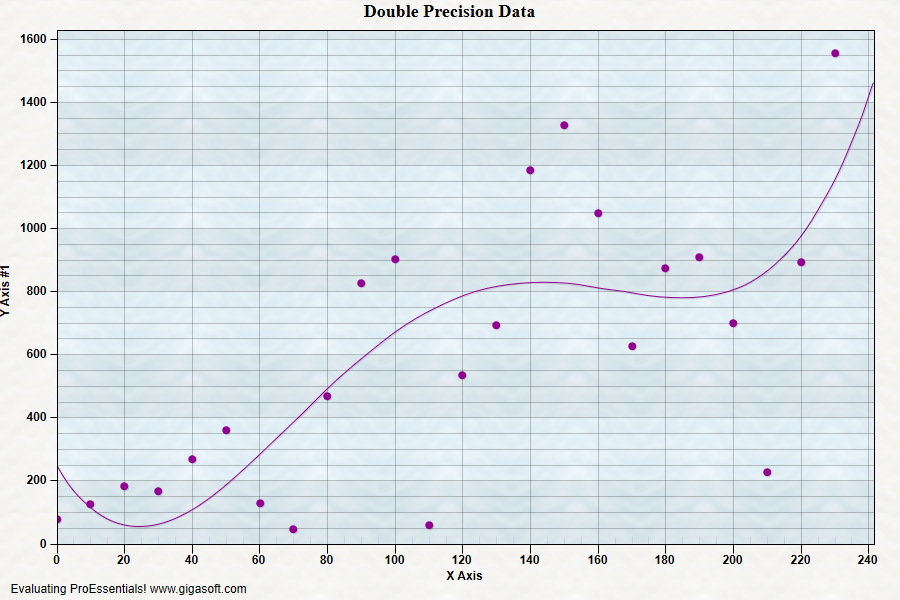
Form3.cs
1double dbl;2int p;3 4Pesgo1.PeData.Subsets = 1;5Pesgo1.PeData.Points = 24;6 7// Enable Double precision x and y data //8// Double precision will give 15 significant degits //9// where as single precision offers 7 digits. //10// 1205.5346 can not be accurately stored as single precision //11Pesgo1.PeData.UsingXDataii = true;12Pesgo1.PeData.UsingYDataii = true;13 14// Pass data to XDataII and YDataII for double precision //15for (p = 0; p <= 23; p++)16{17 Pesgo1.PeData.Xii[0, p] = p * 10 + 0.0123456789;18 dbl = -1.0 * ((Math.Sin(p * 0.074) * 60.0) + (p / 2.0)) + 0.0123456789;19 dbl = (Rand_Num.NextDouble() * 85) * (p + 1);20 Pesgo1.PeData.Yii[0, p] = dbl;21}22 23// Set some colors and etc //24Pesgo1.PeColor.BitmapGradientMode = true;25Pesgo1.PeColor.QuickStyle = QuickStyle.LightLine;26Pesgo1.PeGrid.LineControl = GridLineControl.Both;27Pesgo1.PeGrid.Option.YAxisLongTicks = true;28Pesgo1.PePlot.Option.BestFitDegree = BestFitDegree.Fourth;29Pesgo1.PePlot.Method = SGraphPlottingMethod.PointsPlusBestFitCurve;30Pesgo1.PeUserInterface.Allow.ZoomStyle = ZoomStyle.Ro2Not;31 32// Change Titles and Labels //33Pesgo1.PeString.MainTitle = "Double Precision Data";34Pesgo1.PeString.SubTitle = "";35 36Pesgo1.PeColor.SubsetColors[0] = Color.FromArgb(255, 145, 0, 145);37Pesgo1.PePlot.MarkDataPoints = true;38Pesgo1.PeConfigure.PrepareImages = true;39Pesgo1.PeConfigure.CacheBmp = true;40Pesgo1.PeUserInterface.Allow.FocalRect = false;41Pesgo1.PeFont.Fixed = true;42 43Pesgo1.PePlot.Option.GradientBars = 8;44Pesgo1.PeConfigure.TextShadows = TextShadows.BoldText;47Pesgo1.PeFont.Label.Bold = true;48Pesgo1.PePlot.Option.LineShadows = true;50Pesgo1.PeUserInterface.Scrollbar.ScrollingHorzZoom = true;51 52// Set various export defaults //53Pesgo1.PeSpecial.DpiX = 600;54Pesgo1.PeSpecial.DpiY = 600;55 56// default export setting //57Pesgo1.PeUserInterface.Dialog.ExportSizeDef = ExportSizeDef.NoSizeOrPixel;58Pesgo1.PeUserInterface.Dialog.ExportTypeDef = ExportTypeDef.Png;59Pesgo1.PeUserInterface.Dialog.ExportDestDef = ExportDestDef.Clipboard;60Pesgo1.PeUserInterface.Dialog.ExportUnitXDef = "1280";61Pesgo1.PeUserInterface.Dialog.ExportUnitYDef = "768";62Pesgo1.PeUserInterface.Dialog.ExportImageDpi = 300;63 64// v9 features65Pesgo1.PeUserInterface.Cursor.PromptTracking = true;66Pesgo1.PeUserInterface.Cursor.PromptStyle = CursorPromptStyle.XYValues;67Pesgo1.PeUserInterface.Cursor.PromptLocation = CursorPromptLocation.ToolTip;68 69Pesgo1.PeConfigure.RenderEngine = RenderEngine.Direct2D;70Pesgo1.PeConfigure.AntiAliasGraphics = true;71Pesgo1.PeConfigure.AntiAliasText = true;72 73// Generally call ReinitializeResetImage at end **'74Pesgo1.PeFunction.ReinitializeResetImage();75Pesgo1.Invalidate();76// Optionally call Pego1.Refresh() if you are not seeing changes immediatelyTip: Uses property syntax like
Pego1.PeData.Y[s, p]Click underlined properties to view documentation