Example 139: Scientific Graph showing WaveData-Heatmap-Spectrogram
PesgoScientific Graph Objectintermediate
WaveData-Heatmap-Spectrogram
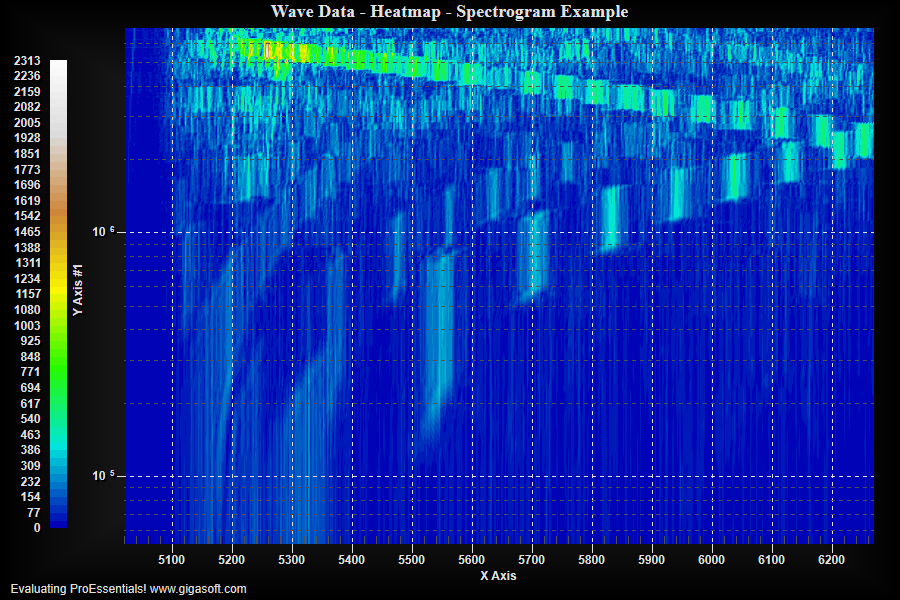
Form3.cs
1Pesgo1.PeData.Subsets = 183;2Pesgo1.PeData.Points = 512;3 4Pesgo1.PeData.DuplicateDataX = DuplicateData.PointIncrement;5Pesgo1.PeData.DuplicateDataY = DuplicateData.SubsetIncrement;6 7Pesgo1.PeData.X[0, 511] = 0; // pre allocates memory so guaranteed we never have to reallocate as we spoon feed below8Pesgo1.PeData.Y[0, 182] = 0; // note that we use SubsetIncrement above so think of it as a one dimensional array9Pesgo1.PeData.Z[182, 511] = 0;10 11int nSubsetCount = 0;12int nPointCount = 0;13 14string[] fileArray = { "", "" };15try16{17 fileArray = File.ReadAllLines("Heatmap.txt"); // 183 subsets(rows) x 512 points(columns)18}19catch20{21 System.Windows.Forms.MessageBox.Show("Demo File Not Found?", "Error", System.Windows.Forms.MessageBoxButtons.OK);22 System.Windows.Forms.Application.Exit();23}24 25for (int i = 0; i < fileArray.Length; i++)26{27 String line = fileArray[i];28 if (line.Length < 3) { continue; }29 var columns = line.Split('\t');30 String valueX = columns[0];31 String valueY = columns[1];32 String valueZ = columns[2];33 34 float fX = float.Parse(valueX, CultureInfo.InvariantCulture.NumberFormat);35 float fY = float.Parse(valueY, CultureInfo.InvariantCulture.NumberFormat);36 float fZ = float.Parse(valueZ, CultureInfo.InvariantCulture.NumberFormat);37 38 if (nSubsetCount == 0)39 Pesgo1.PeData.X[0, nPointCount] = fX + 20.0F;40 41 if (nPointCount == 0)42 Pesgo1.PeData.Y[0, nSubsetCount] = fY * (i + 1000) / 100.0F; //make the data more log like to match YAxisScaleControl = Log43 44 Pesgo1.PeData.Z[nSubsetCount, nPointCount] = fZ;45 46 nPointCount++;47 if (nPointCount > 511)48 {49 nPointCount = 0;50 nSubsetCount++;51 }52}53 54// Log y scale55Pesgo1.PeGrid.Configure.YAxisScaleControl = Gigasoft.ProEssentials.Enums.ScaleControl.Log;57 58// Set Various Other Properties ///59Pesgo1.PeColor.BitmapGradientMode = true;60Pesgo1.PeColor.QuickStyle = QuickStyle.DarkNoBorder;61Pesgo1.PeColor.GridBold = true;62 63// Set the plotting method ///64Pesgo1.PePlot.Allow.ContourColors = true;65Pesgo1.PePlot.Allow.ContourColorsShadows = true;66 67// Set Contour Color regions //68Pesgo1.PeColor.ContourColorBlends = 10;69Pesgo1.PeColor.ContourColorSet = ContourColorSet.BlueCyanGreenYellowBrownWhite;70 71Pesgo1.PeLegend.ContourLegendPrecision = ContourLegendPrecision.ZeroDecimals;72Pesgo1.PeLegend.ContourStyle = true;73 74Pesgo1.PePlot.Method = SGraphPlottingMethod.ContourColors;75Pesgo1.PeUserInterface.Menu.DataShadow = MenuControl.Hide;76 77Pesgo1.PeUserInterface.Scrollbar.MouseWheelZoomFactor = 1.4F;78Pesgo1.PeUserInterface.Scrollbar.MouseWheelZoomSmoothness = 2;79Pesgo1.PeGrid.GridBands = false;80 81Pesgo1.PeUserInterface.Allow.ZoomStyle = ZoomStyle.Ro2Not;82Pesgo1.PeUserInterface.Allow.Zooming = AllowZooming.HorzAndVert;83Pesgo1.PeUserInterface.Scrollbar.MouseWheelFunction = MouseWheelFunction.HorizontalVerticalZoom;84 85Pesgo1.PeLegend.Location = LegendLocation.Left;86Pesgo1.PeGrid.InFront = true;87Pesgo1.PeGrid.LineControl = GridLineControl.Both;89 90// Disable other non contour plotting method //91Pesgo1.PePlot.Allow.Line = false;92Pesgo1.PePlot.Allow.Point = false;93Pesgo1.PePlot.Allow.Bar = false;94Pesgo1.PePlot.Allow.Area = false;95Pesgo1.PePlot.Allow.Spline = false;96Pesgo1.PePlot.Allow.SplineArea = false;97Pesgo1.PePlot.Allow.PointsPlusLine = false;98Pesgo1.PePlot.Allow.PointsPlusSpline = false;99Pesgo1.PePlot.Allow.BestFitCurve = false;100Pesgo1.PePlot.Allow.BestFitLine = false;101Pesgo1.PePlot.Allow.Stick = false;102 103// Set Titles //104Pesgo1.PeString.MainTitle = "Wave Data - Heatmap - Spectrogram Example";105Pesgo1.PeString.SubTitle = "";106 107// So contour goes to edge of grid //108Pesgo1.PeGrid.Configure.AutoMinMaxPadding = 0;109 110// Set small font size //112Pesgo1.PeFont.Fixed = true;113 114// Disable appropriate tabs //115Pesgo1.PeUserInterface.Dialog.Axis = false;116Pesgo1.PeUserInterface.Dialog.Style = false;117Pesgo1.PeUserInterface.Dialog.Subsets = false;118 119Pesgo1.PeConfigure.TextShadows = TextShadows.BoldText;122Pesgo1.PeFont.Label.Bold = true;123 124Pesgo1.PeUserInterface.Scrollbar.ScrollingVertZoom = true;125Pesgo1.PeUserInterface.Scrollbar.ScrollingHorzZoom = true;126 127// Set various export defaults //128Pesgo1.PeSpecial.DpiX = 600;129Pesgo1.PeSpecial.DpiY = 600;130 131// default export setting //132Pesgo1.PeUserInterface.Dialog.AllowEmfExport = false;133Pesgo1.PeUserInterface.Dialog.AllowWmfExport = false;134Pesgo1.PeUserInterface.Dialog.ExportSizeDef = ExportSizeDef.NoSizeOrPixel;135Pesgo1.PeUserInterface.Dialog.ExportTypeDef = ExportTypeDef.Png;136Pesgo1.PeUserInterface.Dialog.ExportDestDef = ExportDestDef.Clipboard;137Pesgo1.PeUserInterface.Dialog.ExportUnitXDef = "1280";138Pesgo1.PeUserInterface.Dialog.ExportUnitYDef = "768";139Pesgo1.PeUserInterface.Dialog.ExportImageDpi = 300;140 141Pesgo1.PeConfigure.Composite2D3D = Composite2D3D.Foreground;142Pesgo1.PeConfigure.RenderEngine = RenderEngine.Direct3D;143 144Pesgo1.PeData.ComputeShader = true; // v10 Enable ComputeShader for fastest possible rendering145 146Pesgo1.PeFunction.Force3dxNewColors = true;147Pesgo1.PeFunction.Force3dxVerticeRebuild = true;148 149Pesgo1.PeUserInterface.Cursor.PromptTracking = true;150Pesgo1.PeUserInterface.Cursor.PromptStyle = CursorPromptStyle.XYZValues;151Pesgo1.PeUserInterface.Cursor.PromptLocation = CursorPromptLocation.Text;152Pesgo1.PeUserInterface.Cursor.HourGlassThreshold = 9999999;153 154// Generally call ReinitializeResetImage at end **'155Pesgo1.PeFunction.ReinitializeResetImage();156Pesgo1.Invalidate();157// Optionally call Pesgo1.Refresh() if you are not seeing changes immediatelyTip: Uses property syntax like
Pego1.PeData.Y[s, p]Click underlined properties to view documentation