Example 106: Scientific Graph showing date time handling
PesgoScientific Graph Objectintermediate
Date time handling
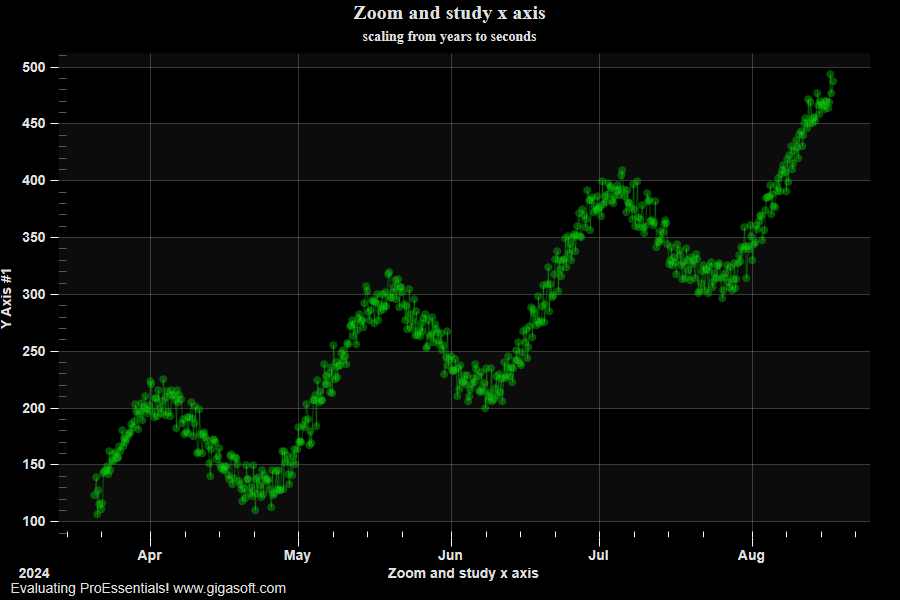
Form3.cs
1double d, dt;2int p;3dt = DateTime.Now.ToOADate() - 700;4 5// Enable MouseWheel Zooming6Pesgo1.PeUserInterface.Scrollbar.MouseWheelFunction = MouseWheelFunction.HorizontalVerticalZoom;7Pesgo1.PeUserInterface.Scrollbar.MouseDraggingX = true; // note that pan gestures require MouseDragging to be enabled8Pesgo1.PeUserInterface.Scrollbar.MouseDraggingY = true; // also, pan gestures should have ScrollingHorzZooom enabled9 10// Enable MouseWheel Zoom Smoothness11Pesgo1.PeUserInterface.Scrollbar.MouseWheelZoomSmoothness = 5;12Pesgo1.PeUserInterface.Scrollbar.PinchZoomSmoothness = 2;13 14// Allow zooming and panning //15Pesgo1.PeUserInterface.Allow.Zooming = AllowZooming.HorzAndVert;16Pesgo1.PeUserInterface.Scrollbar.ScrollingHorzZoom = true;17Pesgo1.PeUserInterface.Scrollbar.ScrollingVertZoom = true;18 19// Enable Plotting style gradient and bevel features //20Pesgo1.PePlot.Option.AreaGradientStyle = PlotGradientStyle.RadialBottomRight;21Pesgo1.PePlot.Option.AreaBevelStyle = BevelStyle.MediumSmooth;22Pesgo1.PePlot.Option.SplineGradientStyle = PlotGradientStyle.RadialBottomRight;23Pesgo1.PePlot.Option.SplineBevelStyle = SplineBevelStyle.MediumSmooth;24 25// Enable ZoomWindow //26Pesgo1.PePlot.ZoomWindow.Show = true;27 28Pesgo1.PeData.Subsets = 1;29Pesgo1.PeData.Points = 600;30 31// Enable double precision which is usually //32// required for date time handling. //33// This means we pass x data to XDataII //34Pesgo1.PeData.UsingXDataii = true;35 36// Pass XDataII and YData //37for (p = 0; p <= 599; p++)38{39 d = (dt + (p * 0.25));40 Pesgo1.PeData.Xii[0, p] = d;41 Pesgo1.PeData.Y[0, p] = (float)((150 + (Math.Sin(p * 0.034) * 60) + (Rand_Num.NextDouble() * 30) + (p / 2)) - (35 + (Rand_Num.NextDouble() * 20)));42}43 44// Enable DateTimeMode //45Pesgo1.PeData.DateTimeMode = true;46 47// Cursor prompting in top left corner //48Pesgo1.PeUserInterface.Cursor.Mode = CursorMode.DataSquare;49Pesgo1.PeUserInterface.Cursor.PromptTracking = true;50Pesgo1.PeUserInterface.Cursor.PromptStyle = CursorPromptStyle.XYValues;51Pesgo1.PeUserInterface.HotSpot.Data = true;52Pesgo1.PeUserInterface.Cursor.MouseCursorControl = true;53Pesgo1.PeUserInterface.HotSpot.Size = (HotSpotSize)12; // 12 pixels54 55// v9 Features56Pesgo1.PeUserInterface.Cursor.PromptLocation = CursorPromptLocation.ToolTip;57Pesgo1.PeUserInterface.Cursor.TrackingTooltipMaxWidth = 150;58 59// Set Various Other Properties ///60Pesgo1.PeColor.BitmapGradientMode = false;61Pesgo1.PeColor.QuickStyle = QuickStyle.DarkNoBorder;62Pesgo1.PeUserInterface.Allow.FocalRect = false;63Pesgo1.PeConfigure.PrepareImages = true;64Pesgo1.PePlot.MarkDataPoints = true;65Pesgo1.PeFont.Fixed = true;66Pesgo1.PeConfigure.CacheBmp = true;67Pesgo1.PeUserInterface.Allow.ZoomStyle = ZoomStyle.Ro2Not;68 69// You can modify date label formats with //70// Pesgo1.PeGrid.Option.TimeLabelType;71// Pesgo1.PeGrid.Option.DayLabelType;72// Pesgo1.PeGrid.Option.MonthLabelType;73// Pesgo1.PeGrid.Option.YearLabelType;74 75// subset colors //76Pesgo1.PeColor.SubsetColors[0] = Color.FromArgb(96, 10, 218, 10);77 78Pesgo1.PePlot.Option.GradientBars = 8;79Pesgo1.PeConfigure.TextShadows = TextShadows.BoldText;82Pesgo1.PeFont.Label.Bold = true;83Pesgo1.PePlot.Option.LineShadows = true;85Pesgo1.PeUserInterface.Scrollbar.ScrollingHorzZoom = true;86 87Pesgo1.PePlot.Method = SGraphPlottingMethod.PointsPlusLine;88 89Pesgo1.PeString.MainTitle = "Zoom and study x axis";90Pesgo1.PeString.SubTitle = "scaling from years to seconds";91Pesgo1.PeString.XAxisLabel = "Zoom and study x axis";92 93// Set various export defaults //94Pesgo1.PeSpecial.DpiX = 600;95Pesgo1.PeSpecial.DpiY = 600;96 97// default export setting //98Pesgo1.PeUserInterface.Dialog.ExportSizeDef = ExportSizeDef.NoSizeOrPixel;99Pesgo1.PeUserInterface.Dialog.ExportTypeDef = ExportTypeDef.Png;100Pesgo1.PeUserInterface.Dialog.ExportDestDef = ExportDestDef.Clipboard;101Pesgo1.PeUserInterface.Dialog.ExportUnitXDef = "1280";102Pesgo1.PeUserInterface.Dialog.ExportUnitYDef = "768";103Pesgo1.PeUserInterface.Dialog.ExportImageDpi = 300;104 105Pesgo1.PeConfigure.RenderEngine = RenderEngine.Direct2D;106Pesgo1.PeConfigure.AntiAliasGraphics = true;107Pesgo1.PeConfigure.AntiAliasText = true;108 109// Generally call ReinitializeResetImage at end **'110Pesgo1.PeFunction.ReinitializeResetImage();111Pesgo1.Invalidate();112// Optionally call Pego1.Refresh() if you are not seeing changes immediatelyTip: Uses property syntax like
Pego1.PeData.Y[s, p]Click underlined properties to view documentation