Example 409: 2D Contour with Shadow
Pe3do3D Scientific Objectintermediate
2D Contour with Shadow
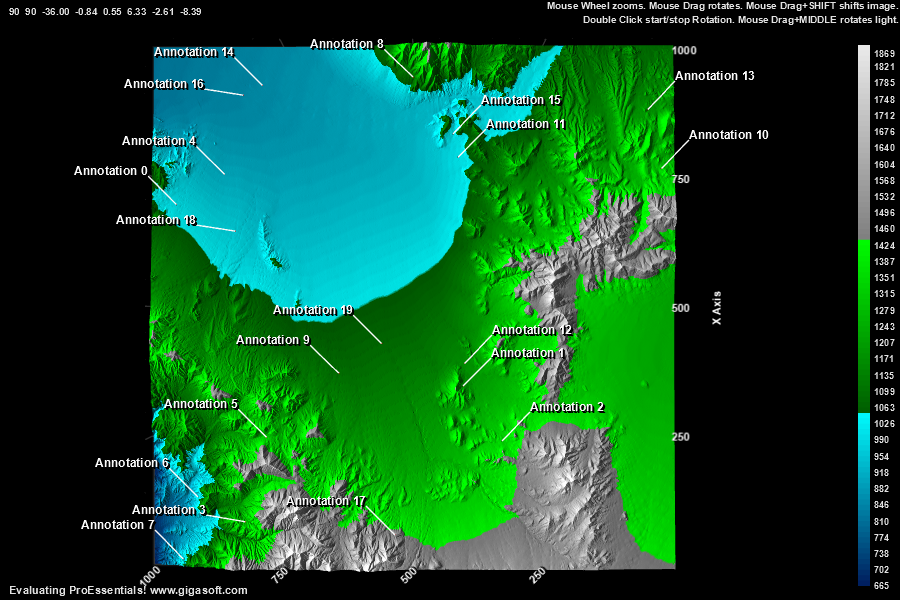
Form6.cs
1//! Left click and drag to rotate. Also Hold shift to translate. //2//! Mouse Wheel zooms in/out.3//! Middle Button hold down while drag rotates light. //4//! Right click to show popup menu. //5 6// call Example 401 as a base to this example7CreateLargeSurfaceFlattenedFlyBy(Pe3do1);8 9Pe3do1.PeGrid.Option.ShowXAxis = ShowAxis.All;10Pe3do1.PeGrid.Option.ShowZAxis = ShowAxis.All;11Pe3do1.PeGrid.Configure.AutoMinMaxPadding = 0;12 13// Set eye/camera distance, or Zoom amount //14Pe3do1.PeUserInterface.Scrollbar.ViewingHeight = 90;15Pe3do1.PeUserInterface.Scrollbar.DegreeOfRotation = 90;16 17// Set eye/camera distance, or Zoom amount //18Pe3do1.PePlot.Option.DxZoom = -36.0F;19 20Pe3do1.PePlot.Option.DxZoomMax = 1F; // v10 New properties to control max and min mousewheel zoom21Pe3do1.PePlot.Option.DxZoomMin = -50F;22Pe3do1.PePlot.Option.DxViewportPanFactor = 2.0F; // v10 New properties to control shift/drag and mousewheel sensitivity23 24// Zoom faster //25Pe3do1.PeUserInterface.Scrollbar.MouseWheelZoomFactor = 20;26Pe3do1.PeUserInterface.Scrollbar.PinchZoomFactor = 20;27 28// Reduce the terrain height with respect to surface area29Pe3do1.PeGrid.Option.GridAspectX = 15.0F;30Pe3do1.PeGrid.Option.GridAspectZ = 15.0F;31 32// Set a chart translation //33Pe3do1.PePlot.Option.DxViewportX = -.84F;34Pe3do1.PePlot.Option.DxViewportY = .55F;35 36// Enable CursorPromptTracking HighlighColor, etc only applicable to Direct3D RenderEngine37Pe3do1.PeUserInterface.Cursor.PromptTracking = true;38Pe3do1.PeUserInterface.Cursor.PromptStyle = CursorPromptStyle.YValue; // only y and xyz are options.39Pe3do1.PeUserInterface.Cursor.HighlightColor = Color.FromArgb(255, 255, 0, 0);40Pe3do1.PeUserInterface.HotSpot.Data = false; // true provides hotspot data41 42Pe3do1.PeUserInterface.Menu.Contour = MenuControl.Hide;43 44// Set a light location //45Pe3do1.PeFunction.SetLight(0, 1.72F, -.71F, -2.28F);46 47Pe3do1.PeConfigure.RenderEngine = RenderEngine.Direct3D;48 49Pe3do1.PeColor.BitmapGradientMode = false;50Pe3do1.PeColor.QuickStyle = QuickStyle.DarkNoBorder;51 52Pe3do1.PeData.ComputeShader = true; // v10 Enable ComputeShader for fastest possible rendering.53 54Pe3do1.PeFunction.Force3dxVerticeRebuild = true;55 56Pe3do1.PeFunction.ReinitializeResetImage();57Pe3do1.Invalidate();58Pe3do1.Refresh();Tip: Uses property syntax like
Pego1.PeData.Y[s, p]Click underlined properties to view documentation