Example 400: 3D Simple Wire Frame
Pe3do3D Scientific Objectadvanced
3D Simple Wire Frame
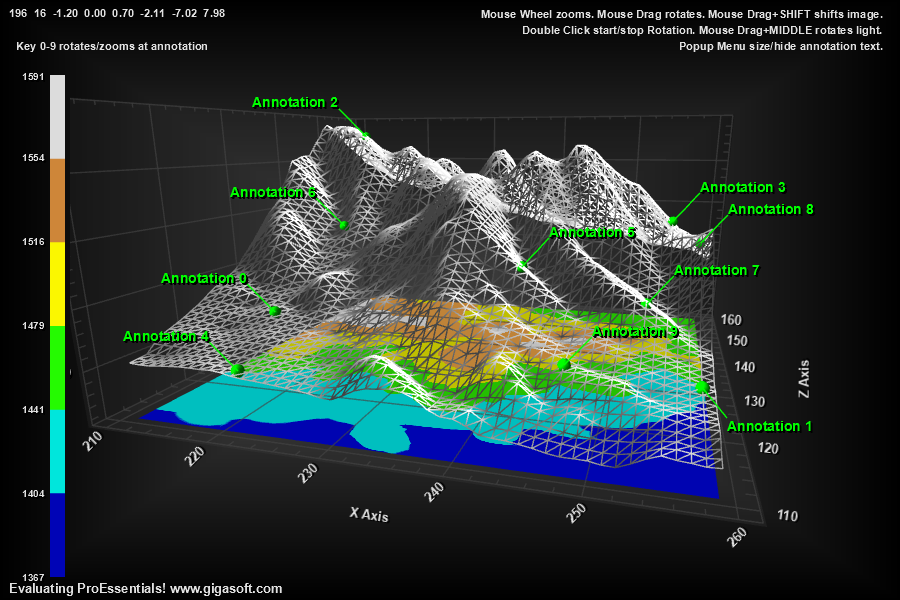
Form6.cs
1//! Left click and drag to rotate. Also Hold shift to translate. //2//! Mouse Wheel zooms in/out.3//! Middle Button hold down while drag rotates light. //4//! Right click to show popup menu. //5 6int Row, Col, o, nQ, nStartRow, nStartCol;7int nEndRow, nEndCol, nTargetRows, nTargetCols;8int rowcounter, colcounter;9Boolean foundtargetindex = false;10 11// Example showing the basics of creating a simple 3d //12 13Pe3do1.PeFunction.Reset(); // always start a 3D new initialization with a call to Reset14Pe3do1.PeUserInterface.Dialog.ModelessAutoClose = true; // needed as this demo never destroys the chart object15 16int nRndRow = (int)(Rand_Num.NextDouble() * 300.0F);17int nRndCol = (int)(Rand_Num.NextDouble() * 300.0F);18 19nStartRow = 110;20nEndRow = 158;21nTargetRows = nEndRow - nStartRow + 1;22 23nStartCol = 210;24nEndCol = 258;25nTargetCols = nEndCol - nStartCol + 1;26nQ = nTargetRows * nTargetCols;27 28Int32[] pElevData = new Int32[2250000];29 30String filepath = null;31filepath = System.AppDomain.CurrentDomain.BaseDirectory + "\\terrain2.bin";32System.IO.FileStream fs = null;33try34{35 fs = new System.IO.FileStream(filepath, System.IO.FileMode.Open);36}37catch38{39 System.Windows.Forms.MessageBox.Show("Demo File Not Found?", "Error", System.Windows.Forms.MessageBoxButtons.OK);40 System.Windows.Forms.Application.Exit();41}42 43System.IO.BinaryReader r = new System.IO.BinaryReader(fs);44 45for (o = 0; o < 2250000; o++)46 pElevData[o] = r.ReadInt32();47fs.Close();48 49float[] pMyXData = new float[nQ];50float[] pMyYData = new float[nQ];51float[] pMyZData = new float[nQ];52rowcounter = 0;53colcounter = 0;54 55for (Row = 0; Row < 1500; Row++)56{57 for (Col = 0; Col < 1500; Col++)58 {59 foundtargetindex = false;60 if (Row >= nStartRow && Row <= nEndRow)61 {62 if (Col >= nStartCol && Col <= nEndCol)63 {64 foundtargetindex = true;65 o = (rowcounter * nTargetRows) + colcounter;66 pMyXData[o] = Col + 1;67 pMyZData[o] = Row + 1;68 pMyYData[o] = (float)(pElevData[(Row * 1500) + Col] * 0.1);69 }70 }71 if (foundtargetindex)72 colcounter = colcounter + 1;73 }74 if (foundtargetindex)75 rowcounter = rowcounter + 1;76}77 78Pe3do1.PeData.Subsets = nTargetRows;79Pe3do1.PeData.Points = nTargetCols;80 81// Perform the transfer of data //82Pe3do1.PeData.X.FastCopyFrom(pMyXData, nQ);83Pe3do1.PeData.Y.FastCopyFrom(pMyYData, nQ);84Pe3do1.PeData.Z.FastCopyFrom(pMyZData, nQ);85// One can spoon feed data into Pe3do1.PeData.X, Y, Z though FastCopyFrom and/or optionally passing reference with UseDataLocation is most efficient.86 87Pe3do1.PePlot.Option.DxZoomMax = 4F; // v10 New properties to control max and min mousewheel zoom88Pe3do1.PePlot.Option.DxZoomMin = -4F;89 90Pe3do1.PePlot.Option.DxViewportPanFactor = 1.1F; // v10 New properties to control shift/drag and mousewheel sensitivity91Pe3do1.PeUserInterface.Scrollbar.MouseWheelZoomFactor = 3.5F;92 93// Enable smooth rotating and zooming //94Pe3do1.PeUserInterface.Scrollbar.ScrollSmoothness = 3;95Pe3do1.PeUserInterface.Scrollbar.MouseWheelZoomSmoothness = 3;96Pe3do1.PeUserInterface.Scrollbar.PinchZoomSmoothness = 2;97 98// Enable DegreePrompting, to view rotation, zoom, light location to aid99// in determining different default values for such properties //100Pe3do1.PePlot.Option.DegreePrompting = true;101 102// Enable button dragging //103Pe3do1.PeUserInterface.Scrollbar.MouseDraggingX = true;104Pe3do1.PeUserInterface.Scrollbar.MouseDraggingY = true;105 106// Set view107Pe3do1.PeUserInterface.Scrollbar.ViewingHeight = 16;108Pe3do1.PeUserInterface.Scrollbar.DegreeOfRotation = 196;109 110// Set a light location //111Pe3do1.PeFunction.SetLight(0, -2.2F, -7.30F, 8.3F);112 113// Set eye/camera distance, or Zoom amount //114Pe3do1.PePlot.Option.DxZoom = -1.20F;115Pe3do1.PePlot.Option.DxFitControlShape = false;116Pe3do1.PeGrid.Option.GridAspectX = 2.0F;117Pe3do1.PeGrid.Option.GridAspectZ = 2.0F;118Pe3do1.PePlot.Option.DxViewportY = 0.7F;119 120// Mechanism to control polygon border color //121Pe3do1.PeColor.SubsetColors[(int)(SurfaceColors.WireFrame)] = Color.FromArgb(255, 225, 225, 225);122Pe3do1.PeColor.SubsetColors[(int)(SurfaceColors.SolidSurface)] = Color.FromArgb(255, 159, 159, 159);123 124// v9 feature125Pe3do1.PeColor.ContourColorSet = ContourColorSet.BlueCyanGreenYellowBrownWhite;126Pe3do1.PeLegend.Location = LegendLocation.Left;127Pe3do1.PeLegend.ContourStyle = true;128Pe3do1.PeLegend.ContourLegendPrecision = ContourLegendPrecision.ZeroDecimals;129Pe3do1.PePlot.Option.ShowWireFrame = true;130 131// Set the plotting method //132//! There are different plotting method values for each //133//! case of PolyMode //134Pe3do1.PePlot.Method = ThreeDGraphPlottingMethod.Zero;135Pe3do1.PePlot.Allow.SurfaceContour = true;136 137// Set various other properties //138Pe3do1.PeString.MainTitle = "";139Pe3do1.PeString.SubTitle = "||Mouse Wheel zooms. Mouse Drag rotates. Mouse Drag+SHIFT shifts image. ";140Pe3do1.PeString.MultiSubTitles[0] = "||Double Click start/stop Rotation. Mouse Drag+MIDDLE rotates light. ";141 142// Add some padding around chart for prettiness if using inset or shadow borders143Pe3do1.PeConfigure.ImageAdjustLeft = 100;144Pe3do1.PeConfigure.ImageAdjustRight = 100;145Pe3do1.PeConfigure.ImageAdjustTop = 50;146Pe3do1.PeConfigure.ImageAdjustBottom = 50;147 148Pe3do1.PeFont.Fixed = true;150Pe3do1.PeConfigure.PrepareImages = true;151Pe3do1.PeConfigure.CacheBmp = true;152Pe3do1.PeUserInterface.Allow.FocalRect = false;153 154Pe3do1.PeConfigure.TextShadows = TextShadows.BoldText;155Pe3do1.PeFont.Label.Bold = true;156 157// Set various export defaults //158Pe3do1.PeSpecial.DpiX = 600;159Pe3do1.PeSpecial.DpiY = 600;160 161// default export setting //162Pe3do1.PeUserInterface.Dialog.ExportSizeDef = ExportSizeDef.NoSizeOrPixel;163Pe3do1.PeUserInterface.Dialog.ExportTypeDef = ExportTypeDef.Png;164Pe3do1.PeUserInterface.Dialog.ExportDestDef = ExportDestDef.Clipboard;165Pe3do1.PeUserInterface.Dialog.ExportUnitXDef = "1280";166Pe3do1.PeUserInterface.Dialog.ExportUnitYDef = "768";167Pe3do1.PeUserInterface.Dialog.ExportImageDpi = 300;168Pe3do1.PeUserInterface.Dialog.AllowEmfExport = false;169Pe3do1.PeUserInterface.Dialog.AllowWmfExport = false;170 171Pe3do1.PeConfigure.AntiAliasGraphics = true;172Pe3do1.PeConfigure.AntiAliasText = true;173 174// Enable CursorPromptTracking HighlighColor, etc only applicable to Direct3D RenderEngine175Pe3do1.PeUserInterface.HotSpot.Data = true;176Pe3do1.PeUserInterface.Cursor.PromptTracking = true;177Pe3do1.PeUserInterface.Cursor.PromptStyle = CursorPromptStyle.YValue; // only y and xyz are options.178Pe3do1.PeData.Precision = DataPrecision.TwoDecimals;179Pe3do1.PeUserInterface.Cursor.HighlightColor = Color.FromArgb(255, 255, 0, 0);180Pe3do1.PePlot.Option.ShowContour = ShowContour.BottomColors;181Pe3do1.PeUserInterface.Menu.DataShadow = MenuControl.Show;182 183Pe3do1.PeUserInterface.Menu.AnnotationControl = true;184Pe3do1.PeUserInterface.Menu.ShowAnnotationText = MenuControl.Show;185Pe3do1.PeUserInterface.Menu.AnnotationTextFixedSize = MenuControl.Show;186 187// Add some random graph annotations //188int aCnt = 0;189for (int annot = 0; annot < 10; annot++)190{191 nRndRow = (int)(Rand_Num.NextDouble() * (float)nTargetRows - 1);192 nRndCol = (int)(Rand_Num.NextDouble() * (float)nTargetCols - 1);193 Pe3do1.PeAnnotation.Graph.X[aCnt] = nStartCol + nRndCol + 1;194 Pe3do1.PeAnnotation.Graph.Z[aCnt] = nStartRow + nRndRow + 1;196 Pe3do1.PeAnnotation.Graph.Type[aCnt] = (int)Gigasoft.ProEssentials.Enums.GraphAnnotationType.LargeDotSolid;197 Pe3do1.PeAnnotation.Graph.Text[aCnt] = "";198 Pe3do1.PeAnnotation.Graph.Color[aCnt] = Color.FromArgb(255, 0, 255, 0);199 MainWindow.m_nAnnotationStartIndices[annot] = aCnt;200 aCnt++;201 Pe3do1.PeAnnotation.Graph.X[aCnt] = nStartCol + nRndCol + 1;202 Pe3do1.PeAnnotation.Graph.Z[aCnt] = nStartRow + nRndRow + 1;204 Pe3do1.PeAnnotation.Graph.Type[aCnt] = (int)Gigasoft.ProEssentials.Enums.GraphAnnotationType.Pointer;205 Pe3do1.PeAnnotation.Graph.Text[aCnt] = "|lAnnotation " + annot.ToString();206 Pe3do1.PeAnnotation.Graph.Color[aCnt] = Color.FromArgb(255, 0, 255, 0);207 aCnt++;208}209Pe3do1.PeAnnotation.Show = true;210Pe3do1.PeAnnotation.Graph.Show = true;211Pe3do1.PeAnnotation.Graph.LeftJustificationOutside = true;212Pe3do1.PeAnnotation.Graph.SymbolObstacles = true;213Pe3do1.PeFont.GraphAnnotationTextSize = 110;214Pe3do1.PeUserInterface.HotSpot.GraphAnnotation = false;215 216Pe3do1.PeUserInterface.Menu.CustomMenuText[0] = "Zoom Rotate on Center ";217Pe3do1.PeUserInterface.Menu.CustomMenuState[0, 0] = CustomMenuState.Checked;218Pe3do1.PeUserInterface.Menu.CustomMenuLocation[0] = CustomMenuLocation.AboveSeparator;219Pe3do1.PeString.MultiSubTitles[1] = "Key 0-9 rotates/zooms at annotation| |Popup Menu size/hide annotation text.";220 221// Set a default ViewingAt location.222float x, y, z;223x = (float)Pe3do1.PeAnnotation.Graph.X[0];224y = (float)Pe3do1.PeAnnotation.Graph.Y[0];225z = (float)Pe3do1.PeAnnotation.Graph.Z[0];226Pe3do1.PeFunction.SetViewingAt(x, y, z);227 228Pe3do1.PeConfigure.RenderEngine = RenderEngine.Direct3D;229Pe3do1.PeColor.BitmapGradientMode = true;230// Note RenderEngine 3DX requires setting RenderEngine before QuickStyle231Pe3do1.PeColor.QuickStyle = QuickStyle.DarkNoBorder;232 233Pe3do1.PeData.ComputeShader = true; // v10 Enable ComputeShader for fastest possible rendering.234 235Pe3do1.PeFunction.Force3dxVerticeRebuild = true;236Pe3do1.PeFunction.Force3dxAnnotVerticeRebuild = true;237 238Pe3do1.PeFunction.ReinitializeResetImage();239Pe3do1.Invalidate();240Pe3do1.Refresh();Tip: Uses property syntax like
Pego1.PeData.Y[s, p]Click underlined properties to view documentation