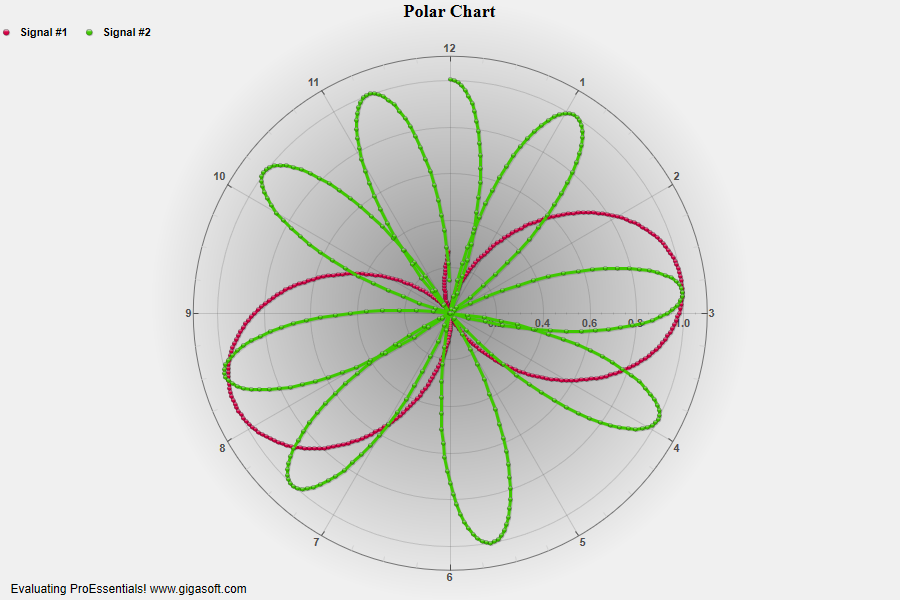
Example 201: Polar Chart showing custom polar grid
PepsoPolar Chart Objectbeginner
Custom polar grid
Form4.cs
1//! Note degree axis is hours on clock //2 3// This example builds upon the basic CreateSimplePolar '200' example chart //4CreateSimplePolar(Pepso1);5 6// Change the data for some variety //7for( int p = 0; p <= 359; p++)8{9 Pepso1.PeData.X[0, p] = p;10 Pepso1.PeData.Y[0, p] = (float)(Math.Sin(p * 0.019) * Math.Sin(p * 0.019));11}12 13//Set second subset's data //14for( int p = 0; p <= 359; p++)15{16 Pepso1.PeData.X[1, p] = p;17 Pepso1.PeData.Y[1, p] = (float)(Math.Cos(p * 0.074));18}19 20// Change zero degree to 12 o clock location //21Pepso1.PeGrid.Configure.ZeroDegreeOffset = 90;22 23// Set Manual Degree Line Frequencies //24Pepso1.PeGrid.Configure.ManualXAxisTicknLine = true;25Pepso1.PeGrid.Configure.ManualXAxisTick = 7.5;26Pepso1.PeGrid.Configure.ManualXAxisLine = 30;27 28// Change direction of increasing degrees //29Pepso1.PeGrid.Option.InvertedXAxis = true;30 31// Set Point Labels //'32Pepso1.PeString.PointLabels[0] = "12";33Pepso1.PeString.PointLabels[1] = "11";34Pepso1.PeString.PointLabels[2] = "10";35Pepso1.PeString.PointLabels[3] = "9";36Pepso1.PeString.PointLabels[4] = "8";37Pepso1.PeString.PointLabels[5] = "7";38Pepso1.PeString.PointLabels[6] = "6";39Pepso1.PeString.PointLabels[7] = "5";40Pepso1.PeString.PointLabels[8] = "4";41Pepso1.PeString.PointLabels[9] = "3";42Pepso1.PeString.PointLabels[10] = "2";43Pepso1.PeString.PointLabels[11] = "1";44 45// Set Various other features //46Pepso1.PeColor.BitmapGradientMode = true;47Pepso1.PeColor.QuickStyle = QuickStyle.MediumNoBorder;48Pepso1.PePlot.MarkDataPoints = true;49 50Pepso1.PeFunction.ReinitializeResetImage();51Pepso1.Invalidate();Tip: Uses property syntax like
Pego1.PeData.Y[s, p]Click underlined properties to view documentation