Example 200: Simple Polar Chart
PepsoPolar Chart Objectintermediate
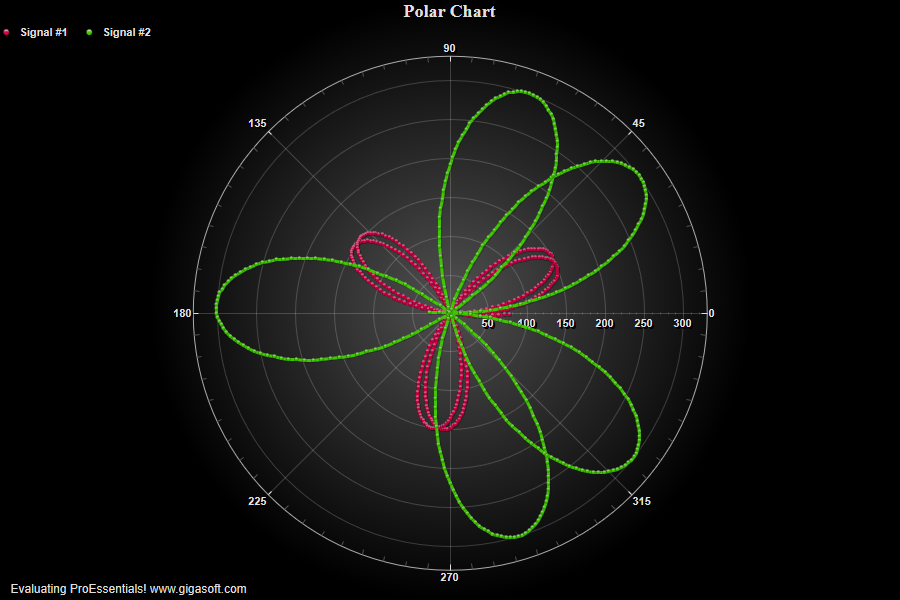
Simple Polar Chart
Form4.cs
1//! Right button click to show popup menu. //2//! Double Click to show customization dialog. //3//! Left-Click and drag to draw zoom box. Use popup memu or 'z' to undo zoom. //4 5// Simple example show the basics of a polar object. //6// Polar Graph's contain both YData and XData. //7 8// Define how much data in in chart ///9Pepso1.PeData.Subsets = 2;10Pepso1.PeData.Points = 360;11 12// Define how much data in in chart ///13for (int p = 0; p <= 359; p++)14{15 Pepso1.PeData.X[0, p] = p;16 Pepso1.PeData.Y[0, p] = (float)(150 * (Math.Sin(p * 0.054) * 1.0F));17}18 19// Set second subset's data //20for (int p = 0; p <= 359; p++)21{22 Pepso1.PeData.X[1, p] = p;23 Pepso1.PeData.Y[1, p] = (float)(150 * (Math.Sin(p * 0.044)) * 2.0F);24}25 26// Set plotting method, zooming, etc //27Pepso1.PePlot.Method = PSGraphPlottingMethod.PointsPlusLine;28Pepso1.PeUserInterface.Allow.Zooming = AllowZooming.HorzAndVert;29 30Pepso1.PeString.MainTitle = "Polar Chart";31Pepso1.PeString.SubTitle = "";32Pepso1.PeFont.SizeLegendCntl = 0.9F;33Pepso1.PeConfigure.PrepareImages = true;34Pepso1.PeConfigure.CacheBmp = true;35Pepso1.PeUserInterface.Allow.FocalRect = false;36 37// Set Subset line types //38Pepso1.PeLegend.SubsetLineTypes[0] = LineType.MediumSolid;39Pepso1.PeLegend.SubsetLineTypes[1] = LineType.MediumSolid;40 41// Set Subset colors //42Pepso1.PeColor.SubsetColors[0] = MainWindow.DemoColors[0];43Pepso1.PeColor.SubsetColors[1] = MainWindow.DemoColors[1];44 45// Set Subset point types //46Pepso1.PeLegend.SubsetPointTypes[0] = PointType.DotSolid;47Pepso1.PeLegend.SubsetPointTypes[1] = PointType.DotSolid;48 49// Set Subset labels //50Pepso1.PeString.SubsetLabels[0] = "Signal #1";51Pepso1.PeString.SubsetLabels[1] = "Signal #2";52 53// Change null data value so zeros are plotted //54Pepso1.PeData.NullDataValueX = -99999;55Pepso1.PeData.NullDataValue = -99999;56 57// Set Various other features //58Pepso1.PeFont.Fixed = true;59Pepso1.PeColor.BitmapGradientMode = true;60Pepso1.PeColor.QuickStyle = QuickStyle.DarkNoBorder;61Pepso1.PeLegend.SimplePoint = true;62Pepso1.PeLegend.SimpleLine = true;63Pepso1.PeLegend.Style = SimpleLegendStyle.OneLine;64Pepso1.PeUserInterface.Allow.ZoomStyle = ZoomStyle.Ro2Not;65Pepso1.PePlot.PointSize = PointSize.Small;66 67Pepso1.PeConfigure.TextShadows = TextShadows.BoldText;70Pepso1.PeFont.Label.Bold = true;71Pepso1.PePlot.Option.LineShadows = true;73Pepso1.PeFont.SizeGridNumberCntl = 1.2F;74Pepso1.PePlot.DataShadows = DataShadows.Shadows;75 76Pepso1.PePlot.Option.PointGradientStyle = PlotGradientStyle.VerticalAscentInverse;77Pepso1.PeColor.PointBorderColor = Color.FromArgb(100, 0, 0, 0);78Pepso1.PePlot.Option.LineSymbolThickness = 3;79 80Pepso1.PeConfigure.ImageAdjustBottom = 100;81 82// Set various export defaults //83Pepso1.PeSpecial.DpiX = 600;84Pepso1.PeSpecial.DpiY = 600;85 86// default export setting //87Pepso1.PeUserInterface.Dialog.ExportSizeDef = ExportSizeDef.NoSizeOrPixel;88Pepso1.PeUserInterface.Dialog.ExportTypeDef = ExportTypeDef.Png;89Pepso1.PeUserInterface.Dialog.ExportDestDef = ExportDestDef.Clipboard;90Pepso1.PeUserInterface.Dialog.ExportUnitXDef = "1280";91Pepso1.PeUserInterface.Dialog.ExportUnitYDef = "768";92Pepso1.PeUserInterface.Dialog.ExportImageDpi = 300;93 94Pepso1.PeConfigure.RenderEngine = RenderEngine.Direct2D;95Pepso1.PeConfigure.AntiAliasGraphics = true;96Pepso1.PeConfigure.AntiAliasText = true;97 98Pepso1.PeFunction.ReinitializeResetImage();99Pepso1.Invalidate();Tip: Uses property syntax like
Pego1.PeData.Y[s, p]Click underlined properties to view documentation