Example 132: Scientific Graph showing event based custom grid numbers
PesgoScientific Graph Objectadvanced
Event based custom grid numbers
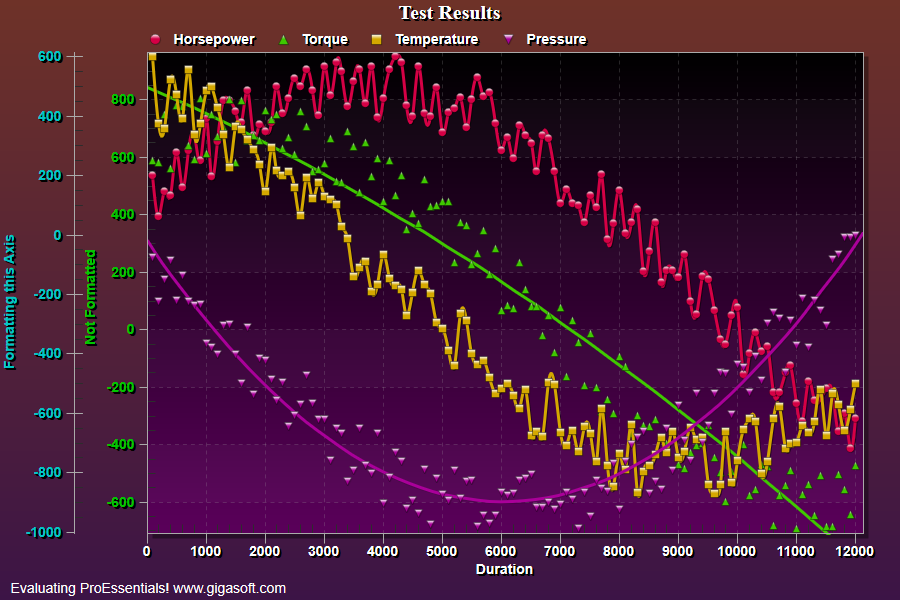
Form3.cs
1//! Example showing custom event based grid number formattimg //2//! An event gets triggered for each major grid line getting drawn. //3//! It gives the developer an opportunity to modify the string as needed. //4 5//! ProEssentials' image construction logic related to control-realestate utilization //6//! is quite complex. Don't be suprised if this event gets triggered more than //7//! once for each image per gridline because grid number space lies within our internal logic //8//! and is modified by this event, Zoom and scroll chart. //9 10//! HIGHLY RECOMMENDED: Do not debug this type of code with breakpoints, //11//! Use debug strings and monitor their output during image construction. //12//! This is generally good advice for all ProEssentials based code because //13//! a breakpoint may trigger a WM_PAINT and cause ProEssentials to rebuild //14//! its image. This is only related to placing breakpoints within a stretch //15//! of ProEssentials type code which could cause an image to be constructed //16//! prematurely before other inter-related properties are allowed to set. //17 18// This example builds upon the basic CreateSimpleSGraph '100' example chart //19CreateSimpleSGraph(Pesgo1);20 21Pesgo1.PeGrid.MultiAxesSubsets[0] = 2;22Pesgo1.PeGrid.MultiAxesSubsets[1] = 2;23Pesgo1.PeGrid.OverlapMultiAxes[0] = 2;24Pesgo1.PeUserInterface.Allow.MultiAxesSizing = true;25 26Pesgo1.PeGrid.WorkingAxis = 0;27Pesgo1.PeColor.YAxis = Color.FromArgb(255, 0, 198, 0);28Pesgo1.PePlot.Method = SGraphPlottingMethod.PointsPlusSpline;29Pesgo1.PePlot.MethodII = SGraphPlottingMethodII.PointsPlueBestFitCurve;30Pesgo1.PeString.YAxisLabel = "Not Formatted";31Pesgo1.PePlot.ComparisonSubsets = 1;32 33Pesgo1.PeGrid.WorkingAxis = 1;34Pesgo1.PeColor.YAxis = Color.FromArgb(255, 0, 198, 198);35Pesgo1.PePlot.Method = SGraphPlottingMethod.PointsPlusSpline;36Pesgo1.PePlot.MethodII = SGraphPlottingMethodII.PointsPlueBestFitCurve;37Pesgo1.PeString.YAxisLabel = "Formatting this Axis";38Pesgo1.PePlot.ComparisonSubsets = 1;39 40// Enable formatting events for second y axis because WorkingAxis is current 1 //41Pesgo1.PeGrid.Option.CustomGridNumbersY = true;42 43// Reset WorkingAxis to zero //44Pesgo1.PeGrid.WorkingAxis = 0;45 46// Set Various Other Properties //47Pesgo1.PeColor.BitmapGradientMode = true;48Pesgo1.PeColor.QuickStyle = QuickStyle.DarkInset;49Pesgo1.PeConfigure.BorderTypes = TABorder.DropShadow;50Pesgo1.PePlot.MarkDataPoints = true;51Pesgo1.PeUserInterface.Allow.Maximization = false;52Pesgo1.PeUserInterface.Scrollbar.ScrollingHorzZoom = true;53Pesgo1.PeUserInterface.Scrollbar.ScrollingVertZoom = true;54 55Pesgo1.PeColor.SubsetColors[0] = MainWindow.DemoColors[0];56Pesgo1.PeColor.SubsetColors[1] = MainWindow.DemoColors[1];57Pesgo1.PeColor.SubsetColors[2] = MainWindow.DemoColors[2];58Pesgo1.PeColor.SubsetColors[3] = MainWindow.DemoColors[3];59 60// Generally call ReinitializeResetImage at end **'61Pesgo1.PeFunction.ReinitializeResetImage();62Pesgo1.Invalidate();63// Optionally call Pesgo1.Refresh() if you are not seeing changes immediately64 65/*//////////////////////////////////////////////////////66// Example CustomGridNumbers event /////////////////////67////////////////////////////////////////////////////////68private void Pesgo1_PeCustomGridNumber(object sender, Gigasoft.ProEssentials.EventArg.CustomGridNumberEventArgs e)69{70 if(e.AxisType == 0)71 {72 // Left Y Axis //73 if(e.NumberValue == -400.0F)74 e.NumberString = "Low Value";75 else if(e.NumberValue == -200.0F)76 e.NumberString = "Medium Low Value";77 else if (e.NumberValue == 0.0F)78 e.NumberString = "Medium Value";79 else if (e.NumberValue == 200.0F)80 e.NumberString = "Medium High Value";81 else if (e.NumberValue == 400.0F)82 e.NumberString = "High Value"; }83 }84*/Tip: Uses property syntax like
Pego1.PeData.Y[s, p]Click underlined properties to view documentation