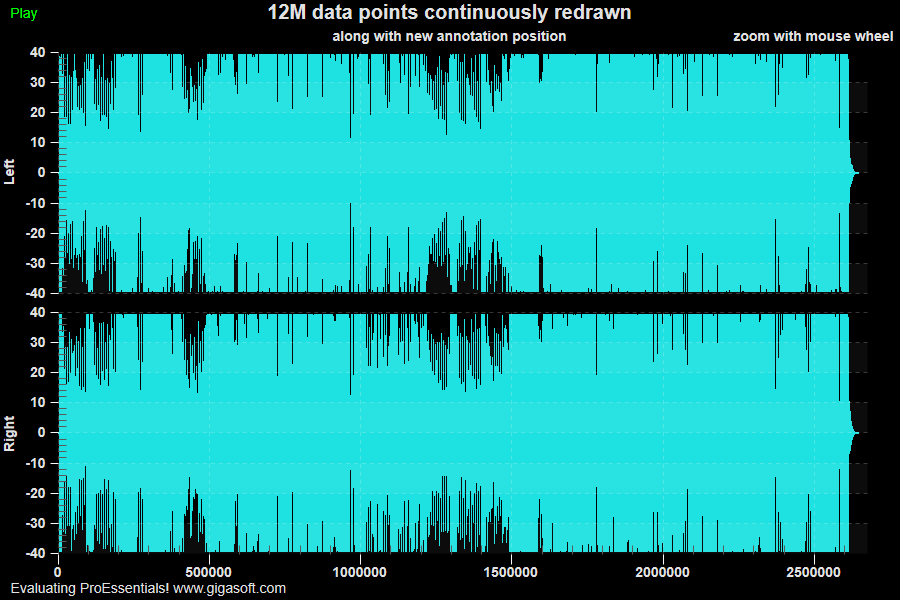
Example 123: Scientific Graph showing large quantity of data
PesgoScientific Graph Objectadvanced
Large quantity of data
Form3.cs
1//! Plotting 12,000,000 data values. //2 3// This example builds upon the basic CreateSimpleSGraph '100' example chart //4CreateSimpleSGraph(Pesgo1);5 6// Enable Bottom Zoom Window //7Pesgo1.PePlot.ZoomWindow.Show = true;8 9// Enable MouseWheelZooming and Mouse Zooming10Pesgo1.PeUserInterface.Scrollbar.MouseWheelFunction = Gigasoft.ProEssentials.Enums.MouseWheelFunction.HorizontalZoom;11Pesgo1.PeUserInterface.Allow.Zooming = AllowZooming.Horizontal;12 13// Enable middle mouse dragging //14Pesgo1.PeUserInterface.Scrollbar.MouseDraggingX = true;15Pesgo1.PeUserInterface.Scrollbar.ScrollingHorzZoom = true;16 17FileStream inStream = null;18WaveReader wr;19 20// v9.521if (MainWindow.tmpSongXData == null) // only read data if we hadn't already22{23 // Pardon the low quality 16000 sample wav; trying to keep the download small and wav playing code simple.24 // The MFC example PEDEMO plays the wav direct to sound system and is more real time.25 try26 {27 inStream = File.OpenRead("triumphantfeelingss.wav");28 }29 catch30 {31 System.Windows.Forms.MessageBox.Show("Demo File Not Found?", "Error", System.Windows.Forms.MessageBoxButtons.OK);32 System.Windows.Forms.Application.Exit();33 }34 35 wr = new WaveReader(inStream);36 inStream.Close();37 38 MainWindow.SongSize = wr.Frames;39 MainWindow.tmpSongYData = new float[MainWindow.SongSize * 2];40 MainWindow.tmpSongXData = new float[MainWindow.SongSize];41 42 for (int k = 0; k < MainWindow.SongSize; k++)43 {44 MainWindow.tmpSongXData[k] = k + 1;45 MainWindow.tmpSongYData[k] = (float)wr.Data[0][k] / 327.680F;46 MainWindow.tmpSongYData[k + MainWindow.SongSize] = (float)wr.Data[1][k] / 327.680F;47 }48}49 50Pesgo1.PeData.Subsets = 2;51Pesgo1.PeData.Points = MainWindow.SongSize;52 53// Send the address of the local data to be shared with ProEssentials54// Only one copy of the data exists and data is not transfered or copied.55// DuplicateDataX signals ProEssentials that only one Subsets worth of XData exists, use it for all Subsets.56Pesgo1.PeData.X.UseDataAtLocation(MainWindow.tmpSongXData, MainWindow.SongSize);57Pesgo1.PeData.Y.UseDataAtLocation(MainWindow.tmpSongYData, 2 * MainWindow.SongSize);58 59Pesgo1.PeData.DuplicateDataX = DuplicateData.PointIncrement;60 61Pesgo1.PeGrid.MultiAxesSubsets[0] = 1;62Pesgo1.PeGrid.MultiAxesSubsets[1] = 1;63 64Pesgo1.PePlot.Option.NullDataGaps = false;65Pesgo1.PeData.NullDataValue = -999;66 67Pesgo1.PePlot.Method = SGraphPlottingMethod.Line;68Pesgo1.PeUserInterface.Dialog.PlotCustomization = false;69 70Pesgo1.PeColor.SubsetColors[0] = Color.FromArgb(255, 30, 225, 225);71Pesgo1.PeColor.SubsetColors[1] = Color.FromArgb(255, 30, 225, 225);72 73Pesgo1.PeColor.SubsetShades[0] = Color.FromArgb(255, 128, 128, 128);74Pesgo1.PeColor.SubsetShades[1] = Color.FromArgb(255, 128, 128, 128);75 76Pesgo1.PeGrid.Configure.AutoMinMaxPadding = 1;77Pesgo1.PeData.AutoScaleData = false;78 79Pesgo1.PePlot.SubsetLineTypes[0] = LineType.ThinSolid;80Pesgo1.PePlot.SubsetLineTypes[1] = LineType.ThinSolid;81Pesgo1.PePlot.Option.LineShadows = false;82Pesgo1.PePlot.DataShadows = Gigasoft.ProEssentials.Enums.DataShadows.None;83 84Pesgo1.PeConfigure.RenderEngine = Gigasoft.ProEssentials.Enums.RenderEngine.Direct3D;85 86Pesgo1.PeColor.BitmapGradientMode = false;87Pesgo1.PeColor.QuickStyle = QuickStyle.DarkNoBorder;88 89Pesgo1.PeUserInterface.Cursor.HourGlassThreshold = 1000000000;90Pesgo1.PeUserInterface.Allow.ZoomStyle = ZoomStyle.Ro2Not;91Pesgo1.PeSpecial.AutoImageReset = false;92 93Pesgo1.PeAnnotation.Line.XAxisType[0] = Gigasoft.ProEssentials.Enums.LineAnnotationType.MediumThinSolid;94Pesgo1.PeAnnotation.Line.XAxisColor[0] = Color.FromArgb(255, 255, 0, 0);95Pesgo1.PeAnnotation.Line.XAxisZoomWindow[0] = Gigasoft.ProEssentials.Enums.AnnotationZoomWindow.GraphAndZoomWindow;96Pesgo1.PeAnnotation.Line.XAxisShow = true;97Pesgo1.PeAnnotation.Line.TextSize = 100;98Pesgo1.PeAnnotation.Show = true;99Pesgo1.PePlot.ZoomWindow.ShowAnnotations = true;100 101Pesgo1.PeString.SubsetLabels[0] = "Left";102Pesgo1.PeString.SubsetLabels[1] = "Right";103Pesgo1.PeLegend.Show = false;104 105Pesgo1.PeString.YAxisLabel = "Left";106Pesgo1.PeGrid.WorkingAxis = 1;107Pesgo1.PeString.YAxisLabel = "Right";108Pesgo1.PeGrid.WorkingAxis = 0;109 110Pesgo1.PeGrid.Option.ShowXAxis = ShowAxis.GridNumbers;111Pesgo1.PePlot.ZoomWindow.ShowXAxis = false;112 113Pesgo1.PeUserInterface.Menu.IncludeDataLabels = MenuControl.Hide;114Pesgo1.PeUserInterface.Menu.LegendLocation = MenuControl.Hide;115Pesgo1.PeUserInterface.Menu.MarkDataPoints = MenuControl.Hide;116Pesgo1.PeUserInterface.Menu.DataShadow = MenuControl.Hide;117Pesgo1.PeUserInterface.Menu.DataPrecision = MenuControl.Hide;118 119Pesgo1.PeUserInterface.Dialog.RandomPointsToExport = false;120Pesgo1.PeUserInterface.Allow.FocalRect = false;121Pesgo1.PePlot.Allow.Bar = false;122Pesgo1.PeUserInterface.Dialog.PlotCustomization = false;123Pesgo1.PeUserInterface.Allow.Popup = true;124Pesgo1.PeUserInterface.Dialog.Page2 = false;125Pesgo1.PeUserInterface.Dialog.Axis = false;126Pesgo1.PeUserInterface.Dialog.Subsets = false;127Pesgo1.PeUserInterface.Allow.TextExport = false;128Pesgo1.PeUserInterface.Dialog.AllowEmfExport = false;129Pesgo1.PeUserInterface.Dialog.AllowWmfExport = false;130 131Pesgo1.PeGrid.Option.CustomGridNumbersX = true;132 133Pesgo1.PeAnnotation.Show = true;134 135// Construct a simple table annotation //136Pesgo1.PeAnnotation.Table.Working = 0;137Pesgo1.PeAnnotation.Table.Rows = 1;138Pesgo1.PeAnnotation.Table.Columns = 1;139 140// Set to cell types and attributes //141Pesgo1.PeAnnotation.Table.Type[0, 1] = LegendAnnotationType.LargeSquareSolid;142 143if (MainWindow.bPlayingSong)144{145 Pesgo1.PeAnnotation.Table.Text[0, 0] = " Stop";146 Pesgo1.PeAnnotation.Table.Color[0, 0] = Color.FromArgb(255, 255, 0, 0);147}148else149{150 Pesgo1.PeAnnotation.Table.Text[0, 0] = " Play";151 Pesgo1.PeAnnotation.Table.Color[0, 0] = Color.FromArgb(255, 0, 255, 0);152}153 154Pesgo1.PeAnnotation.Table.HotSpot[0, 0] = true;155 156// Other Table Related Properties ///157Pesgo1.PeAnnotation.Table.Show = true;158Pesgo1.PeAnnotation.Table.Location = SGraphTALocation.InsidePixelUnits;159Pesgo1.PeAnnotation.Table.X = 10;160Pesgo1.PeAnnotation.Table.Y = 5;161Pesgo1.PeAnnotation.Table.BackColor = Color.FromArgb(0, 0, 0, 0);162Pesgo1.PeAnnotation.Table.HeaderRows = 0;163Pesgo1.PeAnnotation.Table.HeaderColumn = false;164Pesgo1.PeAnnotation.Table.Border = TABorder.NoBorder;165Pesgo1.PeAnnotation.Table.TextSize = 105;166 169Pesgo1.PeString.MainTitle = "|12M data points continuously redrawn|";170Pesgo1.PeString.SubTitle = "|along with new annotation position|zoom with mouse wheel";171 172Pesgo1.PeData.Filter2D = Filter2D.Fastest;173Pesgo1.PeSpecial.AutoImageReset = false;174 175// Improves performance by forcing Direct2D content into one layer,176// The full setting for both foreground and background layers is optional though for this and many177// implementations, this level of detail may not be necessary.178Pesgo1.PeConfigure.Composite2D3D = Composite2D3D.Foreground; // v9.5179 180Pesgo1.PeFunction.Force3dxNewColors = true;181Pesgo1.PeFunction.Force3dxVerticeRebuild = true;182 183// new v9 feature184Pesgo1.PeUserInterface.Cursor.TrackingCustomDataText = true;185Pesgo1.PeUserInterface.Cursor.PromptTracking = true;186Pesgo1.PeUserInterface.Cursor.PromptLocation = CursorPromptLocation.Text;187Pesgo1.PeUserInterface.Cursor.PromptStyle = CursorPromptStyle.XYValues;188 189Pesgo1.PeFunction.ReinitializeResetImage();190Pesgo1.Invalidate();191 192if (MainWindow.bPlayingSong)193 MainWindow.aTimer.Enabled = true;194else195 MainWindow.aTimer.Enabled = false;196 197 /*198 ////////////////////////////////////////////////////////////////////////////////////199 // Code for PeCustomTrackingDataText, Timer, PETableAnnotation PeCustomGridNumber //200 ////////////////////////////////////////////////////////////////////////////////////201 202 // PeCustomTrackingDataText //203 private void Pesgo1_PeCustomTrackingDataText(object sender, Gigasoft.ProEssentials.EventArg.CustomTrackingDataTextEventArgs e)204 {205double dX = Pesgo1.PeUserInterface.Cursor.CursorValueX;206 double dY = Pesgo1.PeUserInterface.Cursor.CursorValueY;207 208 double dMinutes, dSeconds, dRem;209 int nMin, nSec;210 dSeconds = (dX / 16000);211 dMinutes = dSeconds / 60.0F;212 nMin = (int) dMinutes;213 dRem = dSeconds - (60.0F * nMin);214 nSec = (int) dRem;215 string sTime = nMin.ToString();216 sTime += String.Format(":{0:0.000} ", dRem);217 string sAmp = String.Format("Amplitude: {0:0.000} \nTime:", dY);218 e.TrackingText = sAmp + sTime;219 }220 221 // Timer for example 123 to update play position with vert line annotation //222 static void aTimer_Tick(object sender, EventArgs e)223 {224 System.Windows.Application.Current.MainWindow.Dispatcher.Invoke(DispatcherPriority.Render, new NextPrimeDelegate(UpdateChart));225 }226 // Called via Invoke via aTimer_TickTimer, for example 123 updates play position with vert line annotation //227 static void UpdateChart()228 {229 double dPos = (MainWindow.Player.controls.currentPosition * 16000) + (16000 * (80 / 1000));230 sgo.PeAnnotation.Line.XAxis[0] = dPos;231 if (sgo.PeGrid.Zoom.Mode)232 {233 bool bChangeXView = false; // If play position passes current viewport, then potentially update viewport range to include play position234 if (dPos > sgo.PeGrid.Zoom.MaxX) { bChangeXView = true; }235 236 // Test Left Mouse Button not pressed, user may be dragging ZoomBox and it would be ugly to change scale while dragging chart //237 if (Mouse.LeftButton == MouseButtonState.Released)238 {240 241 if (dRange < 16000) // Range is less than 1 second242 {243 if (bChangeXView)244 {245 sgo.PeGrid.Zoom.MaxX = dPos;246 sgo.PeGrid.Zoom.MinX = dPos - dRange;247 }248 // Remove the normal x axis to replace with line annotation based custom x axis249 sgo.PeGrid.Option.ShowXAxis = Gigasoft.ProEssentials.Enums.ShowAxis.Empty;250 sgo.PeAnnotation.Line.XAxisType[0] = Gigasoft.ProEssentials.Enums.LineAnnotationType.NoLine;251 sgo.PeAnnotation.Line.XAxis[1] = dPos - dRange;252 sgo.PeAnnotation.Line.XAxisType[1] = Gigasoft.ProEssentials.Enums.LineAnnotationType.GridTick;253 sgo.PeAnnotation.Line.XAxisText[1] = "|h" + ((dPos - dRange) / 16000).ToString("F6");254 sgo.PeAnnotation.Line.XAxis[2] = dPos;255 sgo.PeAnnotation.Line.XAxisType[2] = Gigasoft.ProEssentials.Enums.LineAnnotationType.GridTick;256 sgo.PeAnnotation.Line.XAxisText[2] = "|h" + ((dPos) / 16000).ToString("F6");257 sgo.PeAnnotation.Line.BottomMargin = "XX"; // Add margin for special x axis via line annotations for less than 1 second display258 }259 else // Range is more than 1 second260 {261 if (bChangeXView)262 {263 sgo.PeGrid.Zoom.MaxX = dPos + dRange;264 sgo.PeGrid.Zoom.MinX = dPos;265 }266 // Show normal x axis, though its not totally normal as its a custom event based x axis267 sgo.PeGrid.Option.ShowXAxis = Gigasoft.ProEssentials.Enums.ShowAxis.All;268 sgo.PeAnnotation.Line.XAxis.Clear(1);269 sgo.PeAnnotation.Line.XAxisType.Clear(1);270 sgo.PeAnnotation.Line.XAxisText.Clear(1);271 sgo.PeAnnotation.Line.XAxisType[0] = Gigasoft.ProEssentials.Enums.LineAnnotationType.MediumThinSolid;272 sgo.PeAnnotation.Line.BottomMargin = ""; // Clear margin space for normal x axis273 }274 }275 }276 sgo.Invalidate();277 }278 279 static void Player_PlayStateChange(int NewState)280 {281 if ((WMPLib.WMPPlayState)NewState == WMPLib.WMPPlayState.wmppsPlaying)282 if ((WMPLib.WMPPlayState)NewState == WMPLib.WMPPlayState.wmppsPlaying)283 {284 sgo.PeAnnotation.Table.Text[0, 0] = " Stop";285 sgo.PeAnnotation.Table.Color[0, 0] = Color.FromArgb(255, 255, 0, 0);286 MainWindow.bPlayingSong = true;287 if (sgo.IsDxAvailable)288 {289 MainWindow.aTimer.Start();290 sgo.PeUserInterface.Allow.Zooming = AllowZooming.None;291 // note, mouse wheel zooming is still available, only click and drag zoom is set to none292 }293 }294 295 if ((WMPLib.WMPPlayState)NewState == WMPLib.WMPPlayState.wmppsStopped)296 {297 MainWindow.aTimer.Stop();298 sgo.PeAnnotation.Table.Text[0, 0] = " Play";299 sgo.PeAnnotation.Table.Color[0, 0] = Color.FromArgb(255, 0, 255, 0);300 sgo.PeUserInterface.Allow.Zooming = AllowZooming.Horizontal;301 MainWindow.bPlayingSong = false;302 sgo.Invalidate();303 }304 }305 306 void Pesgo1_PeCustomGridNumber(object sender, Gigasoft.ProEssentials.EventArg.CustomGridNumberEventArgs e)307 {308 if (e.AxisType == 2 && m_nChart == 123) // x axis309 {310 double dMinutes, dSeconds, dRem;311 int nMin;312 dSeconds = (e.NumberValue / 16000);313 dMinutes = dSeconds / 60.0F;314 nMin = (int)dMinutes;315 dRem = dSeconds - (60.0F * nMin);316 string s = nMin.ToString() + ":";317 string sRem = dRem.ToString("F3");318 s += sRem;319 e.NumberString = s;320 }321 }322 323 */Tip: Uses property syntax like
Pego1.PeData.Y[s, p]Click underlined properties to view documentation