Example 020: Graph showing Real-Time PEpartialresetimage
PegoGraph Objectadvanced
Real-Time PEpartialresetimage
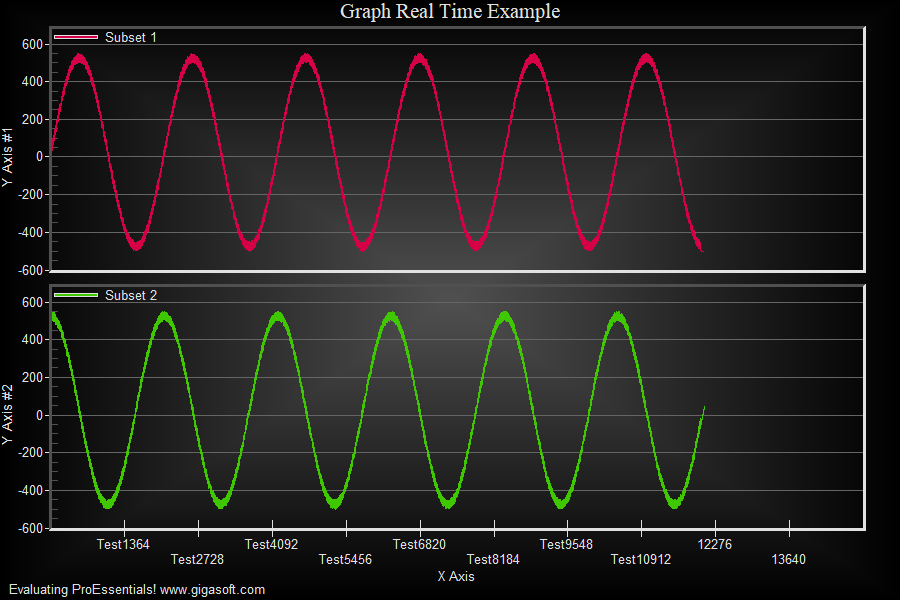
Form2.cs
1//! Rarely needed but can help when application needs many charts, each with many points, all updating.2 3// No Flicker //4Pego1.PeConfigure.PrepareImages = true;5Pego1.PeConfigure.CacheBmp = true; //! Important for PartialResetImage to work.6 7Pego1.PeSpecial.AutoImageReset = false; //! Also important for this type of real-time8Pego1.PeData.SpeedBoost = 0;9Pego1.PeUserInterface.Cursor.HourGlassThreshold = 40000;10 11// Set Subsets and Points //12Pego1.PeData.Subsets = 2;13Pego1.PeData.Points = 15000;14 15// Pass 80% of the data, first one subset, then next subset //16float[] MyYData = new float[12000];17int p;18 19for(p=0; p<12000; p++)20 MyYData[p] = (float)((System.Math.Sin(0.003 * p) * 500.0) + ((Rand_Num.NextDouble()) * 50));21 22// Perform the transfer of data, first subset //23Pego1.PeData.Y.FastCopyFrom(MyYData, 0, 12000);24 25Random New_Rand = new Random(unchecked((int)DateTime.Now.Ticks));26for(p=0; p<12000; p++ )27 MyYData[p] = (float)((System.Math.Cos(0.003 * p) * 500.0) + ((float)(New_Rand.NextDouble()) * 50));28 29// Perform the transfer of data, second subset //30Pego1.PeData.Y.FastCopyFrom(MyYData, 1, 12000);31// for comparison this is same as calling Api.PEvsetEx(Pego1.PeSpecial.HObject, DllProperties.YData, 15000, 12000, MyYData, ref dat);32 33// Setting last point label first allocates memory and speeds up subsequent logic //'34Pego1.PeString.PointLabels[11999] = " ";35 36for(p=0; p<12000; p++)37 Pego1.PeString.PointLabels[p] = "Test" + System.Convert.ToString(p + 1);38 39// Set up two axes, just because it's easy ///40Pego1.PeGrid.MultiAxesSubsets[0] = 1;41Pego1.PeGrid.MultiAxesSubsets[1] = 1;42Pego1.PeGrid.Option.MultiAxisStyle = MultiAxisStyle.SeparateAxes;43 44// Manually configure top scale scale //45Pego1.PeGrid.WorkingAxis = 0;46Pego1.PeGrid.Configure.ManualScaleControlY = ManualScaleControl.MinMax;47Pego1.PeGrid.Configure.ManualMinY = -600;48Pego1.PeGrid.Configure.ManualMaxY = 600;49 50// Manually configure bottom scale scale //51Pego1.PeGrid.WorkingAxis = 1;52Pego1.PeGrid.Configure.ManualScaleControlY = ManualScaleControl.MinMax;53Pego1.PeGrid.Configure.ManualMinY = -600;54Pego1.PeGrid.Configure.ManualMaxY = 600;55 56// Real-Time related properties for Graph Objects //57Pego1.PeGrid.Configure.ManualMaxPointLabel = "Test XXXXXXX";58Pego1.PeGrid.Configure.ManualMaxDataString = "12345";59 60// Set Various Other Properties //61Pego1.PeString.MainTitle = "Graph Real Time Example";62Pego1.PeString.SubTitle = ""; // no subtitle63Pego1.PePlot.Method = GraphPlottingMethod.Line;64Pego1.PeUserInterface.Menu.PlotMethod = MenuControl.Hide;65Pego1.PeUserInterface.Dialog.PlotCustomization = false;66Pego1.PeUserInterface.Allow.FocalRect = false;67Pego1.PeData.Precision = DataPrecision.OneDecimal;68Pego1.PeFont.Fixed = true;70 71Pego1.PeLegend.SubsetLineTypes[0] = LineType.ThinSolid;72Pego1.PeLegend.SubsetLineTypes[1] = LineType.ThinSolid;73 74Pego1.PeUserInterface.Allow.Zooming = AllowZooming.HorzAndVert;75Pego1.PeUserInterface.Allow.ZoomStyle = ZoomStyle.Ro2Not;76 77Pego1.PeColor.BitmapGradientMode = true;78Pego1.PeColor.QuickStyle = QuickStyle.DarkNoBorder;79 80Pego1.PeColor.SubsetColors[0] = MainWindow.DemoColors[0];81Pego1.PeColor.SubsetColors[1] = MainWindow.DemoColors[1];82 83Pego1.PeLegend.Style = LegendStyle.OneLineInsideAxis;84Pego1.PeGrid.LineControl = GridLineControl.YAxis;85Pego1.PeUserInterface.Allow.MultiAxesSizing = true;86Pego1.PeConfigure.BorderTypes = TABorder.Inset;87Pego1.PeUserInterface.Allow.ZoomStyle = ZoomStyle.FramedRect;88 89// Set various export defaults //90Pego1.PeSpecial.DpiX = 600;91Pego1.PeSpecial.DpiY = 600;92 93// default export setting //94Pego1.PeUserInterface.Dialog.ExportSizeDef = ExportSizeDef.NoSizeOrPixel;95Pego1.PeUserInterface.Dialog.ExportTypeDef = ExportTypeDef.Png;96Pego1.PeUserInterface.Dialog.ExportDestDef = ExportDestDef.Clipboard;97Pego1.PeUserInterface.Dialog.ExportUnitXDef = "1280";98Pego1.PeUserInterface.Dialog.ExportUnitYDef = "768";99Pego1.PeUserInterface.Dialog.ExportImageDpi = 300;100Pego1.PeUserInterface.Dialog.AllowEmfExport = false;101Pego1.PeUserInterface.Dialog.AllowWmfExport = false;102 103Pego1.PeFunction.ReinitializeResetImage();104Pego1.Invalidate();105Pego1.Refresh();106// Optionally call Pego1.Refresh() if you are not seeing changes immediately107 108MainWindow.m_nRealTimeCounter = 12000;109MainWindow.m_nSinCounter = 12000;110 111MainWindow.Timer1.Interval = 50;112MainWindow.Timer1.Start();113 114/*///////////////////////////////////////////////////////115// the following code can be found in the Timer Event //116////////////////////////////////////////////////////////117 118private void Timer1_Tick(object sender, System.EventArgs e)119{120 // Graph Real Time Feed using PEpartialresetimage //121 122 if( m_nRealTimeCounter >= 15000)123 {124 // When we reach the end of our data, we shift 20% to the125 // left and make room for another 3000 quick updates.126 float[] dat = new float[6000];127 Pego1.PeString.PointLabels.AppendData(3000); // only shift128 Pego1.PeData.Y.AppendData(dat, 3000); // appends 3000 pt per subset with zero, the default nulldatavalue129 130 // We need to perform a complete image update here.131 Pego1.PeFunction.ResetImage(0, 0);132 Pego1.Invalidate();133 Pego1.Update();134 135 m_nRealTimeCounter = 12000;136 }137 138 // First Subset //139 Pego1.PeData.Y[0, m_nRealTimeCounter] = (float)((System.Math.Sin(0.003 * m_nSinCounter) * 500.0));140 141 // Second Subset //142 Pego1.PeData.Y[1, m_nRealTimeCounter] = (float)((System.Math.Cos(0.003 * m_nSinCounter) * 500.0));143 144 // Set an example string associated with data //145 Pego1.PeString.PointLabels[m_nRealTimeCounter] = "Test" + System.Convert.ToString(m_nSinCounter);146 147 // This call performs a quick partial draw to an internal cached bmp //'148 Pego1.PeFunction.PartialResetImage(m_nRealTimeCounter, 1);149 150 // For comparison purposes, you can uncomment the line below //151 // Calling PEresetimage with each timer event causes CPU usage to go to 100%152 // PEpartialresetimage allows the same visual output while using 2% or less of the CPU153 //--- Pego1.PeFunction.ResetImage(0, 0)154 155 Pego1.Invalidate(rc);156 157 m_nRealTimeCounter = m_nRealTimeCounter + 1;158 m_nSinCounter = m_nSinCounter + 1;159}160*/Tip: Uses property syntax like
Pego1.PeData.Y[s, p]Click underlined properties to view documentation