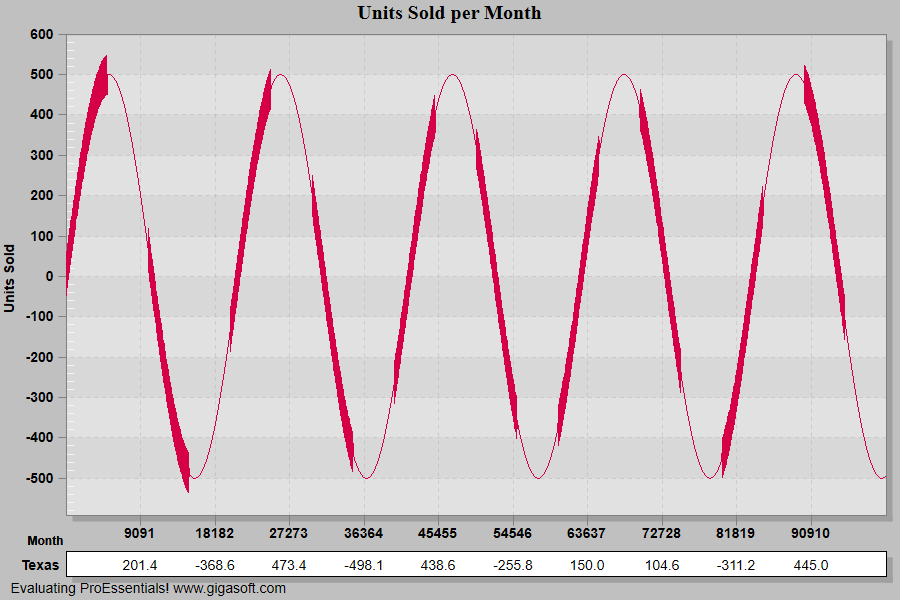
Example 019: Graph showing large quantity of data
PegoGraph Objectintermediate
Large quantity of data
Form2.cs
1// This example builds upon the basic CreateSimpleGraph '000' example chart //2CreateSimpleGraph(Pego1);3 4// Enable Manipulation and Mouse Wheel Zoom Smoothing //5Pego1.PeUserInterface.Scrollbar.MouseWheelZoomSmoothness = 5;6Pego1.PeUserInterface.Scrollbar.PinchZoomSmoothness = 2;7 8Pego1.PeUserInterface.Scrollbar.MouseWheelZoomFactor = 1.2f;9Pego1.PeUserInterface.Scrollbar.PinchZoomFactor = 1.1F;10 11// Enable MouseWheel Zooming12Pego1.PeUserInterface.Scrollbar.MouseWheelFunction = MouseWheelFunction.HorizontalZoom;13 14// Disable some features not ideal for larger data sets.15Pego1.PePlot.Option.PointGradientStyle = PlotGradientStyle.NoGradient;16Pego1.PeColor.PointBorderColor = Color.FromArgb(0, 0, 0, 0);17Pego1.PePlot.Option.LineSymbolThickness = 0;18 19// Enable ZoomWindow '20Pego1.PePlot.ZoomWindow.Show = true;21 22// pass the data, this time with FastCopyFrom call //23Pego1.PeData.Subsets = 1;24Pego1.PeData.Points = 100000;25 26// Prepare data in temp array, make sure it is Single (4 byte floats) **'27float[] MyYData = new float[100000];28int j, k;29for(j = 0; j < 100000; j++)30 MyYData[j] = (float)(System.Math.Sin(0.0003 * j) * 500.0);31 32// Change some of the data so we can see some //'33// variations in data //'34for(j = 0; j < 100000; j+=10000)35{36 for(k = 0; k <= 5000; k++)37 MyYData[j + k] = MyYData[j + k] - 50 + ((float)(Rand_Num.NextDouble()) * 100);38}39 40// Perform the transfer of data //'41Pego1.PeData.Y.FastCopyFrom(MyYData);42 43// This empties PointLabels array and invokes virtual point labels //'44// which are the point number.45Pego1.PeString.PointLabels[-1] = "0";46 47// Set plotting method to line and allow zooming //'48Pego1.PePlot.Method = GraphPlottingMethod.Line;49Pego1.PeUserInterface.Allow.Zooming = AllowZooming.Horizontal;50Pego1.PeUserInterface.Dialog.PlotCustomization = false;51 52// This allows plotting of zero values //'53Pego1.PeData.NullDataValue = -99999;54 55Pego1.PeLegend.SubsetLineTypes[0] = LineType.ThinSolid;56 57Pego1.PePlot.MarkDataPoints = false;58 59Pego1.PeColor.BitmapGradientMode = false;60Pego1.PeColor.QuickStyle = QuickStyle.LightShadow;61Pego1.PePlot.DataShadows = DataShadows.None;62Pego1.PeUserInterface.Dialog.AllowEmfExport = false;63Pego1.PeUserInterface.Dialog.AllowWmfExport = false;64 65Pego1.PeConfigure.RenderEngine = RenderEngine.Direct3D;66 67Pego1.PeFunction.ReinitializeResetImage();68Pego1.Invalidate();69// Optionally call Pego1.Refresh() if you are not seeing changes immediatelyTip: Uses property syntax like
Pego1.PeData.Y[s, p]Click underlined properties to view documentation