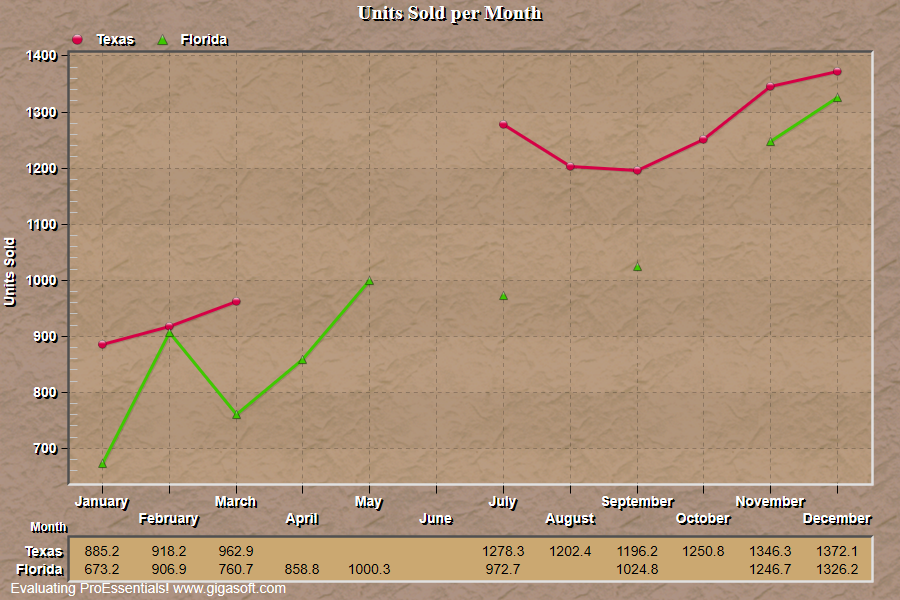
Example 006: Graph showing use of Null Data Gaps
PegoGraph Objectbeginner
Use of Null Data Gaps
Form2.cs
1// This example builds upon the basic CreateSimpleGraph '000' example chart //2CreateSimpleGraph(Pego1);3 4// Change Null Data Value //5// Note that Scientific Graph has NullDataValueX and NullDataValueY //6Pego1.PeData.NullDataValue = -9999.0;7 8// Change to two subsets and set a few data points to nulls //9Pego1.PeData.Subsets = 2;10 11Pego1.PeData.Y[0, 3] = -9999;12Pego1.PeData.Y[0, 4] = -9999;13Pego1.PeData.Y[0, 5] = -9999;14 15Pego1.PeData.Y[1, 5] = -9999; //! Note that (1,6) and (1,8) are valid points16Pego1.PeData.Y[1, 7] = -9999; //! You will see symbols for these points because17Pego1.PeData.Y[1, 9] = -9999; //! they are surrounded by nulls.18 19// Set line Plotting Method //20Pego1.PePlot.Method = GraphPlottingMethod.PointsPlusLine;21 22// Enable Null Data Gaps //23// Using NullDataGaps, the subset's line will stop before null data values //24// If this line is commented out, then line will extend to next non-null //25Pego1.PePlot.Option.NullDataGaps = true;26 27// Other various properties //28Pego1.PeColor.BitmapGradientMode = true;29Pego1.PeColor.QuickStyle = QuickStyle.MediumInset;30Pego1.PePlot.MarkDataPoints = true;31 32// Generally call ReinitializeResetImage at end **'33Pego1.PeFunction.ReinitializeResetImage();34Pego1.Invalidate();35// Optionally call Pego1.Refresh() if you are not seeing changes immediatelyTip: Uses property syntax like
Pego1.PeData.Y[s, p]Click underlined properties to view documentation