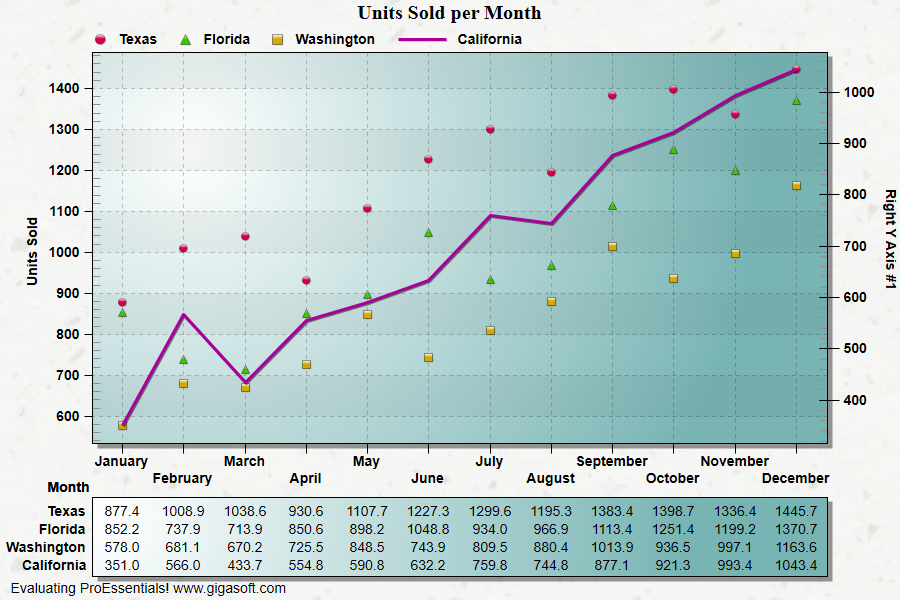
Example 007: Graph showing use of PEconvpixeltograph
PegoGraph Objectadvanced
Use of PEconvpixeltograph
Form2.cs
1//! Look at TitleBar for the chart's window. As you2//! move the mouse, you will see the coordinates of the3//! mouse in the titlebar.4 5//! Right button click to show popup menu. //6//! Double Click to show customization dialog. //7 8// This example builds upon the basic CreateSimpleGraph '000' example chart //9CreateSimpleGraph(Pego1);10 11// Other various properties //12Pego1.PeColor.BitmapGradientMode = true;13Pego1.PeColor.QuickStyle = QuickStyle.LightShadow;14Pego1.PePlot.MarkDataPoints = false;15 16Pego1.PePlot.Method = GraphPlottingMethod.Point;17 18// Set last 1 subset to right y axis19Pego1.PePlot.RYAxisComparisonSubsets = 1;20Pego1.PePlot.MethodII = GraphPlottingMethodII.Line;21 22// Set cursor related properties23// v9 feature24Pego1.PeUserInterface.Cursor.PromptLocation = CursorPromptLocation.ToolTip;25Pego1.PeUserInterface.Cursor.PromptStyle = CursorPromptStyle.XYValues;26Pego1.PeUserInterface.Cursor.TrackingCustomDataText = true;27Pego1.PeUserInterface.Cursor.Mode = CursorMode.DataCross;28 29// This will allow you to move cursor by clicking data point //30Pego1.PeUserInterface.Cursor.MouseCursorControl = true;31Pego1.PeUserInterface.HotSpot.Data = true;32 33// No need to click data point, click close to the data point //34// v9 feature35Pego1.PeUserInterface.Cursor.MouseCursorControlClosestPoint = true;36 37Pego1.PeUserInterface.Cursor.TrackingTooltipMaxWidth = 250;38 39// Generally call ReinitializeResetImage at end **'40Pego1.PeFunction.ReinitializeResetImage();41Pego1.Invalidate();42// Optionally call Pego1.Refresh() if you are not seeing changes immediately43 44/*////////////////////////////////////////45// From MouseMove event of Pego control //46//////////////////////////////////////////47 48private void Pego1_MouseMove(object sender, System.Windows.Forms.MouseEventArgs e)49{50 Double fX = 0;51 Double fY = 0;52 int nA, nX, nY;53 54 // get last mouse location within control //'55 System.Drawing.Point pt = Pego1.PeUserInterface.Cursor.LastMouseMove;56 57 // test to see if this is within grid area //'58 System.Drawing.Rectangle rect = Pego1.PeFunction.GetRectGraph();59 60 if (rect.Contains(pt))61 {62 nA = 0; // Initialize axis if using OverlapMultiAxes, else this function will63 // return the axis if MultiAxesSubsets is used without OverlapMultiAxes64 nX = pt.X; // Initialize nX and nY with mouse location65 nY = pt.Y;66 Pego1.PeFunction.ConvPixelToGraph(ref nA, ref nX, ref nY, ref fX, ref fY, false, false, false);67 this.Title = fX.ToString() + " - " + fY.ToString();68 }69 else70 this.Title = "Outside Grid";71 }72}73 74private void Pego1_PeCustomTrackingDataText(object sender, Gigasoft.ProEssentials.EventArg.CustomTrackingDataTextEventArgs e)75{76 if (Pego1.PeUserInterface.Cursor.TrackingPromptTrigger == TrackingTrigger.MouseMove)77 {78 Double fX = 0, fY = 0, fRY = 0;79 int nA, nX, nY;80 81 // get last mouse location within control //'82 System.Drawing.Point pt = Pego1.PeUserInterface.Cursor.LastMouseMove;83 84 // test to see if this is within grid area //'85 System.Drawing.Rectangle rect = Pego1.PeFunction.GetRectGraph();86 87 if (rect.Contains(pt))88 {89 nA = 0; // Initialize axis if using OverlapMultiAxes, else this function will90 // return the axis if MultiAxesSubsets is used without OverlapMultiAxes91 nX = pt.X; // Initialize nX and nY with mouse location92 nY = pt.Y;93 94 // read the left y axis value95 Pego1.PeFunction.ConvPixelToGraph(ref nA, ref nX, ref nY, ref fX, ref fY, false, false, false);96 97 // read the right y axis value98 Pego1.PeFunction.ConvPixelToGraph(ref nA, ref nX, ref nY, ref fX, ref fRY, true, false, false);99 100 string s;101 s = String.Format("Left Y <- {0:0.00} ", fY);102 s += String.Format("{0:0.00} -> Right Y", fRY);103 e.TrackingText = s;104 }105 }106 else107 {108 // Not a MouseMove, must be a CursorMove trigger109 float fY = Pego1.PeData.Y[Pego1.PeUserInterface.Cursor.Subset, Pego1.PeUserInterface.Cursor.Point];110 111 if (Pego1.PeUserInterface.Cursor.Subset < 3)112 e.TrackingText = String.Format("Left Y <- {0:0.00}", fY);113 else114 e.TrackingText = String.Format("{0:0.00} -> Right Y", fY);115 }116}117 118*/Tip: Uses property syntax like
Pego1.PeData.Y[s, p]Click underlined properties to view documentation