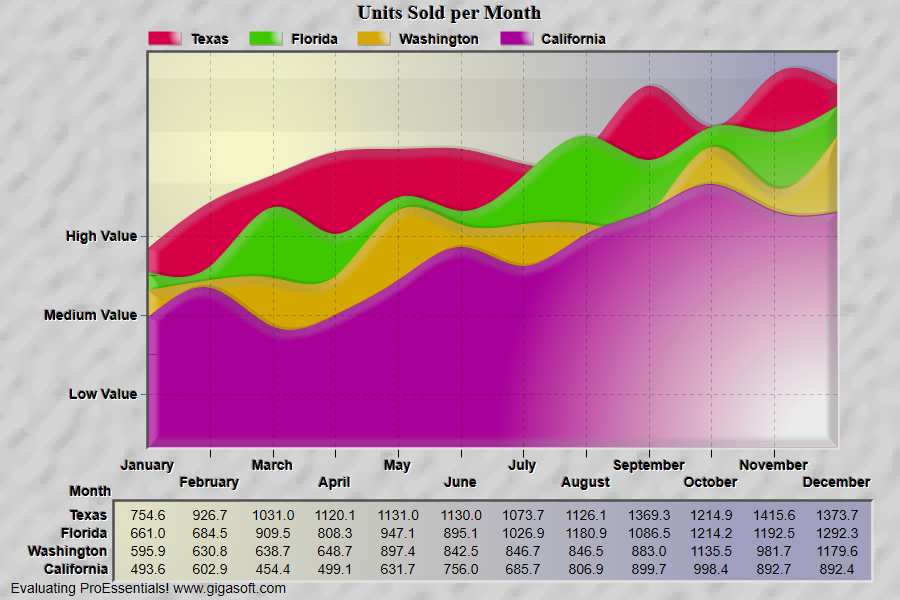
Example 005: Graph With Custom Y Axis
PegoGraph Objectintermediate
Custom Y Axis
Form2.cs
1// This example builds upon the basic CreateSimpleGraph '000' example chart //2CreateSimpleGraph(Pego1);3 4// Change to Spline Area //5Pego1.PePlot.Method = GraphPlottingMethod.SplineArea;6 7// Disable default scale //8Pego1.PeGrid.Option.ShowYAxis = ShowAxis.Empty;9 10// Generally, a custom y axis will need manual range control //11Pego1.PeGrid.Configure.ManualScaleControlY = ManualScaleControl.MinMax;12Pego1.PeGrid.Configure.ManualMinY = 0.0;13Pego1.PeGrid.Configure.ManualMaxY = 1500.0;14 15// Create custom grid lines with HorzLineAnnotations //16// Note that GridLineControl will control these annotations //17Pego1.PeAnnotation.Line.YAxis[0] = 200;18Pego1.PeAnnotation.Line.YAxisType[0] = LineAnnotationType.GridLine;19Pego1.PeAnnotation.Line.YAxisText[0] = "|LLow Value";20 21Pego1.PeAnnotation.Line.YAxis[1] = 500;22Pego1.PeAnnotation.Line.YAxisType[1] = LineAnnotationType.GridLine;23Pego1.PeAnnotation.Line.YAxisText[1] = "|LMedium Value";24 25Pego1.PeAnnotation.Line.YAxis[2] = 800;26Pego1.PeAnnotation.Line.YAxisType[2] = LineAnnotationType.GridLine;27Pego1.PeAnnotation.Line.YAxisText[2] = "|LHigh Value";28 29Pego1.PeAnnotation.Line.YAxis[3] = 350;30Pego1.PeAnnotation.Line.YAxisType[3] = LineAnnotationType.GridTick;31Pego1.PeAnnotation.Line.YAxisText[3] = "";32 33Pego1.PeAnnotation.Line.YAxis[4] = 650;34Pego1.PeAnnotation.Line.YAxisType[4] = LineAnnotationType.GridTick;35Pego1.PeAnnotation.Line.YAxisText[4] = "";36 37// Set LeftMargin to allocate space for line annotation text //38// Use the longest string used in annotations.39Pego1.PeAnnotation.Line.LeftMargin = "Medium Value ";40 41// Set this to see annotations //42Pego1.PeAnnotation.Show = true;43 44// Increase line annotation text size //45Pego1.PeFont.LineAnnotationTextSize = 100;46 47// Put Grid In Front of Bars //48Pego1.PeGrid.InFront = true;49 50// Other various properties //51Pego1.PeColor.BitmapGradientMode = true;52Pego1.PeColor.QuickStyle = QuickStyle.LightInset;53 54// Generally call ReinitializeResetImage at end **'55Pego1.PeFunction.ReinitializeResetImage();56Pego1.Invalidate();57// Optionally call Pego1.Refresh() if you are not seeing changes immediatelyTip: Uses property syntax like
Pego1.PeData.Y[s, p]Click underlined properties to view documentation