Example 002: Graph With Permanent and Scrolling Subsets
PegoGraph Objectintermediate
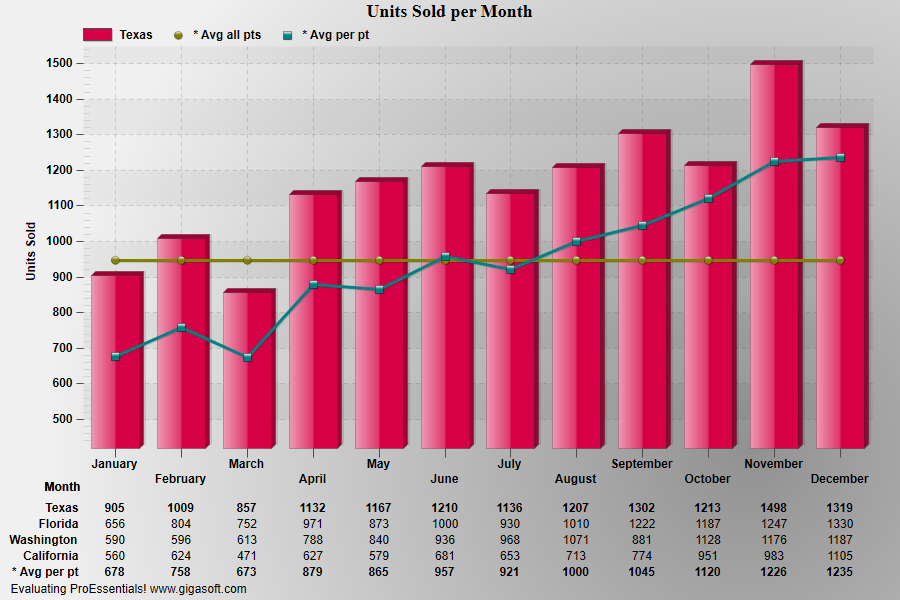
Permanent and Scrolling Subsets
Form2.cs
1//! Scroll vertical scroll bar to revolve subsets. //2//! Right button click to show popup menu. //3//! Double Click to show customization dialog. //4 5// This example builds upon the basic CreateSimpleGraph '000' example chart //6CreateSimpleGraph(Pego1);7 8// tells object to automatically generate statistical9// comparison subsets, the object will have10// 6 subsets when finished reinitializing.11Pego1.PePlot.AutoStatSubsets[0] = (int) Gigasoft.ProEssentials.Enums.AutoStatSubsets.AverageAllPoints; // This will be 5th subset12Pego1.PePlot.AutoStatSubsets[1] = (int) Gigasoft.ProEssentials.Enums.AutoStatSubsets.AveragePerPoint; // This will be 6th subset13 14// Since we are scrolling subsets one at a time,15// we can set the AverageAllPoints and AveragePerPoint subsets as16// permanent. This allows individual subsets to be17// compared to the averages of all points.18Pego1.PeData.RandomSubsetsToGraph[0] = 4; // zero based 5th subset, PEAS_AVGAP19Pego1.PeData.RandomSubsetsToGraph[1] = 5; // zero based 6th subset, PEAS_AVGPP20 21// If we comment this line out, you will only see the22// 5th and 6th subset selected above. RandomSubsetsToGraph23// will either control which subset you see or which24// subsets are permanent if ScrollingSubsets is non-zero.25Pego1.PeUserInterface.Scrollbar.ScrollingSubsets = 1; // Scroll one subset at a time26Pego1.PeTable.What = TableWhat.AllSubsets;27 28// Add a table //29Pego1.PeTable.Show = GraphPlusTable.Both;30Pego1.PeData.Precision = 0;32 33// Other various properties //34Pego1.PeColor.BitmapGradientMode = true;35Pego1.PeColor.QuickStyle = QuickStyle.MediumNoBorder;36Pego1.PeLegend.Style = LegendStyle.OneLineInsideAxis;37Pego1.PePlot.Method = GraphPlottingMethod.Bar;38Pego1.PePlot.MethodII = GraphPlottingMethodII.PointsPlusLine;39Pego1.PePlot.Option.BestFitDegree = BestFitDegree.Fourth;40Pego1.PePlot.MarkDataPoints = true;41Pego1.PeLegend.Style = LegendStyle.OneLine;42Pego1.PePlot.DataShadows = DataShadows.ThreeDimensional;43 44// Generally call ReinitializeResetImage at end **'45Pego1.PeFunction.ReinitializeResetImage();46Pego1.Invalidate();47// Optionally call Pego1.Refresh() if you are not seeing changes immediatelyTip: Uses property syntax like
Pego1.PeData.Y[s, p]Click underlined properties to view documentation