Example 001: Graph With Auto Statistical Subsets

PegoGraph Objectbeginner

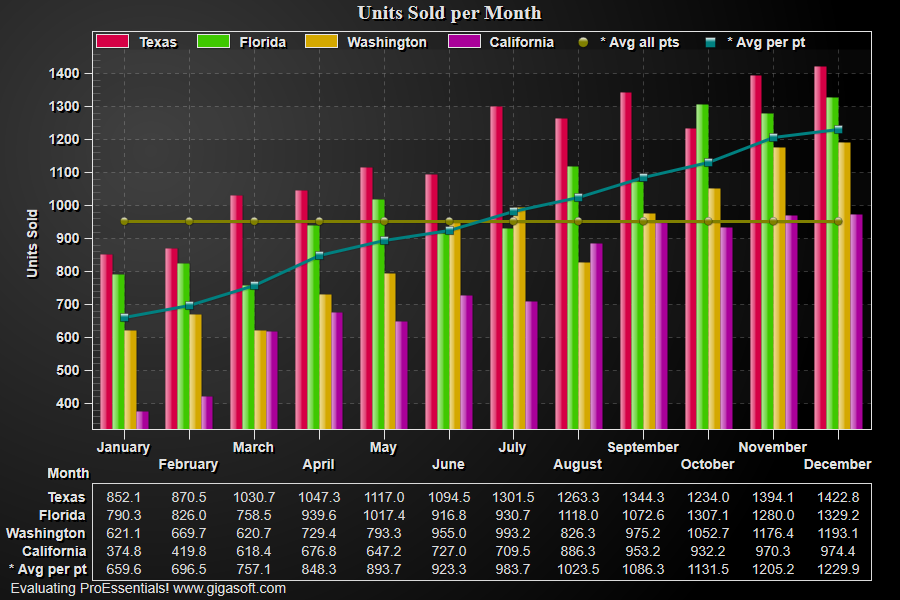
Auto Statistical Subsets

Preview

ProEssentials Pego Graph Object - Graph With Auto Statistical Subsets
Click to enlarge

Source Code

Form2.cs
1//! Right button click to show popup menu. //
2//! Double Click to show customization dialog. //
3
4// This example builds upon the basic CreateSimpleGraph '000' example chart //
5CreateSimpleGraph(Pego1);
6
7// Below tells object to automatically generate statistical
8// comparison subsets, object will have
9// 6 subsets when finished initializing.
10
11Pego1.PePlot.AutoStatSubsets[0] = (int) Gigasoft.ProEssentials.Enums.AutoStatSubsets.AverageAllPoints;
12Pego1.PePlot.AutoStatSubsets[1] = (int) Gigasoft.ProEssentials.Enums.AutoStatSubsets.AveragePerPoint;
13
14// Other various properties //
15Pego1.PeColor.BitmapGradientMode = true;
16Pego1.PeColor.QuickStyle = QuickStyle.DarkLine;
17Pego1.PeLegend.Style = LegendStyle.OneLineInsideAxis;
18Pego1.PePlot.Method = GraphPlottingMethod.Bar;
19Pego1.PePlot.MethodII = GraphPlottingMethodII.PointsPlusLine;
20Pego1.PePlot.MarkDataPoints = true;
21
22// Generally call ReinitializeResetImage at end **'
23Pego1.PeFunction.ReinitializeResetImage();
24Pego1.Invalidate();
25// Optionally call Pego1.Refresh() if you are not seeing changes immediately
Tip: Uses property syntax like Pego1.PeData.Y[s, p]Click underlined properties to view documentation