Example 000: Simple Graph
PegoGraph Objectintermediate
Simple Graph
Preview
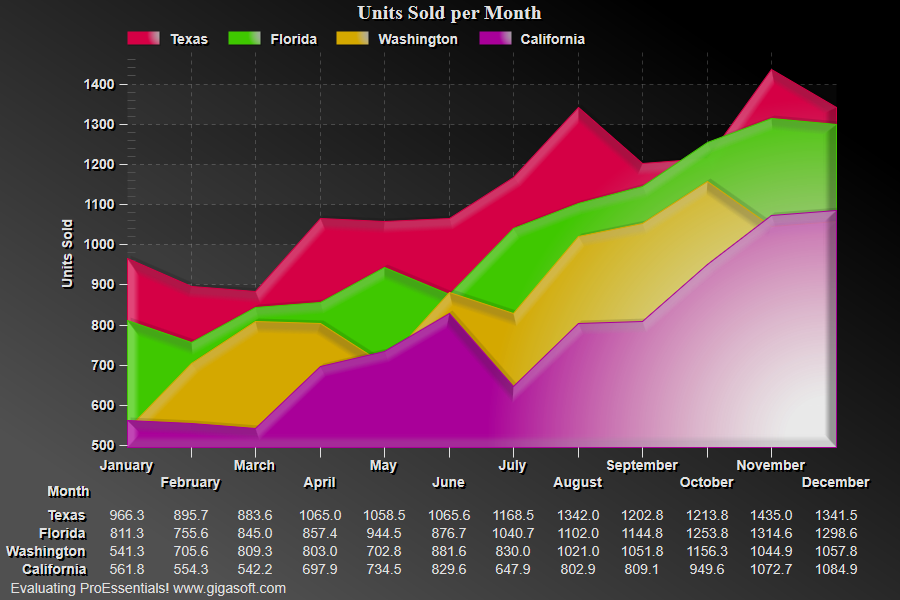
Click to enlarge
Source Code
Form2.cs
1//! Right button click to show popup menu. //2//! Double Click to show customization dialog. //3//! Left-Click and drag to draw zoom box. Use popup menu or 'z' to undo zoom. //4 5// Simple example show the basics of a graph object. //6// Graph's generally only contain YData because we assume7// data is plotted equally spaced left to right.8 9int s, p;10 11Pego1.PeUserInterface.Cursor.PromptTracking = true; // v9 uses a tool tip12 13// Enable Bar Glass Effect //14Pego1.PePlot.Option.BarGlassEffect = true;15 16// Enable Plotting style gradient and bevel features //17Pego1.PePlot.Option.AreaGradientStyle = PlotGradientStyle.RadialBottomRight;18Pego1.PePlot.Option.AreaBevelStyle = BevelStyle.MediumSmooth;19Pego1.PePlot.Option.SplineGradientStyle = PlotGradientStyle.RadialBottomRight;20Pego1.PePlot.Option.SplineBevelStyle = SplineBevelStyle.MediumSmooth;21 22Pego1.PePlot.Option.PointGradientStyle = PlotGradientStyle.VerticalAscentInverse;23Pego1.PeColor.PointBorderColor = Color.FromArgb(100, 0, 0, 0);24Pego1.PePlot.Option.LineSymbolThickness = 3;25Pego1.PePlot.Option.AreaBorder = 1;26 27// Prepare images in memory //28Pego1.PeConfigure.PrepareImages = true;29 30// Pass Data //31Pego1.PeData.Subsets = 4;32Pego1.PeData.Points = 12;33 34for(s = 0; s <= 3; s++)35{36 for(p = 0; p < 12; p++)37 {38 Pego1.PeData.Y[s, p] = ((p + 1) * 50) + ((float)(Rand_Num.NextDouble()) * 250) + 2 + 700.0F - ((s * 140.0F));39 }40}41 42Pego1.PePlot.DataShadows = DataShadows.Shadows;43Pego1.PeUserInterface.Allow.FocalRect = false;44Pego1.PePlot.Method = GraphPlottingMethod.Area;45Pego1.PeGrid.LineControl = GridLineControl.Both;47Pego1.PePlot.Allow.Ribbon = true;48Pego1.PeUserInterface.Allow.Zooming = AllowZooming.HorzAndVert;49Pego1.PeUserInterface.Allow.ZoomStyle = ZoomStyle.Ro2Not;50 51// Enable middle mouse dragging //52Pego1.PeUserInterface.Scrollbar.MouseDraggingX = true;53Pego1.PeUserInterface.Scrollbar.MouseDraggingY = true;54 55Pego1.PeString.MainTitle = "Units Sold per Month";56Pego1.PeString.SubTitle = "";57Pego1.PeString.YAxisLabel = "Units Sold";58Pego1.PeString.XAxisLabel = "Month";59 60// subset labels //61Pego1.PeString.SubsetLabels[0] = "Texas";62Pego1.PeString.SubsetLabels[1] = "Florida";63Pego1.PeString.SubsetLabels[2] = "Washington";64Pego1.PeString.SubsetLabels[3] = "California";65 66// point labels //67Pego1.PeString.PointLabels[0] = "January";68Pego1.PeString.PointLabels[1] = "February";69Pego1.PeString.PointLabels[2] = "March";70Pego1.PeString.PointLabels[3] = "April";71Pego1.PeString.PointLabels[4] = "May";72Pego1.PeString.PointLabels[5] = "June";73Pego1.PeString.PointLabels[6] = "July";74Pego1.PeString.PointLabels[7] = "August";75Pego1.PeString.PointLabels[8] = "September";76Pego1.PeString.PointLabels[9] = "October";77Pego1.PeString.PointLabels[10] = "November";78Pego1.PeString.PointLabels[11] = "December";79 80// subset colors //81Pego1.PeColor.SubsetColors[0] = MainWindow.DemoColors[0];82Pego1.PeColor.SubsetColors[1] = MainWindow.DemoColors[1];83Pego1.PeColor.SubsetColors[2] = MainWindow.DemoColors[2];84Pego1.PeColor.SubsetColors[3] = MainWindow.DemoColors[3];85 86// subset line types //87Pego1.PeLegend.SubsetLineTypes[0] = LineType.MediumSolid;88Pego1.PeLegend.SubsetLineTypes[1] = LineType.MediumSolid;89Pego1.PeLegend.SubsetLineTypes[2] = LineType.MediumSolid;90Pego1.PeLegend.SubsetLineTypes[3] = LineType.MediumSolid;91Pego1.PeLegend.SubsetLineTypes[4] = LineType.MediumSolid;92Pego1.PeLegend.SubsetLineTypes[5] = LineType.MediumSolid;93Pego1.PeLegend.SubsetLineTypes[6] = LineType.MediumSolid;94Pego1.PeLegend.SubsetLineTypes[7] = LineType.MediumSolid;95 96// subset point types //97Pego1.PeLegend.SubsetPointTypes[0] = PointType.DotSolid;98Pego1.PeLegend.SubsetPointTypes[1] = PointType.UpTriangleSolid;99Pego1.PeLegend.SubsetPointTypes[2] = PointType.SquareSolid;100Pego1.PeLegend.SubsetPointTypes[3] = PointType.DownTriangleSolid;101Pego1.PeLegend.SubsetPointTypes[4] = PointType.Dot;102Pego1.PeLegend.SubsetPointTypes[5] = PointType.UpTriangle;103Pego1.PeLegend.SubsetPointTypes[6] = PointType.Square;104Pego1.PeLegend.SubsetPointTypes[7] = PointType.DownTriangle;105 106Pego1.PeLegend.SimplePoint = true;107Pego1.PeLegend.SimpleLine = true;108Pego1.PeLegend.Style = LegendStyle.OneLine;109 110// Allow stacked type graphs //111Pego1.PePlot.Allow.StackedData = true;112 113// Various other features //114Pego1.PeFont.Fixed = true;115Pego1.PeColor.BitmapGradientMode = true;116Pego1.PeColor.QuickStyle = QuickStyle.DarkNoBorder;117 118Pego1.PePlot.Option.GradientBars = 8;119Pego1.PePlot.Option.LineShadows = true;122Pego1.PeFont.Label.Bold = true;123Pego1.PeConfigure.TextShadows = TextShadows.BoldText;125 126Pego1.PeData.Precision = DataPrecision.OneDecimal;127Pego1.PeTable.Show = GraphPlusTable.Both;128Pego1.PePlot.MarkDataPoints = false;129 130Pego1.PeConfigure.ImageAdjustLeft = 20;131Pego1.PeConfigure.ImageAdjustRight = 20;132Pego1.PeConfigure.ImageAdjustTop = 10;133 134// Set various export defaults //135Pego1.PeSpecial.DpiX = 600;136Pego1.PeSpecial.DpiY = 600;137 138// default export setting //139Pego1.PeUserInterface.Dialog.ExportSizeDef = ExportSizeDef.NoSizeOrPixel;140Pego1.PeUserInterface.Dialog.ExportTypeDef = ExportTypeDef.Png;141Pego1.PeUserInterface.Dialog.ExportDestDef = ExportDestDef.Clipboard;142Pego1.PeUserInterface.Dialog.ExportUnitXDef = "1280";143Pego1.PeUserInterface.Dialog.ExportUnitYDef = "768";144Pego1.PeUserInterface.Dialog.ExportImageDpi = 300;145 146 147 148Pego1.PeConfigure.RenderEngine = RenderEngine.Direct2D;149Pego1.PeConfigure.AntiAliasGraphics = true;150Pego1.PeConfigure.AntiAliasText = true;151 152Pego1.PeLegend.AllowLargerLegendWidth = 250; // v10 should default this to 200 or 250 to improve small charts153 154 155// Generally call ReinitializeResetImage at end **'156Pego1.PeFunction.ReinitializeResetImage();157Pego1.Invalidate();158// Optionally call Pego1.Refresh() if you are not seeing changes immediatelyTip: Uses property syntax like
Pego1.PeData.Y[s, p]Click underlined properties to view documentation