Example 300: Simple Pie Chart
PepcoPie Chart Objectintermediate
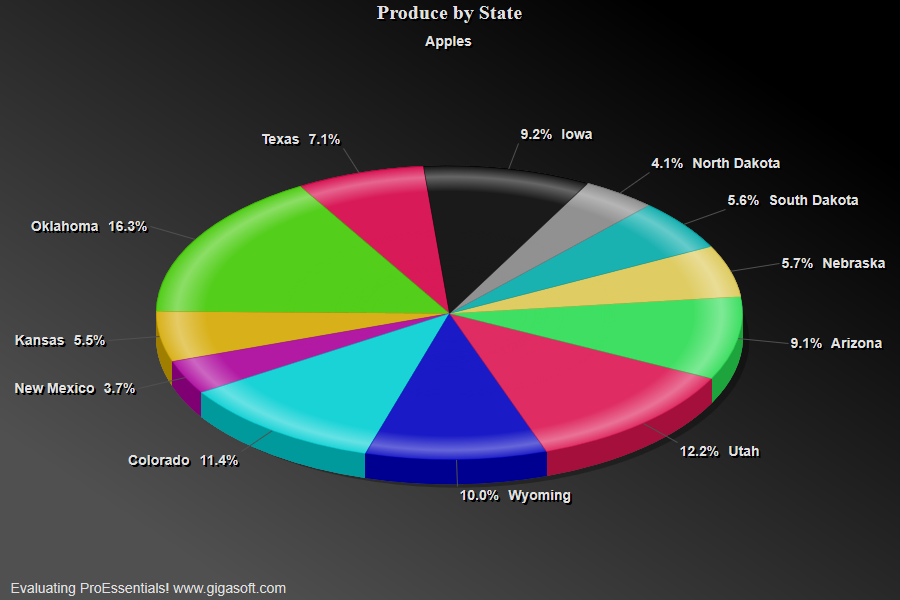
Simple Pie Chart
Form5.cs
1//! V7's Pie Chart control has been improved again. Size this control and use the vertical scrollbar to2//! quickly see multiple variations. Note we've added a zero data point for the first subset. This demonstrates3//! how ProEssentials automatically annotates zero slices and controls which slices are included in the "*Other"4//! slice grouping. Sizing to a small square stresses our text positioning logic that demonstrates three5//! algorithms attempting to prevent text from overlapping. There's no other pie chart on the market that6//! offers this attention to image detail.7 8//! Double click slice label to explode. //9//! Use vertical scrollbar to revolve through subsets. //10 11// Example showing a simple Pie Chart construction //12 13// Set how much data object will hold //14Pepco1.PeData.Subsets = 5;15Pepco1.PeData.Points = 12;16 17// Pass data for slices //18for(int s=0; s<=4; s++)19{20 for(int p=0; p<=11; p++)21 Pepco1.PeData.X[s, p] = (float) ((Rand_Num.NextDouble() * 5) + ((Rand_Num.NextDouble() * 100) / 100.0F));22}23 24// Set Subset labels //25Pepco1.PeString.SubsetLabels[0] = "Apples";26Pepco1.PeString.SubsetLabels[1] = "Oranges";27Pepco1.PeString.SubsetLabels[2] = "Pears";28Pepco1.PeString.SubsetLabels[3] = "Plums";29Pepco1.PeString.SubsetLabels[4] = "Peaches";30 31// Set Slice Labels //32Pepco1.PeString.PointLabels[0] = "Texas";33Pepco1.PeString.PointLabels[1] = "Oklahoma";34Pepco1.PeString.PointLabels[2] = "Kansas";35Pepco1.PeString.PointLabels[3] = "New Mexico";36Pepco1.PeString.PointLabels[4] = "Colorado";37Pepco1.PeString.PointLabels[5] = "Wyoming";38Pepco1.PeString.PointLabels[6] = "Utah";39Pepco1.PeString.PointLabels[7] = "Arizona";40Pepco1.PeString.PointLabels[8] = "Nebraska";41Pepco1.PeString.PointLabels[9] = "South Dakota";42Pepco1.PeString.PointLabels[10] = "North Dakota";43Pepco1.PeString.PointLabels[11] = "Iowa";44 45// Set Slice Colors //46Pepco1.PeColor.SubsetColors[0] = MainWindow.DemoColors[0];47Pepco1.PeColor.SubsetColors[1] = MainWindow.DemoColors[1];48Pepco1.PeColor.SubsetColors[2] = MainWindow.DemoColors[2];49Pepco1.PeColor.SubsetColors[3] = MainWindow.DemoColors[3];50Pepco1.PeColor.SubsetColors[4] = MainWindow.DemoColors[4];51Pepco1.PeColor.SubsetColors[5] = MainWindow.DemoColors[5];52Pepco1.PeColor.SubsetColors[6] = MainWindow.DemoColors[6];53Pepco1.PeColor.SubsetColors[7] = MainWindow.DemoColors[7];54Pepco1.PeColor.SubsetColors[8] = MainWindow.DemoColors[8];55Pepco1.PeColor.SubsetColors[9] = MainWindow.DemoColors[9];56Pepco1.PeColor.SubsetColors[10] = MainWindow.DemoColors[10];57Pepco1.PeColor.SubsetColors[11] = MainWindow.DemoColors[11];58Pepco1.PeColor.SubsetColors[12] = MainWindow.DemoColors[12];59 60// Set Titles //61Pepco1.PeString.MainTitle = "Produce by State";62Pepco1.PeString.SubTitle = "";63 64// Set various other properties //65Pepco1.PeUserInterface.Allow.FocalRect = false;66Pepco1.PeData.Precision = DataPrecision.OneDecimal;67Pepco1.PePlot.GroupingPercent = GroupingPercent.FourPercent;68Pepco1.PePlot.DataShadows = DataShadows.ThreeDimensional;69Pepco1.PePlot.Show3DShadow = true;70Pepco1.PeUserInterface.AutoExplode = AutoExplode.AllSubsets;71Pepco1.PeConfigure.PrepareImages = true;72Pepco1.PeConfigure.CacheBmp = true;74Pepco1.PeFont.Fixed = true;75 76Pepco1.PeColor.BitmapGradientMode = true;77Pepco1.PeColor.QuickStyle = QuickStyle.DarkNoBorder;78 79Pepco1.PeConfigure.TextShadows = TextShadows.BoldText;82Pepco1.PeFont.Label.Bold = true;83 84// default export setting //85Pepco1.PeUserInterface.Dialog.ExportSizeDef = ExportSizeDef.NoSizeOrPixel;86Pepco1.PeUserInterface.Dialog.ExportTypeDef = ExportTypeDef.Png;87Pepco1.PeUserInterface.Dialog.ExportDestDef = ExportDestDef.Clipboard;88Pepco1.PeUserInterface.Dialog.ExportUnitXDef = "1280";89Pepco1.PeUserInterface.Dialog.ExportUnitYDef = "768";90Pepco1.PeUserInterface.Dialog.ExportImageDpi = 300;91 92Pepco1.PeConfigure.RenderEngine = RenderEngine.Direct2D;93Pepco1.PeConfigure.AntiAliasGraphics = true;94Pepco1.PeConfigure.AntiAliasText = true;95 96Pepco1.PeFunction.ReinitializeResetImage();97Pepco1.Invalidate();Tip: Uses property syntax like
Pego1.PeData.Y[s, p]Click underlined properties to view documentation