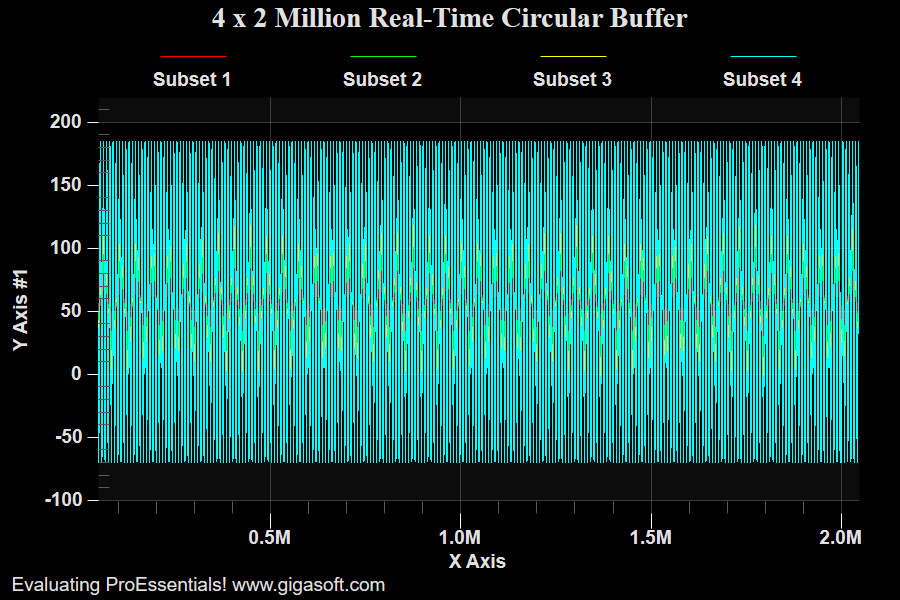
Example 145: Scientific Graph showing Real Time with Circular Buffers
PesgoScientific Graph Objectadvanced
Real Time with Circular Buffers
Form3.cs
1Pesgo1.PeData.Subsets = 4;2Pesgo1.PeData.Points = 2000000;3 4// MouseWheelZooming shows moving data, Example 146 MouseWheelZooming shows frozen data5 6// New v10 feature CircularBuffers // Only applies to Append type features.7// Most beneficial with larger data sets and using AppendYData AppendXData8// combined with ComputerShader construction with StagingBuffers.9// CircularBuffers avoid having to shift existing data when appending.10// ComputeShader rendering block copies data so there is no penalty in accessing data11// to build the chart.12Pesgo1.PeData.CircularBuffers = true;13 14// Prepare data to transfer to chart. See similar example 146 that uses local data by reference and does not copy the data.15 16Pesgo1.PeData.DuplicateDataX = DuplicateData.PointIncrement;17int nX = 1;18Pesgo1.PeData.X[0, 2000000 - 1] = 0; // set last point first pre allocates spoon feeding19for (int p = 0; p < 2000000; p++) // Spoon feed simple x data20{21 Pesgo1.PeData.X[0, p] = nX;22 nX++;23}24 25// quickly create 8 million random y data points, sin function is slow26float[] MySubData0 = new float[8400];27float[] MySubData1 = new float[8400];28float[] MySubData2 = new float[8400];29float[] MySubData3 = new float[8400];30for (int p = 0; p < 8400; p++)31{32 MySubData0[p] = (float)(50 + (Math.Sin(p * 0.00075) * (0 + 1) * 30) + (Rand_Num.NextDouble() * 15));33 MySubData1[p] = (float)(50 + (Math.Sin(p * 0.00075) * (1 + 1) * 30) + (Rand_Num.NextDouble() * 15));34 MySubData2[p] = (float)(50 + (Math.Sin(p * 0.00075) * (2 + 1) * 30) + (Rand_Num.NextDouble() * 15));35 MySubData3[p] = (float)(50 + (Math.Sin(p * 0.00075) * (3 + 1) * 30) + (Rand_Num.NextDouble() * 15));36}37float[] MyYData = new float[8000000];38for (int j = 0; j < 1991600; j += 8400)39 Array.Copy(MySubData0, 0, MyYData, j, 8400);40for (int j = 0; j < 1991600; j += 8400)41 Array.Copy(MySubData1, 0, MyYData, j + 2000000, 8400);42for (int j = 0; j < 1991600; j += 8400)43 Array.Copy(MySubData2, 0, MyYData, j + 4000000, 8400);44for (int j = 0; j < 1991600; j += 8400)45 Array.Copy(MySubData3, 0, MyYData, j + 6000000, 8400);46 47// Block transfer data to chart // CircularBuffer exists inside chart48Pesgo1.PeData.Y.FastCopyFrom(MyYData, 8000000);49// compare speed of example 145 to 146. 146 is faster. Likely because it's not copying memory but using app local memory.50 51// Set Manual Y scale // Avoiding cpu intensive searching for min max52Pesgo1.PeGrid.Configure.ManualScaleControlY = ManualScaleControl.MinMax;53Pesgo1.PeGrid.Configure.ManualMinY = -110;54Pesgo1.PeGrid.Configure.ManualMaxY = 220;55 56// Set Manual X scale // Avoiding cpu intensive searching for min max57Pesgo1.PeGrid.Configure.ManualScaleControlX = ManualScaleControl.MinMax;58Pesgo1.PeGrid.Configure.ManualMinX = 0;59Pesgo1.PeGrid.Configure.ManualMaxX = 2000000;60 61// Set Various Other Properties ///62Pesgo1.PeColor.BitmapGradientMode = false;63Pesgo1.PeColor.QuickStyle = QuickStyle.DarkNoBorder;64 65// Set various properties //66Pesgo1.PeString.MainTitle = "4 x 2 Million Real-Time Circular Buffer";67Pesgo1.PeString.SubTitle = "";68 69Pesgo1.PeConfigure.PrepareImages = true;70Pesgo1.PeConfigure.CacheBmp = true;71Pesgo1.PeFont.Fixed = true;72 73Pesgo1.PeColor.SubsetColors[0] = Color.FromArgb(255, 255, 0, 0);74Pesgo1.PeColor.SubsetColors[1] = Color.FromArgb(255, 0, 255, 0);75Pesgo1.PeColor.SubsetColors[2] = Color.FromArgb(255, 255, 255, 0);76Pesgo1.PeColor.SubsetColors[3] = Color.FromArgb(255, 0, 255, 255);77 78Pesgo1.PeConfigure.TextShadows = TextShadows.BoldText;81Pesgo1.PeFont.Label.Bold = true;83Pesgo1.PeFont.SizeGlobalCntl = 1.4F;84 85Pesgo1.PePlot.SubsetLineTypes[0] = LineType.ThinSolid;86Pesgo1.PePlot.SubsetLineTypes[1] = LineType.ThinSolid;87Pesgo1.PePlot.SubsetLineTypes[2] = LineType.ThinSolid;88Pesgo1.PePlot.SubsetLineTypes[3] = LineType.ThinSolid;89 90Pesgo1.PePlot.Method = SGraphPlottingMethod.Line;91Pesgo1.PePlot.DataShadows = DataShadows.None;92 93Pesgo1.PeGrid.Configure.AutoMinMaxPaddingX = 0;94Pesgo1.PeConfigure.ImageAdjustLeft = 50;95Pesgo1.PeConfigure.ImageAdjustRight = 0;96 97Pesgo1.PeLegend.SimpleLine = true;98 99Pesgo1.PeUserInterface.Dialog.PlotCustomization = false;100Pesgo1.PeUserInterface.Menu.MarkDataPoints = MenuControl.Hide;101Pesgo1.PeUserInterface.Dialog.Page2 = false;102Pesgo1.PeUserInterface.Allow.Popup = true;103Pesgo1.PeUserInterface.Dialog.Axis = false;104Pesgo1.PeUserInterface.Dialog.Subsets = true;105Pesgo1.PeUserInterface.Allow.TextExport = false;106Pesgo1.PeUserInterface.Dialog.AllowEmfExport = false;107Pesgo1.PeUserInterface.Dialog.AllowWmfExport = false;108Pesgo1.PeUserInterface.Menu.DataShadow = MenuControl.Hide;109 110Pesgo1.PeConfigure.RenderEngine = RenderEngine.Direct3D;111Pesgo1.PeConfigure.AntiAliasText = true;112Pesgo1.PeConfigure.AntiAliasGraphics = true;113 114// Allow MouseWheel Zooming //115Pesgo1.PeUserInterface.Scrollbar.ScrollingHorzZoom = true;116Pesgo1.PeUserInterface.Scrollbar.MouseWheelFunction = MouseWheelFunction.HorizontalZoom;117 118Pesgo1.PeData.StagingBufferX = true;119Pesgo1.PeData.StagingBufferY = true;120Pesgo1.PeData.ComputeShader = true;121Pesgo1.PeData.Filter2D3D = true;122 123Pesgo1.PeSpecial.AutoImageReset = false;124Pesgo1.PeUserInterface.Cursor.HourGlassThreshold = 99999999;125 126Pesgo1.PeFunction.Force3dxVerticeRebuild = true;127Pesgo1.PeFunction.ReinitializeResetImage();128 129// Initialize Counters and Timer //130MainWindow.m_nRealTimeCounter = 2000000;131MainWindow.m_nSinCounter = 2000000;132 133MainWindow.Timer1.Interval = 15;134MainWindow.Timer1.Start();135 136/*137/////////////////////////138// Example Timer Event //139/////////////////////////140private void Timer1_Tick(object sender, System.EventArgs e)141{142 int nNewSamplesPerSubsetsPerTick = 150;143 144 // New y value and x value //145 for (int s = 0; s < 4; s++)146 {147 for (int p = 0; p < nNewSamplesPerSubsetsPerTick; p++)148 {149 pNewY145[(s * nNewSamplesPerSubsetsPerTick) + p] = (float)(50 + (Math.Sin((m_nSinCounter + p) * 0.00075) * (s + 1) * 30) + (Rand_Num.NextDouble() * 15));150 }151 }152 for (int p = 0; p < nNewSamplesPerSubsetsPerTick; p++)153 {154 pNewX145[p] = m_nRealTimeCounter + p + 1;155 }156 157 // Append new values //158 Pesgo1.PeData.Y.AppendData(pNewY145, nNewSamplesPerSubsetsPerTick);159 Pesgo1.PeData.X.AppendData(pNewX145, nNewSamplesPerSubsetsPerTick);160 161 // Increment counter ///162 m_nRealTimeCounter = m_nRealTimeCounter + nNewSamplesPerSubsetsPerTick;163 164 // We initialized chart with manual Scaling, so we need to manually control x axis range.165 // For real-time with large data sets, manually scaling axes prevents the chart166 // from having to search for min-max ranges which is cpu intensive.167 168 Pesgo1.PeGrid.Configure.ManualMinX = m_nRealTimeCounter - 2000000;169 Pesgo1.PeGrid.Configure.ManualMaxX = m_nRealTimeCounter;170 171 m_nSinCounter = m_nSinCounter + nNewSamplesPerSubsetsPerTick;172 173 if (Pesgo1.PeGrid.Zoom.Mode == true) // without this, one can zoom and see a stationary view of the data, else the view shifts174 {177 }178 179 Pesgo1.PeFunction.Force3dxVerticeRebuild = true;180 Pesgo1.PeFunction.ReinitializeResetImage(); // needed to update the x axis to latest extents181 Pesgo1.Invalidate();182 183 if (m_nSinCounter >= 135) { m_nSinCounter = 0; }184}185 186*/Tip: Uses property syntax like
Pego1.PeData.Y[s, p]Click underlined properties to view documentation