Example 034: Graph with moveable table
PegoGraph Objectintermediate
Moveable table
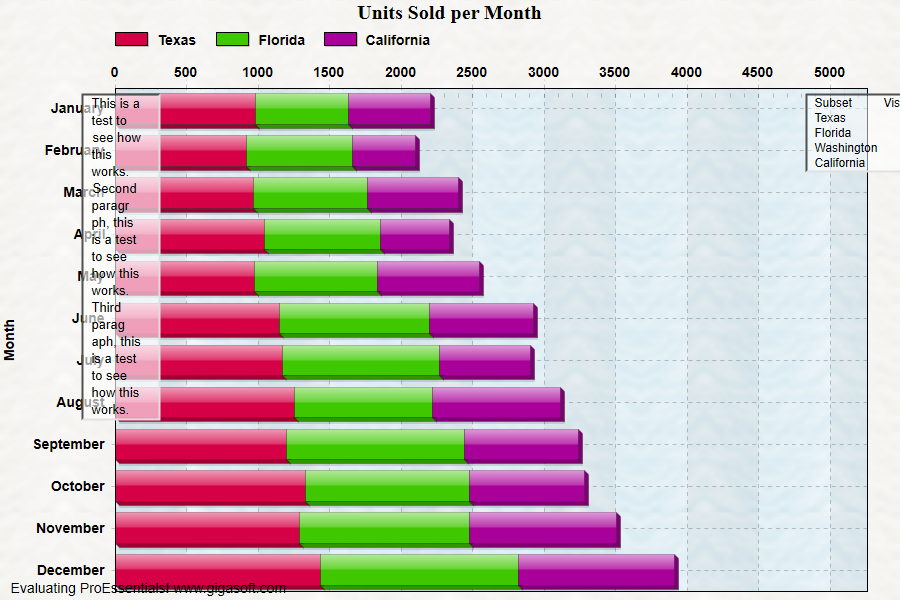
Form2.cs
1//! New features SubsetsToShow and SubsetsToTable control visibility2//! of subsets within the chart and table regions.3//! SubsetsToShow not only controls visibility, but can also control the order.4//! RandomSubsetsToGraph can also control order and visibility of subsets plotted.5 6CreateSimpleGraph(Pego1);7 8Pego1.PePlot.Method = GraphPlottingMethod.HorizontalStackedBar;9Pego1.PeLegend.Style = LegendStyle.OneLine;10Pego1.PeLegend.Location = LegendLocation.Top;11Pego1.PeConfigure.ImageAdjustBottom = 50;12Pego1.PeString.YAxisLabel = " ";13Pego1.PeColor.QuickStyle = QuickStyle.LightLine;14Pego1.PePlot.DataShadows = DataShadows.ThreeDimensional;15 16// Control which subsets to show //17// Value [1 - 9] show subset, subsets with a value of 9 plot before values of 118// Value [0] hides subset19Pego1.PeData.SubsetsToShow[0] = 2; // 2 is just a weighted value, it could be anything [1-9]20Pego1.PeData.SubsetsToShow[1] = 2;21Pego1.PeData.SubsetsToShow[2] = 0;22Pego1.PeData.SubsetsToShow[3] = 2;23 24// Construct a simple table annotation //25Pego1.PeAnnotation.Table.Working = 0;26Pego1.PeAnnotation.Table.Rows = 5;27Pego1.PeAnnotation.Table.Columns = 2;28 29// Pass the table text //30Pego1.PeAnnotation.Table.Text[0, 0] = "Subset ";31Pego1.PeAnnotation.Table.Text[1, 0] = Pego1.PeString.SubsetLabels[0];32Pego1.PeAnnotation.Table.Text[2, 0] = Pego1.PeString.SubsetLabels[1];33Pego1.PeAnnotation.Table.Text[3, 0] = Pego1.PeString.SubsetLabels[2];34Pego1.PeAnnotation.Table.Text[4, 0] = Pego1.PeString.SubsetLabels[3];35Pego1.PeAnnotation.Table.Text[0, 1] = "Visible? ";36 37// Set to cell types and attributes //38Pego1.PeAnnotation.Table.Type[1, 1] = LegendAnnotationType.LargeSquareSolid;39Pego1.PeAnnotation.Table.Type[2, 1] = LegendAnnotationType.LargeSquareSolid;40Pego1.PeAnnotation.Table.Type[3, 1] = LegendAnnotationType.LargeSquare;41Pego1.PeAnnotation.Table.Type[4, 1] = LegendAnnotationType.LargeSquareSolid;;42 43Pego1.PeAnnotation.Table.Color[1, 1] = Color.FromArgb(255, 255, 0, 0);44Pego1.PeAnnotation.Table.Color[2, 1] = Color.FromArgb(255, 255, 0, 0);45Pego1.PeAnnotation.Table.Color[3, 1] = Color.FromArgb(255, 255, 0, 0);46Pego1.PeAnnotation.Table.Color[4, 1] = Color.FromArgb(255, 255, 0, 0);47 48Pego1.PeAnnotation.Table.HotSpot[1, 1] = true;49Pego1.PeAnnotation.Table.HotSpot[2, 1] = true;50Pego1.PeAnnotation.Table.HotSpot[3, 1] = true;51Pego1.PeAnnotation.Table.HotSpot[4, 1] = true;52 53// Other Table Related Properties ///54Pego1.PeAnnotation.Table.Show = true;55Pego1.PeAnnotation.Table.Location = GraphTALocation.InsidePixelUnits;56Pego1.PeAnnotation.Table.X = 50; // initial setting, we set again further down in code.57Pego1.PeAnnotation.Table.Y = 50;58Pego1.PeAnnotation.Table.Moveable = TAMoveable.Full;59 60Pego1.PeAnnotation.Table.BackColor = Color.FromArgb(129, 255, 255, 255);61Pego1.PeAnnotation.Table.HeaderRows = 0;62Pego1.PeAnnotation.Table.HeaderColumn = false;63Pego1.PeAnnotation.Table.Border = TABorder.Inset;64Pego1.PeAnnotation.Table.TextSize = 85;65 66// Construct a simple text table annotation //67Pego1.PeAnnotation.Table.Working = 1;68Pego1.PeAnnotation.Table.Rows = 1;69Pego1.PeAnnotation.Table.Columns = 1;70Pego1.PeAnnotation.Table.TextMode = true;71 72Char n;73n = (Char) 10;74String str;75str = "This is a test to see how this works. ";76str = str + n.ToString();77str = str + "Second paragraph, this is a test to see how this works. ";78str = str + n.ToString();79str = str + "Third paragraph, this is a test to see how this works.";80Pego1.PeAnnotation.Table.Text[0, 0] = str;81 82// Other Table Related Properties ///83Pego1.PeAnnotation.Table.Show = true;84Pego1.PeAnnotation.Table.Location = GraphTALocation.InsidePixelUnits;85Pego1.PeAnnotation.Table.X = 50; // initial setting, we set again further down in code.86Pego1.PeAnnotation.Table.Y = 50;87Pego1.PeAnnotation.Table.Width = 150;88Pego1.PeAnnotation.Table.Moveable = TAMoveable.Full;89Pego1.PeAnnotation.Table.BackColor = Color.FromArgb(159, 255, 255, 255);90Pego1.PeAnnotation.Table.HeaderRows = 0;91Pego1.PeAnnotation.Table.HeaderColumn = false;92Pego1.PeAnnotation.Table.Border = TABorder.NoBorder;93Pego1.PeAnnotation.Table.TextSize = 95;94Pego1.PeAnnotation.Table.Border = TABorder.Inset;95 96Pego1.PeConfigure.RenderEngine = RenderEngine.Direct2D;97Pego1.PeConfigure.AntiAliasGraphics = true;98Pego1.PeConfigure.AntiAliasText = true;99 100// Initialize chart to get graph border rectangle //101Pego1.PeFunction.ReinitializeResetImage();102 103System.Drawing.Rectangle r;104r = Pego1.PeFunction.GetRectGraph();105 106Pego1.PeAnnotation.Table.Working = 0;107Pego1.PeAnnotation.Table.X = (int) (r.Right - 150.0);108Pego1.PeAnnotation.Table.Y =(int) (r.Top + 25.0);109 110Pego1.PeAnnotation.Table.Working = 1;111Pego1.PeAnnotation.Table.X = (int) (r.Left + 50.0);112Pego1.PeAnnotation.Table.Y = (int) (r.Top + 25.0);113 114Pego1.PeAnnotation.Table.Working = 0;115 116Pego1.PeFunction.ReinitializeResetImage();117Pego1.Invalidate();118// Optionally call Pego1.Refresh() if you are not seeing changes immediately119 120 /*121 private void Pego1_PeTableAnnotation(object sender, Gigasoft.ProEssentials.EventArg.TableAnnotationEventArgs e)122{123 // Look for table hot spot and change which subsets are visible //124 125 // Because this a PeTableAnnotation event (click), we know current hotspotdata should hold latest data126 // and we can simply read this data.127 Gigasoft.ProEssentials.Structs.HotSpotData hsd = Pego1.PeFunction.GetHotSpotData();128 129 if (hsd.Type == HotSpotType.TableAnnotation0)130 {131 // If TYPE is SQUARESOLID, change to SQUARE and vice versa. //132 LegendAnnotationType nType = Pego1.PeAnnotation.Table.Type[hsd.Data1, hsd.Data2];133 134 if (nType == LegendAnnotationType.LargeSquare)135 {136 Pego1.PeAnnotation.Table.Type[hsd.Data1, hsd.Data2] = LegendAnnotationType.LargeSquareSolid;137 Pego1.PeData.SubsetsToShow[hsd.Data1 - 1] = 2; // 2 is just an arbitrary weight138 }139 else140 {141 Pego1.PeAnnotation.Table.Type[hsd.Data1, hsd.Data2] = LegendAnnotationType.LargeSquare;142 Pego1.PeData.SubsetsToShow[hsd.Data1 - 1] = 0; // 0 hides subset143 }144 145 Pego1.Refresh();146 }147 }*/Tip: Uses property syntax like
Pego1.PeData.Y[s, p]Click underlined properties to view documentation