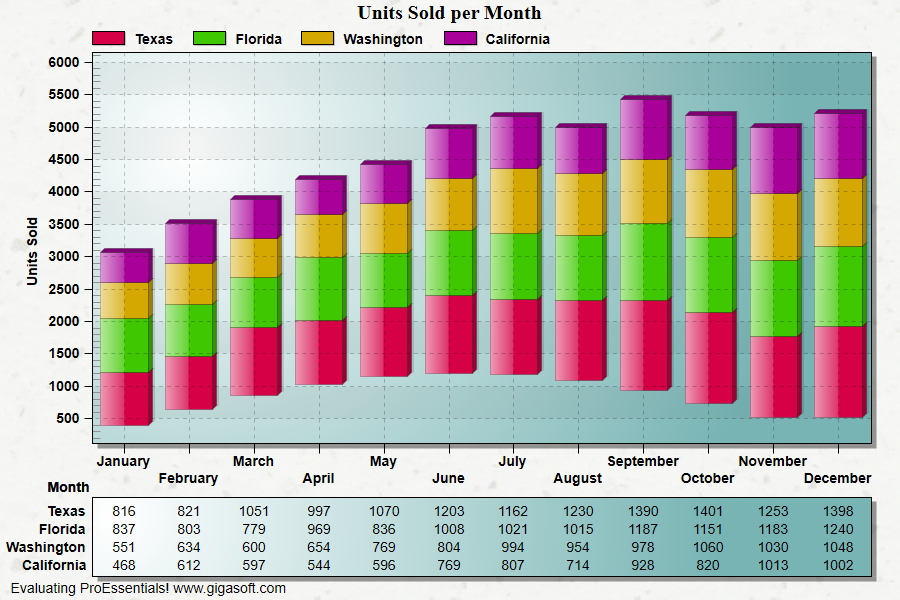
Example 025: Graph showing Floating Stacked Bars
PegoGraph Objectbeginner
Floating Stacked Bars
Form2.cs
1//! Try this... Right Click chart and change the Plotting Method to Horizontal Bar Stacked. //2 3// This example builds upon the basic CreateSimpleGraph '000' example chart //4CreateSimpleGraph(Pego1);5 6// Enable Stacked type charts //7Pego1.PePlot.Allow.StackedData = true;8Pego1.PePlot.Allow.HorzBarStacked = true;9 10// Set plotting method //11Pego1.PePlot.Method = GraphPlottingMethod.BarStacked;12 13// Floating stacked Bars are constructed by setting ZData //14int p;15for(p = 0; p <= 11; p++)16 Pego1.PeData.Z[0, p] = (float)(System.Math.Abs(System.Math.Sin((0.3 * p)) * 800.0) + 400);17 18// Enable floating stacked bar feature //19Pego1.PePlot.Option.FloatingStackedBars = true;20 21// Set Various Other Properties ///22Pego1.PeColor.BitmapGradientMode = true;23Pego1.PeColor.QuickStyle = QuickStyle.LightShadow;24Pego1.PeGrid.LineControl = GridLineControl.Both;26Pego1.PeTable.Show = GraphPlusTable.Both;27Pego1.PeGrid.InFront = true;28Pego1.PeData.Precision = 0;29Pego1.PePlot.Allow.HorzBarStacked = true;30Pego1.PePlot.DataShadows = DataShadows.ThreeDimensional;31 32Pego1.PeFunction.ReinitializeResetImage();33Pego1.Invalidate();34// Optionally call Pego1.Refresh() if you are not seeing changes immediatelyTip: Uses property syntax like
Pego1.PeData.Y[s, p]Click underlined properties to view documentation