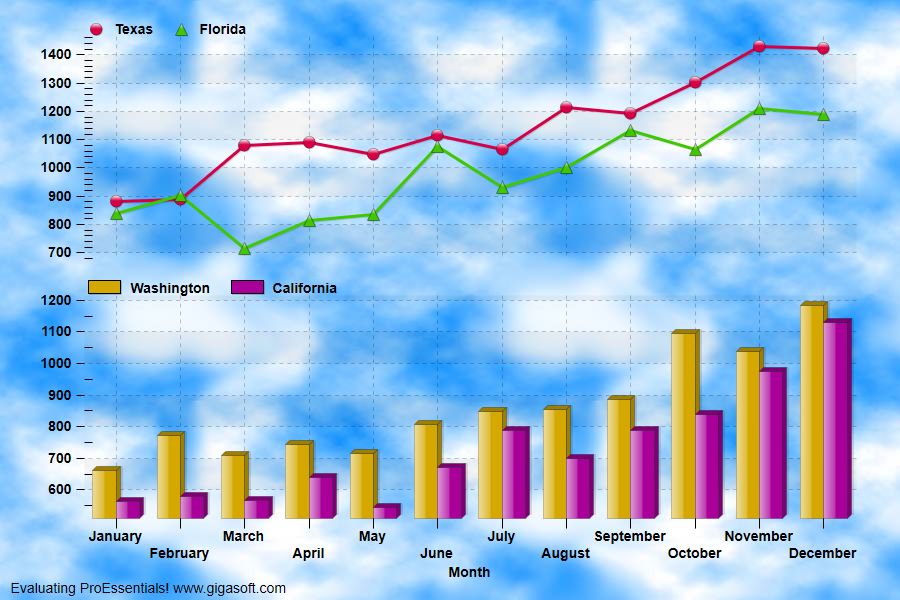
Example 024: Graph showing Background Bitmap
PegoGraph Objectintermediate
Background Bitmap
Form2.cs
1// This example builds upon the basic CreateSimpleGraph '000' example chart //2CreateSimpleGraph(Pego1);3 4Pego1.PeColor.BitmapGradientMode = true;5Pego1.PeColor.Desk = Color.FromArgb(0,1,0,0); // Empty6Pego1.PeColor.DeskBmpFilename = System.AppDomain.CurrentDomain.BaseDirectory + "cloud.jpg";7Pego1.PeColor.DeskBmpStyle = BitmapStyle.TiledBitBlt;8Pego1.PeColor.GraphForeground = Color.FromArgb(255, 0, 0, 0);9Pego1.PeColor.Text = Color.Black;10 11// Now sub-divide subsets into 2 axes //12// Each axis to be transparent //13Pego1.PeGrid.MultiAxesSubsets[0] = 2;14Pego1.PeGrid.MultiAxesSubsets[1] = 2;15Pego1.PeLegend.Style = LegendStyle.OneLineInsideAxis;16Pego1.PeUserInterface.Allow.MultiAxesSizing = true;17 18// Set first axis parameters //19Pego1.PeGrid.WorkingAxis = 0;20Pego1.PeString.YAxisLabel = "";21Pego1.PePlot.Method = GraphPlottingMethod.PointsPlusLine;22Pego1.PeColor.GraphBackground = Color.FromArgb(0,1,0,0);23Pego1.PeColor.GraphGradientStyle = GradientStyle.NoGradient;24 25// Set second axis parameters //26Pego1.PeGrid.WorkingAxis = 1;27Pego1.PeString.YAxisLabel = "";28Pego1.PePlot.Method = GraphPlottingMethod.Bar;29Pego1.PeColor.GraphBackground = Color.FromArgb(0,1,0,0); // Empty30Pego1.PeColor.GraphGradientStyle = GradientStyle.NoGradient;31 32// Reset WorkingAxis when done //33Pego1.PeGrid.WorkingAxis = 0;34 35// Set Various Other Properties //36Pego1.PeString.MainTitle = "";37Pego1.PeString.SubTitle = "";38Pego1.PeGrid.Option.MultiAxisStyle = MultiAxisStyle.SeparateAxes;39 40Pego1.PeColor.TickColor = Color.FromArgb(0,1,0,0); // Empty so use GraphForeColor41Pego1.PePlot.DataShadows = DataShadows.ThreeDimensional;42Pego1.PeFont.Fixed = true;44Pego1.PeFont.Label.Bold = true;45Pego1.PeConfigure.BorderTypes = TABorder.NoBorder;46Pego1.PePlot.PointSize = PointSize.Large;47Pego1.PeGrid.LineControl = GridLineControl.Both;49 50// Make the line types bold //51Pego1.PeLegend.SubsetLineTypes[0] = LineType.MediumSolid;52Pego1.PeLegend.SubsetLineTypes[1] = LineType.MediumSolid;53Pego1.PeLegend.SubsetLineTypes[2] = LineType.MediumSolid;54Pego1.PeLegend.SubsetLineTypes[3] = LineType.MediumSolid;55 56// Add some padding around image //57Pego1.PeConfigure.ImageAdjustTop = 100;58Pego1.PeConfigure.ImageAdjustBottom = 100;59Pego1.PeConfigure.ImageAdjustLeft = 100;60Pego1.PeConfigure.ImageAdjustRight = 100;61 62Pego1.PeTable.Show = GraphPlusTable.Graph ;63 64Pego1.PeFunction.ReinitializeResetImage();65Pego1.Invalidate();66// Optionally call Pego1.Refresh() if you are not seeing changes immediatelyTip: Uses property syntax like
Pego1.PeData.Y[s, p]Click underlined properties to view documentation