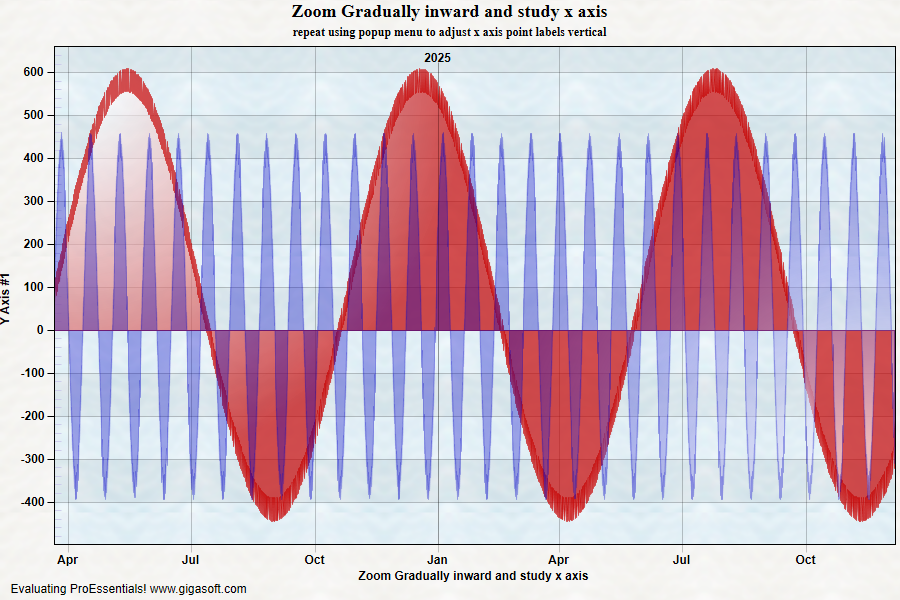
Example 016: Graph showing date time handling
PegoGraph Objectintermediate
Date time handling
Form2.cs
1//! This examples shows Date/Time handling vith the Graph Object.2//! The Graph is suited to show discontinuous date/time scales.3//! Discontinuous for example, 8am to 5pm, Monday to Friday.4 5//! Here's a tip, when debugging your data-passing logic, use the6//! built-in text export feature to verify that data is as7//! expected.8 9// Enable Manipulation and Mouse Wheel Zoom Smoothing //10Pego1.PeUserInterface.Scrollbar.MouseWheelZoomSmoothness = 5;11Pego1.PeUserInterface.Scrollbar.PinchZoomSmoothness = 2;12 13Pego1.PeUserInterface.Scrollbar.MouseWheelZoomFactor = 1.4f;14Pego1.PeUserInterface.Scrollbar.PinchZoomFactor = 1.15F;15 16// Enable MouseWheel Zooming17Pego1.PeUserInterface.Scrollbar.MouseWheelFunction = MouseWheelFunction.HorizontalZoom;18 19// Enable ZoomWindow Feature //20Pego1.PePlot.ZoomWindow.Show = true;21 22// Enable middle mouse dragging //23Pego1.PeUserInterface.Scrollbar.MouseDraggingX = true;24Pego1.PeUserInterface.Scrollbar.MouseDraggingY = true;25 26Pego1.PePlot.Option.AreaBorder = 1;27 28Pego1.PeData.Subsets = 2;29Pego1.PeData.Points = 60000;30 31// Set Date Time Handling related properties //32Pego1.PeData.DeltaX = 5; // 5 minutes between data points33Pego1.PeData.DeltasPerDay = 96; // 96 data points in one day34Pego1.PeData.StartTime = 0.3333333333334; // 8 am35Pego1.PeData.UsingXDataii = true;36Pego1.PeData.Filter2D = Filter2D.Fastest;37 38double d;39int i = 0;40int p;41 42d = DateTime.Now.ToOADate() - 700;43 44// PreAllocates memory, best to use FastCopy like in exp 018 but for simplicity we spoon feed.45// Setting last point first helps spoon feeding large data sets.46Pego1.PeData.Xii[0, 59999] = 0; // Note pego xdata datetimemode only uses 1 subset, thus index 047Pego1.PeData.Y[1, 59999] = 0; // ydata uses 2 subsets, thus last point is index 1, point 5999948 49d = System.Convert.ToInt32(d);50 51for(p = 0; p <= 59999; p++)52{53 Pego1.PeData.Y[0, p] = (float)(55 + ((Rand_Num.NextDouble()) * 55) + (System.Math.Sin(p * 0.0003) * 500));54 Pego1.PeData.Y[1, p] = (float)(5 + ((Rand_Num.NextDouble()) * 55) + (System.Math.Sin(p * 0.003) * 400));55 56 //! Make sure your XData is constructed so that every XData is57 //! DeltaX apart and there are DeltasPerDay worth of data points58 //! in each day. Well, at least for intraday data. Daily/Weekly/Monthly59 //! data is much easier to work with.60 61 //! Also note that if you do not set XData, ProEssentials will62 //! automatically construct your XData with respect to the63 //! AutoXData, DeltaX, StartTime, and DeltasPerDay properties.64 65 // Construct XDataII to match parameters above //66 67 Pego1.PeData.Xii[0, p] = d + 0.333333333333333 + (((i * 5.0) / 60.0) / 24.0);68 // every 5 minutes, 60 minutes in an hour, 24 hours in a day69 70 i = i + 1;71 if(i >= 96)72 {73 i = 0;74 d = d + 1;75 }76}77 78// This empties PointLabels array and invokes virtual point labels //79// which are the point number.80Pego1.PeData.PointLabels[-1] = "0";81 82// You can modify date label formats with //83Pego1.PeGrid.Option.YearMonthDayPrompt = YearMonthDayPrompt.InsideTop;84 85// Optional related properties ...86// PeGrid.Option.TimeLabelType87// PeGrid.Option.DayLabelType88// PeGrid.Option.MonthLabelType89// PeGrid.Option.YearLabelType90 91// Enable DateTimeMode //92Pego1.PeData.DateTimeMode = true;93 94// Enable Zooming, zoom the chart and see how structure //95// of x axis changes as you zoom //96Pego1.PeUserInterface.Allow.Zooming = AllowZooming.Horizontal;97 98// Set various properties //99Pego1.PeConfigure.PrepareImages = true;100Pego1.PePlot.DataShadows = DataShadows.None;101Pego1.PeGrid.LineControl = GridLineControl.Both;102Pego1.PeUserInterface.Allow.FocalRect = false;103Pego1.PeFont.Fixed = true;104Pego1.PeUserInterface.Allow.ZoomStyle = ZoomStyle.Ro2Not;105 106Pego1.PeColor.BitmapGradientMode = true;107Pego1.PeColor.QuickStyle = QuickStyle.LightLine;108 109Pego1.PePlot.Option.LineShadows = false;112Pego1.PeFont.Label.Bold = true;113Pego1.PeConfigure.TextShadows = TextShadows.BoldText;115Pego1.PeUserInterface.Scrollbar.ScrollingScaleControl = true;116 117Pego1.PePlot.Method = GraphPlottingMethod.Area;118Pego1.PePlot.Option.SolidLineOverArea = 1;119Pego1.PePlot.Option.HiddenLinesInArea = false;120 121Pego1.PeColor.SubsetColors[0] = Color.FromArgb(175, 198, 0, 0);122Pego1.PeColor.SubsetColors[1] = Color.FromArgb(85, 0, 0, 198);123 124Pego1.PePlot.Option.NullDataGaps = false;125Pego1.PePlot.Option.SubsetGradientStyle[0] = (int)Gigasoft.ProEssentials.Enums.PlotGradientStyle.RadialTopLeft;126Pego1.PePlot.Option.SubsetGradientStyle[1] = (int)Gigasoft.ProEssentials.Enums.PlotGradientStyle.RadialBottomRight;127Pego1.PeLegend.Show = false;128Pego1.PeString.MainTitle = "Zoom Gradually inward and study x axis";129Pego1.PeString.SubTitle = "repeat using popup menu to adjust x axis point labels vertical";130Pego1.PeString.XAxisLabel = "Zoom Gradually inward and study x axis";131 132// Set various export defaults //133Pego1.PeSpecial.DpiX = 600;134Pego1.PeSpecial.DpiY = 600;135 136// default export setting //137Pego1.PeUserInterface.Dialog.ExportSizeDef = ExportSizeDef.NoSizeOrPixel;138Pego1.PeUserInterface.Dialog.ExportTypeDef = ExportTypeDef.Png;139Pego1.PeUserInterface.Dialog.ExportDestDef = ExportDestDef.Clipboard;140Pego1.PeUserInterface.Dialog.ExportUnitXDef = "1280";141Pego1.PeUserInterface.Dialog.ExportUnitYDef = "768";142Pego1.PeUserInterface.Dialog.ExportImageDpi = 300;143 144// v9 features145Pego1.PeUserInterface.Cursor.PromptTracking = true;146Pego1.PeUserInterface.Cursor.PromptLocation = CursorPromptLocation.ToolTip;147Pego1.PeUserInterface.Cursor.PromptStyle = CursorPromptStyle.XYValues;148Pego1.PeUserInterface.Cursor.TrackingTooltipMaxWidth = 100;149 150Pego1.PeConfigure.RenderEngine = RenderEngine.Direct2D;151Pego1.PeConfigure.AntiAliasGraphics = true;152Pego1.PeConfigure.AntiAliasText = true;153 154Pego1.PeFunction.ReinitializeResetImage();155Pego1.Invalidate();156// Optionally call Pego1.Refresh() if you are not seeing changes immediatelyTip: Uses property syntax like
Pego1.PeData.Y[s, p]Click underlined properties to view documentation