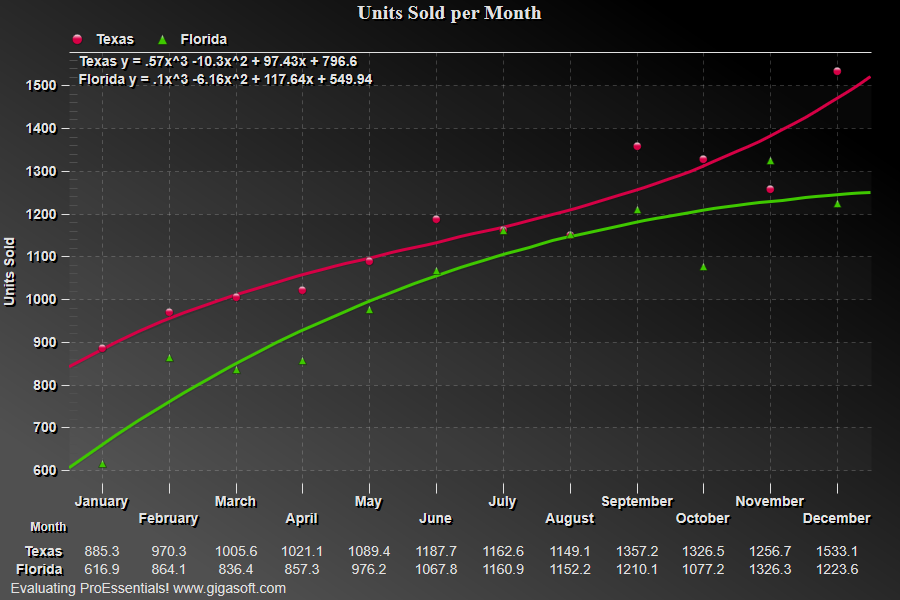
Example 009: Graph showing use of BestFitCoeffs
PegoGraph Objectintermediate
Use of BestFitCoeffs
Form2.cs
1// This example builds upon the basic CreateSimpleGraph '000' example chart //2CreateSimpleGraph(Pego1);3 4// Reduce to just two subsets //5Pego1.PeData.Subsets = 2;6 7// Set BestFitDegree and Plotting Method //8Pego1.PePlot.Option.BestFitDegree = BestFitDegree.Third;9Pego1.PePlot.Method = GraphPlottingMethod.PointsPlusBestFitCurve;10 11// Call PEreinitialize and PEresetimage //12Pego1.PeFunction.Reinitialize(); // Reinitialize can be used to read ManualMaxY, etc13Pego1.PeFunction.ResetImage(0, 0); // ResetImage is needed to calculate coeffs.14 15// Now add annotations that represents coefficients //16 17//** First subset's coeffs. **'18String t;19t = "Texas y = " + String.Format( "{0:#.##}", Pego1.PePlot.Option.BestFitCoeffs[0, 3]) + "x^3 ";20if(Pego1.PePlot.Option.BestFitCoeffs[0, 2] >= 0)21 t = t + "+ ";22t = t + String.Format("{0:#.##}", Pego1.PePlot.Option.BestFitCoeffs[0, 2]) + "x^2 ";23if(Pego1.PePlot.Option.BestFitCoeffs[0, 1] >= 0)24 t = t + "+ ";25t = t + String.Format("{0:#.##}", Pego1.PePlot.Option.BestFitCoeffs[0, 1]) + "x ";26if(Pego1.PePlot.Option.BestFitCoeffs[0, 0] >= 0)27 t = t + "+ ";28t = t + String.Format("{0:#.##}", Pego1.PePlot.Option.BestFitCoeffs[0, 0]);29t = t + '\n'; // Line feed30 31// Second subset's coeffs. //32t = t + "Florida y = " + String.Format("{0:#.##}", Pego1.PePlot.Option.BestFitCoeffs[1, 3]) + "x^3 ";33if(Pego1.PePlot.Option.BestFitCoeffs[1, 2] >= 0)34 t = t + "+ ";35t = t + String.Format("{0:#.##}", Pego1.PePlot.Option.BestFitCoeffs[1, 2]) + "x^2 ";36if(Pego1.PePlot.Option.BestFitCoeffs[1, 1] >= 0)37 t = t + "+ ";38t = t + String.Format("{0:#.##}", Pego1.PePlot.Option.BestFitCoeffs[1, 1]) + "x ";39if(Pego1.PePlot.Option.BestFitCoeffs[1, 0] >= 0)40 t = t + "+ ";41t = t + String.Format("{0:#.##}", Pego1.PePlot.Option.BestFitCoeffs[1, 0]);42 43// Put text into a line annotations //'44Pego1.PeAnnotation.Line.YAxis[0] = Pego1.PeGrid.Configure.ManualMaxY - 1;45//Pego1.PeAnnotation.Line.HorizontalType[0] = -1; // no line, just text46Pego1.PeAnnotation.Line.YAxisText[0] = t;47 48// Increases line annotation text size to max49Pego1.PeFont.LineAnnotationTextSize = 100;50Pego1.PeAnnotation.Show = true;51 52// Generally call ReinitializeResetImage at end **'53Pego1.PeFunction.ReinitializeResetImage();54Pego1.Invalidate();55// Optionally call Pego1.Refresh() if you are not seeing changes immediatelyTip: Uses property syntax like
Pego1.PeData.Y[s, p]Click underlined properties to view documentation