Example 204: Polar Chart showing rose chart
PepsoPolar Chart Objectintermediate
Rose chart
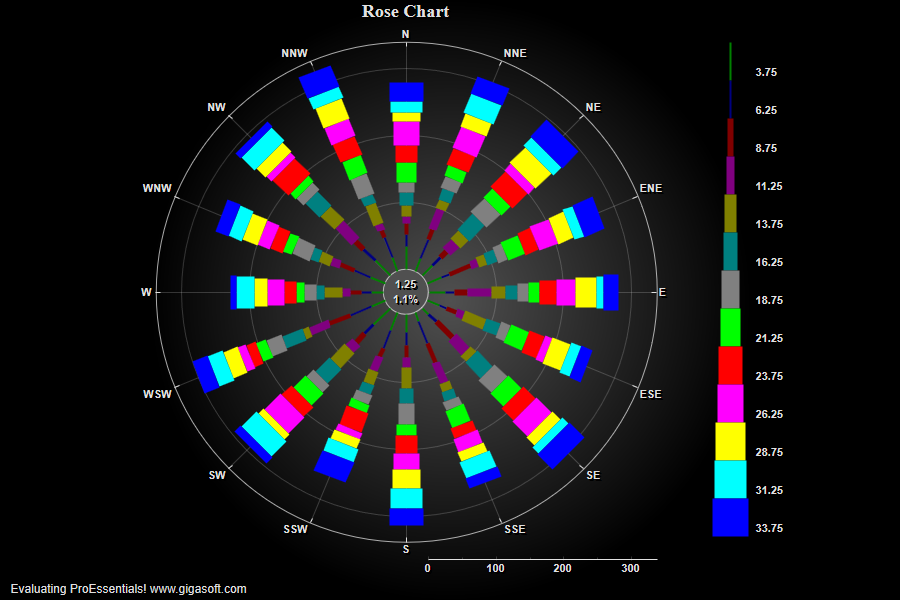
Form4.cs
1//! Rose chart is a polar histogram/frequency distribution //2 3// Enable Smith Mode //4Pepso1.PePlot.SmithChart = SmithChart.Rose;5Pepso1.PeString.MainTitle = "Rose Chart";6Pepso1.PeString.SubTitle = "";7 8// Change the data to something more appropriate //9Pepso1.PeData.Subsets = 13;10Pepso1.PeData.Points = 16;11 12float[] DataX = new float[]{90.0F, 67.5F, 45.0F, 22.5F, 0.0F, 337.5F, 315.0F, 292.5F, 270.0F, 247.5F, 225.0F, 202.5F, 180.0F, 157.5F, 135.0F, 112.5F};13 14// Set first subset's data //15for( int s = 0; s <= 12; s++)16{17 for( int p = 0; p <= 15; p++)18 {19 Pepso1.PeData.X[s, p] = DataX[p];20 Pepso1.PeData.Y[s, p] = (float)(10 + (Rand_Num.NextDouble() * 25));21 }22}23 24// Set Point Labels, these will label degree grid lines //25Pepso1.PeString.PointLabels[0] = "E";26Pepso1.PeString.PointLabels[1] = "ENE";27Pepso1.PeString.PointLabels[2] = "NE";28Pepso1.PeString.PointLabels[3] = "NNE";29Pepso1.PeString.PointLabels[4] = "N";30Pepso1.PeString.PointLabels[5] = "NNW";31Pepso1.PeString.PointLabels[6] = "NW";32Pepso1.PeString.PointLabels[7] = "WNW";33Pepso1.PeString.PointLabels[8] = "W";34Pepso1.PeString.PointLabels[9] = "WSW";35Pepso1.PeString.PointLabels[10] = "SW";36Pepso1.PeString.PointLabels[11] = "SSW";37Pepso1.PeString.PointLabels[12] = "S";38Pepso1.PeString.PointLabels[13] = "SSE";39Pepso1.PeString.PointLabels[14] = "SE";40Pepso1.PeString.PointLabels[15] = "ESE";41 42// Set Subset Labels, these will show in legend //43Pepso1.PeString.SubsetLabels[0] = "3.75";44Pepso1.PeString.SubsetLabels[1] = "6.25";45Pepso1.PeString.SubsetLabels[2] = "8.75";46Pepso1.PeString.SubsetLabels[3] = "11.25";47Pepso1.PeString.SubsetLabels[4] = "13.75";48Pepso1.PeString.SubsetLabels[5] = "16.25";49Pepso1.PeString.SubsetLabels[6] = "18.75";50Pepso1.PeString.SubsetLabels[7] = "21.25";51Pepso1.PeString.SubsetLabels[8] = "23.75";52Pepso1.PeString.SubsetLabels[9] = "26.25";53Pepso1.PeString.SubsetLabels[10] = "28.75";54Pepso1.PeString.SubsetLabels[11] = "31.25";55Pepso1.PeString.SubsetLabels[12] = "33.75";56 57// Manually control degree line frequency //58Pepso1.PeGrid.Configure.ManualXAxisTicknLine = true;59Pepso1.PeGrid.Configure.ManualXAxisLine = 22.5;60Pepso1.PeGrid.Configure.ManualXAxisTick = 22.5;61 62// So monochrome images use just black and white //63Pepso1.PeColor.SubsetShades[0] = Color.Black;64Pepso1.PeColor.SubsetShades[1] = Color.White;65 66// Get rid of normal legend, rose has a special legend //67Pepso1.PeLegend.SubsetsToLegend[0] = -1;68 69// No radius line labels //70Pepso1.PeGrid.RadiusLabels = false;72 73Pepso1.PeString.RoseCenterLabel = "1.25|1.1%"; // inner circle label74 75// Set Various other features //76Pepso1.PeUserInterface.Allow.Zooming = AllowZooming.Horizontal;77Pepso1.PeFont.Fixed = true;78Pepso1.PeColor.BitmapGradientMode = true;79Pepso1.PeColor.QuickStyle = QuickStyle.DarkNoBorder;80Pepso1.PeLegend.SimplePoint = true;81Pepso1.PeLegend.SimpleLine = true;82Pepso1.PeLegend.Style = SimpleLegendStyle.OneLine;83Pepso1.PeUserInterface.Allow.ZoomStyle = ZoomStyle.Ro2Not;84Pepso1.PePlot.PointSize = PointSize.Small;85Pepso1.PeConfigure.PrepareImages = true;86Pepso1.PeConfigure.CacheBmp = true;87 88// Add Some Padding on Right and Bottom //89Pepso1.PeConfigure.ImageAdjustLeft = 100;90Pepso1.PeConfigure.ImageAdjustRight = 100;91Pepso1.PeConfigure.ImageAdjustBottom = 100;92 93Pepso1.PeConfigure.TextShadows = TextShadows.BoldText;96Pepso1.PeFont.Label.Bold = true;97Pepso1.PePlot.Option.LineShadows = true;99Pepso1.PeFont.SizeGridNumberCntl = 1.2F;100Pepso1.PePlot.DataShadows = DataShadows.Shadows;101 102// Set various export defaults //103Pepso1.PeSpecial.DpiX = 600;104Pepso1.PeSpecial.DpiY = 600;105 106// default export setting //107Pepso1.PeUserInterface.Dialog.ExportSizeDef = ExportSizeDef.NoSizeOrPixel;108Pepso1.PeUserInterface.Dialog.ExportTypeDef = ExportTypeDef.Png;109Pepso1.PeUserInterface.Dialog.ExportDestDef = ExportDestDef.Clipboard;110Pepso1.PeUserInterface.Dialog.ExportUnitXDef = "1280";111Pepso1.PeUserInterface.Dialog.ExportUnitYDef = "768";112Pepso1.PeUserInterface.Dialog.ExportImageDpi = 300;113 114Pepso1.PeConfigure.RenderEngine = RenderEngine.Direct2D;115Pepso1.PeConfigure.AntiAliasGraphics = true;116Pepso1.PeConfigure.AntiAliasText = true;117 118Pepso1.PeFunction.ReinitializeResetImage();119Pepso1.Invalidate();Tip: Uses property syntax like
Pego1.PeData.Y[s, p]Click underlined properties to view documentation