Example 143: Scientific Graph showing Subsets Different Points 2
PesgoScientific Graph Objectintermediate
Subsets Different Points 2
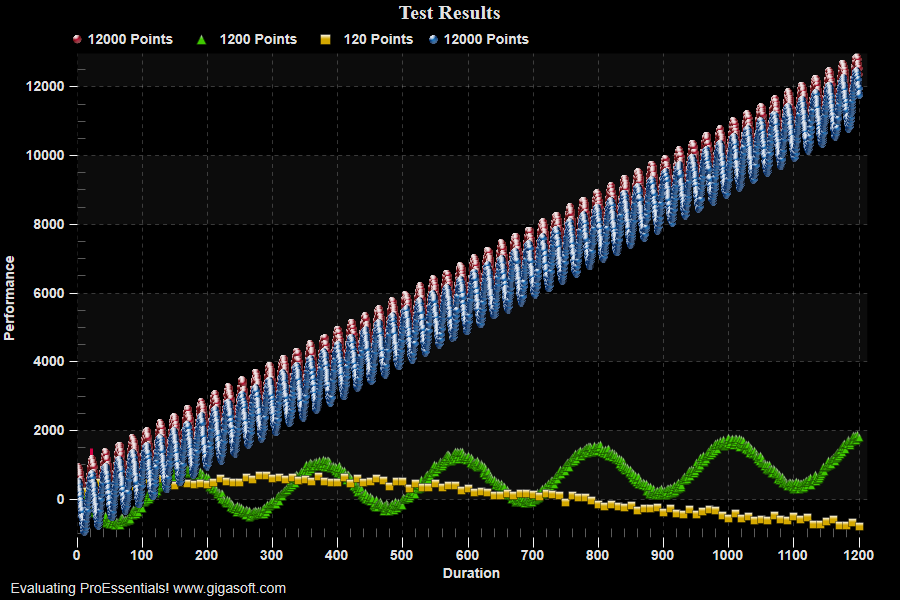
Form3.cs
1//! Showing use of Jagged Data, subsets with different amounts of Data,2//! combined with passing data via CopyFromJagged pointing to blocks of memory3 4CreateSimpleSGraph(Pesgo1);5 6Pesgo1.PeConfigure.RenderEngine = RenderEngine.Direct2D;7Pesgo1.PeData.JaggedData = true; // For now Direct3D does not support JaggedData, only use with Direct2D.8 9// Change Data //10Pesgo1.PeData.Subsets = 4;11Pesgo1.PeData.Points = 1; // When JaggedData = True, when chart calls PeFunction.Reinitialize(), Points property will automatically set to the maximum of any subset12 13float[] MyXData = new float[12000]; // demo Temp Blocks Of Memory14float[] MyYData = new float[12000];15 16// If a subset will have very few points, consider plotting this data as a GraphAnnotation (demo example 015)17 18int s = 0;19int nOffset = (int)(Rand_Num.NextDouble() * 250);20for (int p = 0; p <= 11999; p++)21{22 MyXData[p] = (p + 1) * .10F;23 MyYData[p] = (float)((p + 1) * 1 + (Rand_Num.NextDouble() * 250)) + (float)(Math.Sin(((double)(nOffset + p)) * .03F) * 700.0F) - ((s * 140.0F));24}25// Pass subset 0, 12 points //26Pesgo1.PeData.X.CopyFromJagged(MyXData, 0); // nElements default = 0 denotes use the length of source as size27Pesgo1.PeData.Y.CopyFromJagged(MyYData, 0);28 29s = 1;30nOffset = (int)(Rand_Num.NextDouble() * 250);31for (int p = 0; p <= 1199; p++)32{33 MyXData[p] = (p + 1) * 1.0F;34 MyYData[p] = (float)((p + 1) * 1 + (Rand_Num.NextDouble() * 250)) + (float)(Math.Sin(((double)(nOffset + p)) * .03F) * 700.0F) - ((s * 140.0F));35}36// Pass subset 1, 1200 points //37Pesgo1.PeData.X.CopyFromJagged(MyXData, 1, 1200); // nElements = 1200, which is fewer than size of array, so 1200 needed to control size of data38Pesgo1.PeData.Y.CopyFromJagged(MyYData, 1, 1200);39 40s = 2;41nOffset = (int)(Rand_Num.NextDouble() * 250);42for (int p = 0; p <= 119; p++)43{44 MyXData[p] = (p + 1) * 10.0F;45 MyYData[p] = (float)((p + 1) * 1 + (Rand_Num.NextDouble() * 250)) + (float)(Math.Sin(((double)(nOffset + p)) * .03F) * 700.0F) - ((s * 140.0F));46}47// Pass subset 3, 120 points //48Pesgo1.PeData.X.CopyFromJagged(MyXData, 2, 120);49Pesgo1.PeData.Y.CopyFromJagged(MyYData, 2, 120);50 51s = 3;52nOffset = (int)(Rand_Num.NextDouble() * 250);53for (int p = 0; p <= 11999; p++)54{55 MyXData[p] = (p + 1) * 0.1F;56 MyYData[p] = (float)((p + 1) * 1 + (Rand_Num.NextDouble() * 250)) + (float)(Math.Sin(((double)(nOffset + p)) * .03F) * 700.0F) - ((s * 140.0F));57}58// Pass subset 4, 12000 points //59Pesgo1.PeData.X.CopyFromJagged(MyXData, 3); // defaults to size of array60Pesgo1.PeData.Y.CopyFromJagged(MyYData, 3);61 62Pesgo1.PeString.SubsetLabels[0] = "12000 Points";63Pesgo1.PeString.SubsetLabels[1] = "1200 Points";64Pesgo1.PeString.SubsetLabels[2] = "120 Points";65Pesgo1.PeString.SubsetLabels[3] = "12000 Points";66 67Pesgo1.PePlot.Bitmaps.WorkingBitmap = 0;68Pesgo1.PePlot.Bitmaps.Filename = "symbolBlueDot.png"; // Define a blue dot symbol bitmap resource69Pesgo1.PePlot.Bitmaps.Style = ResourceBitmapStyle.SmallCentered; // bitmap symbols plot faster though vector output is not poosible70Pesgo1.PePlot.SubsetPointTypes[3] = (PointType)10001; // 4th subset, set to WorkingBitmap 0, 10001 + Working Bitmap Index71Pesgo1.PePlot.Bitmaps.WorkingBitmap = 1;72Pesgo1.PePlot.Bitmaps.Filename = "symbolRedDot.png"; // Define a blue dot symbol bitmap resource73Pesgo1.PePlot.Bitmaps.Style = ResourceBitmapStyle.SmallCentered; // bitmap symbols plot faster though vector output is not poosible74Pesgo1.PePlot.SubsetPointTypes[0] = (PointType)10001 + 1; // 1st subset, set to WorkingBitmap 1, 10001 + Working Bitmap Index75 76Pesgo1.PeUserInterface.Dialog.AllowWmfExport = false;77Pesgo1.PeUserInterface.Dialog.AllowEmfExport = false;78 79Pesgo1.PeUserInterface.Dialog.Style = false;80Pesgo1.PePlot.DataShadows = DataShadows.None;81 82// Generally call ReinitializeResetImage at end **'83Pesgo1.PeConfigure.RenderEngine = RenderEngine.Direct2D;84Pesgo1.PeFunction.ReinitializeResetImage();85Pesgo1.Invalidate();86// Optionally call Pesgo1.Refresh() if you are not seeing changes immediatelyTip: Uses property syntax like
Pego1.PeData.Y[s, p]Click underlined properties to view documentation