Example 118: Scientific Graph showing real-time 4
PesgoScientific Graph Objectadvanced
Real-time 4
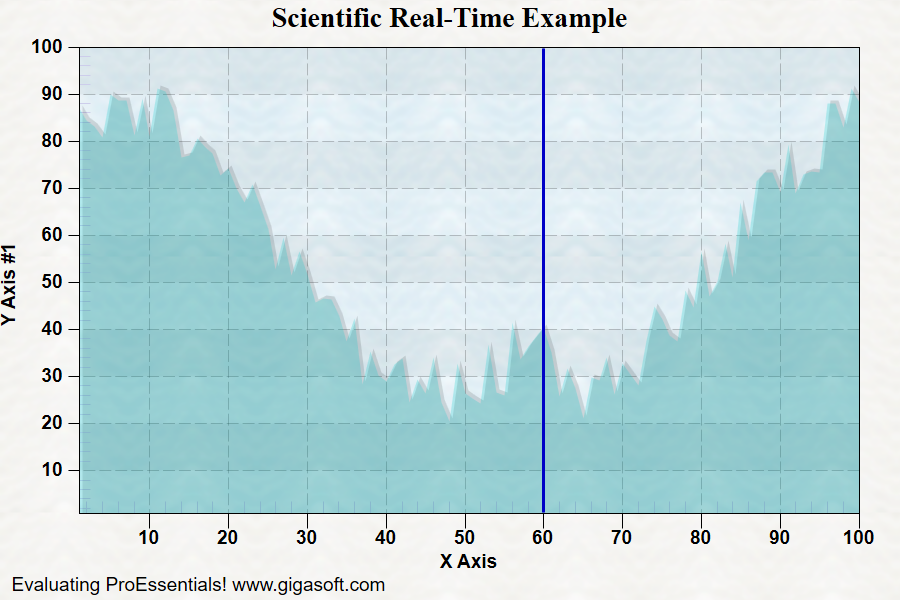
Form3.cs
1//! Chart fills 100 points and once 100 points have2//! been passed, old data is over-written as more3//! data is passed to chart.4 5Pesgo1.PeData.Subsets = 1;6Pesgo1.PeData.Points = 100;7 8// Set Manual Y scale //9Pesgo1.PeGrid.Configure.ManualScaleControlY = ManualScaleControl.MinMax;10Pesgo1.PeGrid.Configure.ManualMinY = 1;11Pesgo1.PeGrid.Configure.ManualMaxY = 100;12 13// Set Manual X scale//14Pesgo1.PeGrid.Configure.ManualScaleControlX = ManualScaleControl.MinMax;15Pesgo1.PeGrid.Configure.ManualMinX = 1;16Pesgo1.PeGrid.Configure.ManualMaxX = 100;17 18// Show Annotations //19Pesgo1.PeAnnotation.Show = true;20 21// Clear out default data //22Pesgo1.PeData.X[0, 0] = 0;23Pesgo1.PeData.X[0, 1] = 0;24Pesgo1.PeData.X[0, 2] = 0;25Pesgo1.PeData.X[0, 3] = 0;26Pesgo1.PeData.Y[0, 0] = 0;27Pesgo1.PeData.Y[0, 1] = 0;28Pesgo1.PeData.Y[0, 2] = 0;29Pesgo1.PeData.Y[0, 3] = 0;30 31// Set Various Other Properties ///32Pesgo1.PeColor.BitmapGradientMode = true;33Pesgo1.PeColor.QuickStyle = QuickStyle.LightLine;34 35// Set various properties //36Pesgo1.PeString.MainTitle = "Scientific Real-Time Example";37Pesgo1.PeString.SubTitle = "";38Pesgo1.PeUserInterface.Dialog.RandomPointsToExport = true;39Pesgo1.PeUserInterface.Allow.FocalRect = false;40Pesgo1.PePlot.Allow.Bar = false;41Pesgo1.PeUserInterface.Allow.Popup = false;42Pesgo1.PeConfigure.PrepareImages = true;43Pesgo1.PeConfigure.CacheBmp = true;44Pesgo1.PeFont.Fixed = true;45Pesgo1.PeColor.SubsetColors[0] = Color.FromArgb(60, 0, 200, 200);46 47Pesgo1.PeConfigure.TextShadows = TextShadows.BoldText;50Pesgo1.PeFont.Label.Bold = true;51Pesgo1.PePlot.Option.LineShadows = true;52 54Pesgo1.PeFont.SizeGlobalCntl = 1.4F;55 56Pesgo1.PePlot.SubsetLineTypes[0] = LineType.MediumThickSolid;57Pesgo1.PePlot.Method = SGraphPlottingMethod.Area;58Pesgo1.PePlot.DataShadows = DataShadows.Shadows;59Pesgo1.PeGrid.Configure.AutoMinMaxPaddingX = 0;60// Not ideal for real-time, but nice for presentation/demonstration61Pesgo1.PePlot.Option.PointGradientStyle = PlotGradientStyle.VerticalAscentInverse;62Pesgo1.PeColor.PointBorderColor = Color.FromArgb(100, 0, 0, 0);64 65// Set various export defaults //66Pesgo1.PeSpecial.DpiX = 600;67Pesgo1.PeSpecial.DpiY = 600;68 69Pesgo1.PeConfigure.RenderEngine = RenderEngine.Direct2D;70Pesgo1.PeConfigure.AntiAliasText = true;71Pesgo1.PeConfigure.AntiAliasGraphics = true;72 73Pesgo1.PeFunction.ReinitializeResetImage();74 75// Initialize Counters and Timer //76MainWindow.m_nRealTimeCounter = 0;77MainWindow.m_nSinCounter = 1;78 79MainWindow.Timer1.Interval = 25;80MainWindow.Timer1.Start();81 82/*83/////////////////////////84// Example Timer Event //85/////////////////////////86private void Timer1_Tick(object sender, System.EventArgs e)87{88 float newy, newx;89 90 // New y value and x value //91 newy = (float)(50 + (Math.Sin(m_nSinCounter * 0.075) * 30) + (Rand_Num.NextDouble() * 15));92 newx = m_nRealTimeCounter;93 94 // Update new data at current index //95 Pesgo1.PeData.Y[0, m_nRealTimeCounter] = newy;96 Pesgo1.PeData.X[0, m_nRealTimeCounter] = newx + 1.0F;97 98 Pesgo1.PeAnnotation.Line.XAxis[0] = newx + 1.0F;99 Pesgo1.PeAnnotation.Line.XAxisType[0] = LineAnnotationType.MediumSolid;100 Pesgo1.PeAnnotation.Line.XAxisColor[0] = Color.FromArgb(0, 0, 198);101 102 // Increment counter//103 m_nRealTimeCounter = m_nRealTimeCounter + 1;104 105 // Reset counter at end of data //106 if (m_nRealTimeCounter == 100)107 m_nRealTimeCounter = 0;108 109 // SinCounter is only to produce sin wave data //110 m_nSinCounter = m_nSinCounter + 1;111 if (m_nSinCounter > 30000)112 m_nSinCounter = 1;113 114 // Update image and force paint///115 Pesgo1.PeFunction.ReinitializeResetImage();116 Pesgo1.Refresh();117}118*/Tip: Uses property syntax like
Pego1.PeData.Y[s, p]Click underlined properties to view documentation