Example 028: Graph showing Table Annotations, Real-time update
PegoGraph Objectadvanced
Table Annotations, Real-time update
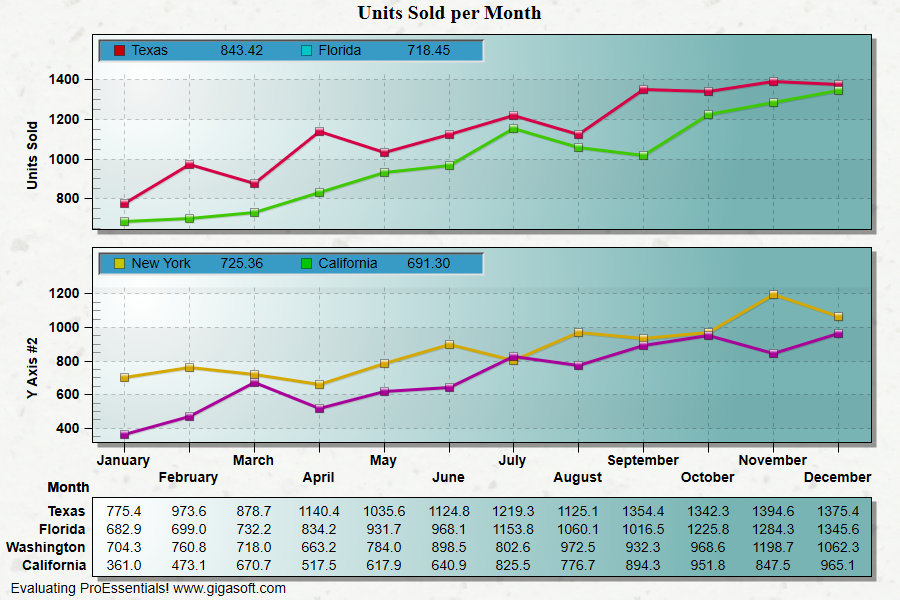
Form2.cs
1//! Move mouse over chart to see tables update with the subset values located2//! at the vertical cursor line. //3 4// This example builds upon the basic CreateSimpleGraph '000' example chart //5CreateSimpleGraph(Pego1);6 7// Construct a simple table annotation //8Pego1.PeAnnotation.Table.Working = 0;9Pego1.PeAnnotation.Table.Rows = 1;10Pego1.PeAnnotation.Table.Columns = 6;11 12// column index for table with 6 columns //13// 0 = symbol, no default width14// 1 = text, subset label, no default width15// 2 = text, data value, default width set to 7 characters16// 3 = symbol second subset, no default width17// 4 = text, second subset label, no default width18// 5 = text, second data value, default width set to 7 characters19 20// Pass the table type, text, color //21Pego1.PeAnnotation.Table.Type[0, 0] = LegendAnnotationType.SquareSolid;22Pego1.PeAnnotation.Table.Color[0, 0] = Color.FromArgb(255, 198, 0, 0);23Pego1.PeAnnotation.Table.Text[0, 1] = "Texas ";24Pego1.PeAnnotation.Table.Color[0, 1] = Color.FromArgb(255, 0, 0, 0);25Pego1.PeAnnotation.Table.Color[0, 2] = Color.FromArgb(255, 0, 0, 0);26 27Pego1.PeAnnotation.Table.Type[0, 3] = LegendAnnotationType.SquareSolid;28Pego1.PeAnnotation.Table.Color[0, 3] = Color.FromArgb(255, 0, 198, 198);29Pego1.PeAnnotation.Table.Text[0, 4] = "Florida ";30Pego1.PeAnnotation.Table.Color[0, 4] = Color.FromArgb(255, 0, 0, 0);31Pego1.PeAnnotation.Table.Color[0, 5] = Color.FromArgb(255, 0, 0, 0);32 33Pego1.PeAnnotation.Table.ColumnWidth[0] = 2;34Pego1.PeAnnotation.Table.ColumnWidth[1] = 8;35Pego1.PeAnnotation.Table.ColumnWidth[2] = 7;36Pego1.PeAnnotation.Table.ColumnWidth[3] = 2;37Pego1.PeAnnotation.Table.ColumnWidth[4] = 8;38Pego1.PeAnnotation.Table.ColumnWidth[5] = 7;39 40// Other Table Related Properties ///41Pego1.PeAnnotation.Table.Show = true;42Pego1.PeAnnotation.Table.Location = GraphTALocation.InsideAxis0;43Pego1.PeAnnotation.Table.AxisLocation = GraphTAAxisLocation.TopLeft;44Pego1.PeAnnotation.Table.BackColor = Color.FromArgb(255, 55, 155, 198);45Pego1.PeAnnotation.Table.Border = TABorder.Inset;46 47// Construct another table annotation //48Pego1.PeAnnotation.Table.Working = 1;49Pego1.PeAnnotation.Table.Rows = 1;50Pego1.PeAnnotation.Table.Columns = 6;51 52// Pass the table type, text, color //53Pego1.PeAnnotation.Table.Type[0, 0] = LegendAnnotationType.SquareSolid;54Pego1.PeAnnotation.Table.Color[0, 0] = Color.FromArgb(255, 198, 198, 0);55Pego1.PeAnnotation.Table.Text[0, 1] = "New York ";56Pego1.PeAnnotation.Table.Color[0, 1] = Color.FromArgb(255, 0, 0, 0);57Pego1.PeAnnotation.Table.Color[0, 2] = Color.FromArgb(255, 0, 0, 0);58 59Pego1.PeAnnotation.Table.Type[0, 3] = LegendAnnotationType.SquareSolid;60Pego1.PeAnnotation.Table.Color[0, 3] = Color.FromArgb(255, 0, 198, 0);61Pego1.PeAnnotation.Table.Text[0, 4] = "California ";62Pego1.PeAnnotation.Table.Color[0, 4] = Color.FromArgb(255, 0, 0, 0);63Pego1.PeAnnotation.Table.Color[0, 5] = Color.FromArgb(255, 0, 0, 0);64 65Pego1.PeAnnotation.Table.ColumnWidth[0] = 2;66Pego1.PeAnnotation.Table.ColumnWidth[1] = 8;67Pego1.PeAnnotation.Table.ColumnWidth[2] = 7;68Pego1.PeAnnotation.Table.ColumnWidth[3] = 2;69Pego1.PeAnnotation.Table.ColumnWidth[4] = 8;70Pego1.PeAnnotation.Table.ColumnWidth[5] = 7;71 72// Other Table Related Properties //73Pego1.PeAnnotation.Table.Show = true;74Pego1.PeAnnotation.Table.Location = GraphTALocation.InsideAxis1;75Pego1.PeAnnotation.Table.AxisLocation = GraphTAAxisLocation.TopLeft;76Pego1.PeAnnotation.Table.BackColor = Color.FromArgb(255, 55, 155, 198);77Pego1.PeAnnotation.Table.Border = TABorder.Inset;78Pego1.PeAnnotation.Table.Working = 0;79 80// Other various Properties //81Pego1.PeColor.BitmapGradientMode = true;82Pego1.PeColor.QuickStyle = QuickStyle.LightShadow;83 84Pego1.PeGrid.MultiAxesSubsets[0] = 2;85Pego1.PeGrid.MultiAxesSubsets[1] = 2;86 87Pego1.PeGrid.Option.MultiAxisStyle = MultiAxisStyle.SeparateAxes;88Pego1.PePlot.Method = GraphPlottingMethod.PointsPlusLine;89Pego1.PeGrid.WorkingAxis = 1;90Pego1.PePlot.Method = GraphPlottingMethod.PointsPlusLine;91Pego1.PeGrid.WorkingAxis = 0;92Pego1.PeLegend.Show = false;93Pego1.PePlot.MarkDataPoints = true;94Pego1.PeUserInterface.Allow.Zooming = AllowZooming.Horizontal;95Pego1.PeUserInterface.Allow.MultiAxesSizing = true;96 97// Make the line types bold //98Pego1.PeLegend.SubsetLineTypes[0] = LineType.MediumSolid;99Pego1.PeLegend.SubsetLineTypes[1] = LineType.MediumSolid;100Pego1.PeLegend.SubsetLineTypes[2] = LineType.MediumSolid;101Pego1.PeLegend.SubsetLineTypes[3] = LineType.MediumSolid;102 103Pego1.PeLegend.SubsetPointTypes[0] = PointType.SquareSolid;104Pego1.PeLegend.SubsetPointTypes[1] = PointType.SquareSolid;105Pego1.PeLegend.SubsetPointTypes[2] = PointType.SquareSolid;106Pego1.PeLegend.SubsetPointTypes[3] = PointType.SquareSolid;107 108Pego1.PeUserInterface.Cursor.Mode = CursorMode.FloatingXY;109Pego1.PeUserInterface.Cursor.MouseCursorControl = true;110 111Pego1.PeConfigure.RenderEngine = RenderEngine.Direct2D;112 113Pego1.PeFunction.ReinitializeResetImage();114Pego1.Invalidate();115// Optionally call Pego1.Refresh() if you are not seeing changes immediately116 117/*/////////////////////////////////////////////////////////////////////////////118// Example MouseMove Event //119// When mouse is moved, update table annotation contents. //120///////////////////////////////////////////////////////////////////////////////121 122void Pego1_MouseMove(object sender, MouseEventArgs e)123{124 // get last mouse location within control //125 int pX, pY, nA;126 Double fX=0, fY=0;127 128 // get last mouse location within control //'129 System.Drawing.Point pt = Pego1.PeUserInterface.Cursor.LastMouseMove;130 131 nA = 0; // Initialize axis, non-zero only if using MultiAxesSubsets132 nX = pt.X; // Initialize nX and nY with mouse location133 nY = pt.Y;134 Pego1.PeFunction.ConvPixelToGraph(ref nA,ref nX,ref nY,ref fX,ref fY, false, false, false);135 136 // We now know data coordinates for mouse location //137 138 // Use fX to interpolate each subset to find approximate Y value //139 float Subset1Y, Subset2Y, Subset3Y, Subset4Y, slope;140 float y0, y1, y2, x1, x2;141 142 nX = Convert.ToInt32(fX) - 1; // nX is floor of fX143 x2 = nX + 1; // x2 is right most point index144 x1 = nX; // x1 is left most point index or nX145 146 if(fX < 1 || fX > 12)147 {148 Pego1.PeAnnotation.Table.Working = 0;149 Pego1.PeAnnotation.Table.Text[0, 2] = " ";150 Pego1.PeAnnotation.Table.Text[0, 5] = " ";151 Pego1.PeAnnotation.Table.Working = 1;152 Pego1.PeAnnotation.Table.Text[0, 2] = " ";153 Pego1.PeAnnotation.Table.Text[0, 5] = " ";154 Pego1.PeFunction.DrawTable(0);155 Pego1.PeFunction.DrawTable(1);156 return;157 }158 159 fX = fX - 1.0;160 161 // 1st subset //162 y2 = Pego1.PeData.Y[0, nX + 1];163 y1 = Pego1.PeData.Y[0, nX];164 slope = (y2 - y1) / (x2 - x1);165 y0 = y1 - (slope * x1);166 Subset1Y = (float)((slope * fX) + y0);167 168 // 2nd subset //169 y2 = Pego1.PeData.Y[1, nX + 1];170 y1 = Pego1.PeData.Y[1, nX];171 slope = (y2 - y1) / (x2 - x1);172 y0 = y1 - (slope * x1);173 Subset2Y = (float)((slope * fX) + y0);174 175 // 3rd subset //176 y2 = Pego1.PeData.Y[2, nX + 1];177 y1 = Pego1.PeData.Y[2, nX];178 slope = (y2 - y1) / (x2 - x1);179 y0 = y1 - (slope * x1);180 Subset3Y = (float)((slope * fX) + y0);181 182 // 4th subset //183 y2 = Pego1.PeData.Y[3, nX + 1];184 y1 = Pego1.PeData.Y[3, nX];185 slope = (y2 - y1) / (x2 - x1);186 y0 = y1 - (slope * x1);187 Subset4Y = (float)((slope * fX) + y0);188 189 // Place text in table annotation //190 Pego1.PeAnnotation.Table.Working = 0;191 Pego1.PeAnnotation.Table.Text[0, 2] = String.Format("{0:##0.00}",Subset1Y);192 Pego1.PeAnnotation.Table.Text[0, 5] = String.Format("{0:##0.00}",Subset2Y);193 194 Pego1.PeAnnotation.Table.Working = 1;195 Pego1.PeAnnotation.Table.Text[0, 2] = String.Format("{0:##0.00}",Subset3Y);196 Pego1.PeAnnotation.Table.Text[0, 5] = String.Format("{0:##0.00}",Subset4Y);197 198 Pego1.PeFunction.DrawTable(0);199 Pego1.PeFunction.DrawTable(1);200}201*/Tip: Uses property syntax like
Pego1.PeData.Y[s, p]Click underlined properties to view documentation