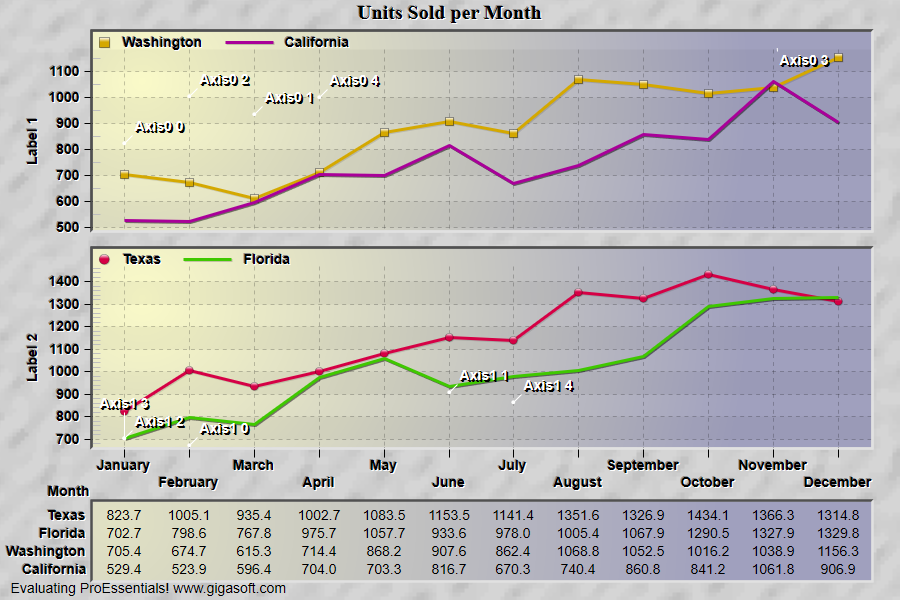
Example 013: Graph showing MultiAxesSubsets 2
PegoGraph Objectintermediate
MultiAxesSubsets 2
Form2.cs
1//! Right button click to show popup menu. //2//! Double Click to show customization dialog. //3//! Left-Click and drag to draw zoom box. Use popup memu or 'z' to undo zoom. //4 5// This example builds upon the basic CreateSimpleGraph '000' example chart //6CreateSimpleGraph(Pego1);7 8// Now sub-divide subsets 4 into individual axes //9// Each axis with 2 subsets in each //10Pego1.PeGrid.MultiAxesSubsets[0] = 2;11Pego1.PeGrid.MultiAxesSubsets[1] = 2;12 13// v10, Optionally alter which subsets go to which axes14Pego1.PeGrid.SubsetAxes[0] = 1; // assign Subset 0 to axis 1, without this, default is subset 0 would be in top axis 015Pego1.PeGrid.SubsetAxes[1] = 1; // assign Subset 1 to axis 116Pego1.PeGrid.SubsetAxes[2] = 0; // assign Subset 2 to axis 017Pego1.PeGrid.SubsetAxes[3] = 0; // assign Subset 3 to axis 018 19// Set first axis parameters //20Pego1.PeGrid.WorkingAxis = 0;21Pego1.PeString.YAxisLabel = "Label 1";22Pego1.PePlot.Method = GraphPlottingMethod.PointsPlusLine;23Pego1.PePlot.ComparisonSubsets = 1;24 25// Set second axis parameters //26Pego1.PeGrid.WorkingAxis = 1;27Pego1.PeString.YAxisLabel = "Label 2";28Pego1.PePlot.Method = GraphPlottingMethod.PointsPlusLine;29Pego1.PePlot.ComparisonSubsets = 1;30 31// Reset WorkingAxis when done //32Pego1.PeGrid.WorkingAxis = 0;33 34// Separate Axes //35Pego1.PeGrid.Option.MultiAxisStyle = MultiAxisStyle.SeparateAxes;36 37// Axis Sizing //38Pego1.PeUserInterface.Allow.MultiAxesSizing = true;39 40// Legend Inside Each Axis //41Pego1.PeLegend.Style = LegendStyle.OneLineInsideAxis;42 43// Other various properties //44Pego1.PeColor.BitmapGradientMode = true;45Pego1.PeColor.QuickStyle = QuickStyle.LightInset;46Pego1.PePlot.MarkDataPoints = false;47 48// Add graph annotations showing how to place annotations per axis // v9.549Pego1.PeUserInterface.Menu.AnnotationControl = true;50Pego1.PePlot.DataShadows = DataShadows.Shadows;51 52int aCnt = 0;53for (int annot = 0; annot < 5; annot++)54{55 int nRndRow = 0; // Subset56 int nRndCol = (int)(Rand_Num.NextDouble() * (float)Pego1.PeData.Points - 1);57 Pego1.PeAnnotation.Graph.X[aCnt] = nRndCol + 1;59 Pego1.PeAnnotation.Graph.Type[aCnt] = (int)Gigasoft.ProEssentials.Enums.GraphAnnotationType.Pointer;60 Pego1.PeAnnotation.Graph.Text[aCnt] = "Axis0 " + annot.ToString();61 Pego1.PeAnnotation.Graph.Color[aCnt] = Color.FromArgb(255, 255, 255, 255);62 Pego1.PeAnnotation.Graph.Axis[aCnt] = 0;63 aCnt++;64}65for (int annot = 0; annot < 5; annot++)66{67 int nRndRow = 2; // Subset68 int nRndCol = (int)(Rand_Num.NextDouble() * (float)Pego1.PeData.Points - 1);69 Pego1.PeAnnotation.Graph.X[aCnt] = nRndCol + 1;71 Pego1.PeAnnotation.Graph.Type[aCnt] = (int)Gigasoft.ProEssentials.Enums.GraphAnnotationType.Pointer;72 Pego1.PeAnnotation.Graph.Text[aCnt] = "Axis1 " + annot.ToString();73 Pego1.PeAnnotation.Graph.Color[aCnt] = Color.FromArgb(255, 255, 255, 255);74 Pego1.PeAnnotation.Graph.Axis[aCnt] = 1;75 aCnt++;76}77 78Pego1.PeAnnotation.Show = true;79Pego1.PeFont.GraphAnnotationTextSize = 105;80Pego1.PeAnnotation.Graph.MinSymbolSize = MinimumPointSize.Large;81Pego1.PeAnnotation.Graph.MaxSymbolSize = MinimumPointSize.Large;82 83// Generally call ReinitializeResetImage at end **'84Pego1.PeFunction.ReinitializeResetImage();85Pego1.Invalidate();86// Optionally call Pego1.Refresh() if you are not seeing changes immediatelyTip: Uses property syntax like
Pego1.PeData.Y[s, p]Click underlined properties to view documentation